Business Tips
Lawn Care Price Increase Letter: How to Raise Prices Without Losing Customers
The letter is the easy part. Most owners can write three honest paragraphs about fuel and insurance in ten minutes. What stops them is the list of 140 customers on the other end of it, and the quiet fear that raising the price means losing the best ones.
So they wait. A season goes by, then two, and the customer who was priced right in 2021 is now one of your least profitable stops.
This guide covers how to raise prices on existing lawn care and landscaping customers without guessing: what inflation has done since your last increase, how many customers an increase can cost you before it stops paying, which accounts need the biggest correction, when to send notice, and three copy-and-paste price increase letters. Every number is either sourced from federal data or labeled as a worked example with assumptions you can replace with your own.
Why prices stay flat longer than they should
Nobody decides to hold prices for four years. It happens one skipped spring at a time, and each skip feels like kindness. The cost shows up later, in a margin that has quietly shrunk.
Federal price data shows how fast that adds up. The Bureau of Labor Statistics publishes the Consumer Price Index monthly. It measures what households pay, not what a landscaping company pays, so treat it as a gauge of how far prices moved, not of your own costs. Here is the all-items index for each August since 2021, the latest release at the time of writing:
| August of | CPI-U index | Change from prior August |
|---|---|---|
| 2021 | 273.567 | n/a |
| 2022 | 296.171 | +8.3% |
| 2023 | 307.026 | +3.7% |
| 2024 | 314.796 | +2.5% |
| 2025 | 323.976 | +2.9% |
| 2026 | 334.980 | +3.4% |
Source: BLS Consumer Price Index (opens in a new tab), CPI-U, U.S. city average, all items, not seasonally adjusted. Percentages are our arithmetic on the published index values.
Across those five years the general price level rose 22.4%. If your last increase was the fall of 2021 and you have held your rates since, every dollar you charge buys roughly a fifth less than it did.
Two other lines from the same data matter to this trade. The services portion of the index (CPI-U services) is up 26.2% over the same five years, and has grown 3.1% over the most recent twelve months. And the gasoline index in August 2026 was 27.4% higher than in August 2025 (359.738 against 282.358), which lands directly on every route you drive.
Wages are the larger cost, and the federal Occupational Outlook Handbook (opens in a new tab) puts the median wage for grounds maintenance workers at $18.50 an hour as of May 2024. Your market may sit well above or below that, but whatever you paid your crew when you last set prices, you are paying more now, plus the payroll taxes and insurance that move with it.
Do not pass through a CPI number as your increase. Use it as the honest argument: costs moved, here is a modest adjustment, here is the date.
What an increase is worth, and how many customers you can lose
The fear is that a price increase costs more customers than it earns. The arithmetic says that is rarely true, and you can work out the exact threshold for your own business in a few minutes.
Take a simple book. One hundred recurring customers, each paying $200 a month, so $20,000 in monthly revenue. Direct costs for serving them, which means crew labor, fuel, equipment, materials, and your overhead, come to $15,000. That leaves $5,000 a month, a 25% margin. Every figure here is an assumption for illustration.
Raise every price 6%. Each customer now pays $212 and revenue rises to $21,200. If nobody leaves, the extra $1,200 drops straight to profit, because none of your costs changed. Profit goes from $5,000 to $6,200, a 24% jump in profit from a 6% change in price. That leverage is the whole reason pricing is the cheapest growth you will ever buy.
Now the question that keeps owners up at night: how many customers can leave before the increase costs you money? There are two honest answers, because it depends on whether your costs fall when a customer does.
- Best case, costs fall with every lost customer. The route gets shorter, the crew finishes sooner, materials are not bought. In this case the break-even loss is the price increase divided by the margin plus the price increase: 6% / (25% + 6%), or 19.4%. In the example, you could lose 19 of 100 customers and still earn the same profit.
- Worst case, costs do not fall at all. The crew still drives the same route past the empty driveway. Here the break-even loss is the increase divided by one plus the increase: 6% / 106%, or 5.7%. Lose five customers and profit is $5,140. Lose six and it is $4,928, a little under where you started.
Real routes land between the two, closer to the worst case when the lost customers are scattered and closer to the best case when they are clustered or the crew can absorb new work. Here is the best-case threshold for a range of margins and increases:
| Margin | 3% increase | 5% increase | 8% increase | 10% increase |
|---|---|---|---|---|
| 10% | 23.1% | 33.3% | 44.4% | 50.0% |
| 20% | 13.0% | 20.0% | 28.6% | 33.3% |
| 30% | 9.1% | 14.3% | 21.1% | 25.0% |
| 40% | 7.0% | 11.1% | 16.7% | 20.0% |
Each cell is the share of customers you could lose before the increase leaves you worse off, with costs falling in proportion. And here is the worst case, which does not depend on margin at all:
| Increase | 3% | 5% | 8% | 10% |
|---|---|---|---|---|
| Break-even loss, costs fixed | 2.9% | 4.8% | 7.4% | 9.1% |
Two lessons come out of the tables. Thin margins make increases more valuable, not less: a business earning 10% can lose a third of its customers to a 5% increase in the best case and still break even. And the worst-case row is a warning about route density. If an increase pushes out the customers who made your route efficient, the loss costs far more than the count suggests, which is why the next section is about which accounts to raise. Our guide to what to charge for lawn mowing covers why the same crew and the same lawn can price out at $54.55 or $75.00 depending on how dense the route is.
Find the accounts that need it most
An across-the-board percentage is the simplest increase to send and the least accurate. It raises the price on the customer paying you $170 an hour and the one paying you $73 an hour by the same fraction. Before you pick a number, find out which accounts are actually underwater.
The measure is revenue per on-site crew hour. Take what the customer pays per visit, divide by the minutes your crew spends on the property, and multiply by 60. Compare the result with the hourly price your costs require. In the mowing guide’s worked example, a two-person crew costs $104.73 per on-site hour, and a 20% net margin on top makes the required price $130.91 per hour. Those are example figures. Use your own.
Here is what five accounts might look like against that target:
| Account | Price per visit | Minutes on site | Per hour | Gap to $130.91 |
|---|---|---|---|---|
| A | $85 | 30 | $170.00 | +$39.09 |
| B | $75 | 40 | $112.50 | -$18.41 |
| C | $65 | 45 | $86.67 | -$44.24 |
| D | $90 | 55 | $98.18 | -$32.73 |
| E | $110 | 90 | $73.33 | -$57.58 |
Account A is paying you well, so a small increase there is nearly free. Account B is close enough that a normal adjustment moves it toward target. Accounts C, D, and E are the real problem, and a letter alone will not close the gap: getting D to target means $120 per visit, a 33% jump, and E would need $196, nearly double.
That is the useful discovery, and it points to three different actions rather than one:
| Segment | What to do |
|---|---|
| At or above target | Normal annual adjustment, same percentage as everyone |
| Close to target, within about 20% | Larger step this year, finish the correction next year |
| Far below target | Re-measure first. If the lawn grew or the scope crept, reprice with a new quote. If the property is simply a poor fit for the route, offer a fair price or let it go |
Notice what is not on the list: guessing which customers will tolerate more. That is how price lists fragment. Segment by the numbers, apply one rule per segment, and you can explain any account in a sentence.
New customers belong in the exercise too. If you are about to send a 6% letter to your existing book, quote every new customer at the post-increase price starting today. Otherwise next month you sign someone at the old rate and raise them in a year.
How much, and how often
There are two workable rhythms.
A small increase every year. The customer sees a modest change on a predictable date, it reads as routine, and you never fall far behind. In our view, a number near general inflation, sent at the same time each year, is the safest default for accounts already near target.
A larger correction every few years. This is what you get when you skip years, and it is the pattern that triggers cancellations: a big jump with no routine around it.
If you are several years behind, split the correction. Send one increase now and say plainly that you review prices each year. The first letter sets the number and establishes the habit, so the second is expected.
Whatever you choose, state it as a percentage or a dollar amount, never as a range. “Your price will increase to $58 per visit starting April 1” gets read once and accepted. “Your price will be adjusted to reflect market conditions” gets read as the opening bid of a negotiation.
When to send it
The right time is before the customer has mentally committed to the season, and well before they receive the first higher invoice. A price that appears on a bill with no warning is the single most reliable way to turn a routine increase into a complaint. Our suggested schedule:
| Service | Send the notice | Increase takes effect |
|---|---|---|
| Weekly mowing and maintenance | Late winter, 45 to 60 days before the first spring visit | The first visit of the new season |
| Fertilization and treatment programs | With the program renewal, before round one | Round one |
| Monthly flat-fee accounts | At least 60 days before the billing month that changes | First full billing month after the notice period |
| Seasonal snow contracts | Late summer, before the contract renews | Contract start. See snow removal contract pricing |
| Commercial agreements | At the end-of-season review, in the fall | Per the escalation clause in the agreement |
These intervals are our rule of thumb, not a legal standard: thirty days is the least notice that feels fair on a recurring service, and 60 gives customers time to ask questions. Check your signed agreements first. If a customer has a fixed price for a stated term, you generally cannot change it before the term ends, and the notice language in the agreement controls. When the wording is unclear, have a lawyer read it. This is business guidance, not legal advice.
Commercial customers set budgets months ahead, so the conversation belongs in the fall, alongside the end-of-season review. Our commercial bidding guide covers why renewal season is a sales season, and the commercial season review letter is the starting point.
What the letter has to do
A price increase letter has a narrow job: make the new price clear, make the reason believable, and make the next step easy. The best ones are short. Include these, in roughly this order:
- The new price and the date, in the first two sentences. Do not bury it under three paragraphs of context. Customers who have to hunt for the number assume you are hiding it.
- A specific, honest reason. Wages, fuel, insurance, and materials are all true and all specific enough. Name one or two, not six.
- What stays the same. The crew, the schedule, the standard. One sentence is enough.
- A way to talk. A reply address and a phone number, with a promise to look at the account if the new price is a problem.
- A thank-you. Short, once, at the end. Opening and closing with gratitude reads as cushioning; one sincere line reads as sincere.
And avoid four things: “due to market conditions,” which tells the customer you sent the same letter to everyone; apology, which makes a fair price sound unfair; a one-time discount in the same letter, which makes the new price look negotiable; and hedging words like “approximately” or “in the near future,” which hand the customer room to argue.
Three letters you can copy
The letters below are written for the three situations that cover most of a book. Every field in square brackets is something you fill in once before sending, and the fields in double angle marks, like «CustomerName», are mail merge fields that fill in per recipient inside our mail merge tool. Merge fields can hold the customer name, address, and your company name, but not each customer’s individual new price, so a letter that names one price should go to a group of customers who all pay the same amount, and everyone else gets a letter that states a percentage.
Letter 1: the standard annual adjustment
Use this for accounts at or near target, on any recurring service. It states a percentage, so one version works for the whole segment.
Subject: A price change starting [effective date]
Dear «CustomerFirstName»,
Beginning with our first visit on or after [effective date], the price of your lawn care service will increase by [percentage] percent. Your invoice will show the new amount, and nothing about your service day or schedule changes.
This is our first increase since [month and year]. Over that time, crew wages, fuel, equipment, and insurance have all gone up, and this adjustment covers part of that. We review our prices once a year, and you will always hear from us before a change.
What stays the same is the crew, the standards, and the care we put into «Address1».
If you would like to talk about your service, adjust what we do to fit your budget, or ask anything at all, reply to this email or call us at [phone number]. We are glad to help.
Thank you for trusting us with your property.
«CompanyName»
Letter 2: the larger correction
Use this for accounts well below target, after you have re-measured. The reason is specific to the property and the letter offers a choice about scope, so review it account by account.
Subject: Your service at «Address1»
Dear «CustomerFirstName»,
We recently reviewed every property on our route, measuring the time each one takes against what we charge. Your property takes more of our crew’s time than your current price covers, so beginning [effective date] your price will change to [new price] per [visit or month].
We know that is a meaningful change. If it does not fit your budget, there are options that keep the price closer to where it is now: reducing visits to every other week during slower growth months, or removing a service such as edging or bed work. Tell us which matters most and we will price it plainly.
Either way, we would like to keep caring for your property. Reply to this email or call [phone number] and we will sort it out together.
Thank you,
«CompanyName»
Letter 3: the contract reminder
Use this for customers on an agreement that already includes an annual adjustment. Nothing is being negotiated, so it simply reminds them of what they agreed to.
Subject: Your annual renewal on [renewal date]
Dear «CustomerFirstName»,
Your service agreement renews on [renewal date]. As the agreement states, the annual price adjustment of [percentage] percent applies at renewal, so your new price will be [new price] per [visit or month].
If you have questions, or if anything about your service needs to change before renewal, please reply by [opt-out date]. Otherwise there is nothing you need to do, and we will see you on your usual day.
Thank you for being a long-term customer.
«CompanyName»
Our free price adjustment notice is a shorter alternative, and the seasonal billing explainer helps with customers who ask why their monthly amount is not the per-visit number.
Draft one more line for the first higher invoice, such as “This invoice reflects the price adjustment we notified you about on [date].” It ends the “when did this change” call before it starts.
Sending it
Getting the letters to the right people is where owners usually stall, so make it a short routine.
- Build your segments. From the accounting above, you have a list for each letter. Sort the customer list so each letter goes to the right group, and send each group its own version.
- Pick the channel for the customer. Email is faster and you can see what happened to it. A printed letter suits older customers and anyone without an email on file. A practical approach is to email everyone with an address and mail a printed copy to the rest.
- Send it all in one window. Customers talk to their neighbors, and a letter that reaches one street before the next produces calls.
In LandscapingSoftware, mail merge handles the sending on every plan. Go to Tools > Mail Merge, create a new template, and paste the letter in. Merge fields like «CustomerName» fill in per recipient. From the Customers list, filter to the customers in one segment, click Mail Merge, choose your template, and either send an email campaign or produce Word or PDF letters to print. The History tab then shows how many were sent, skipped, or failed. Email campaigns need sending set up on your account first, anyone without an email address on file is skipped rather than failed, and a frequency guard skips people who recently received a different campaign email, so do not stack the price letter on top of another send that week.
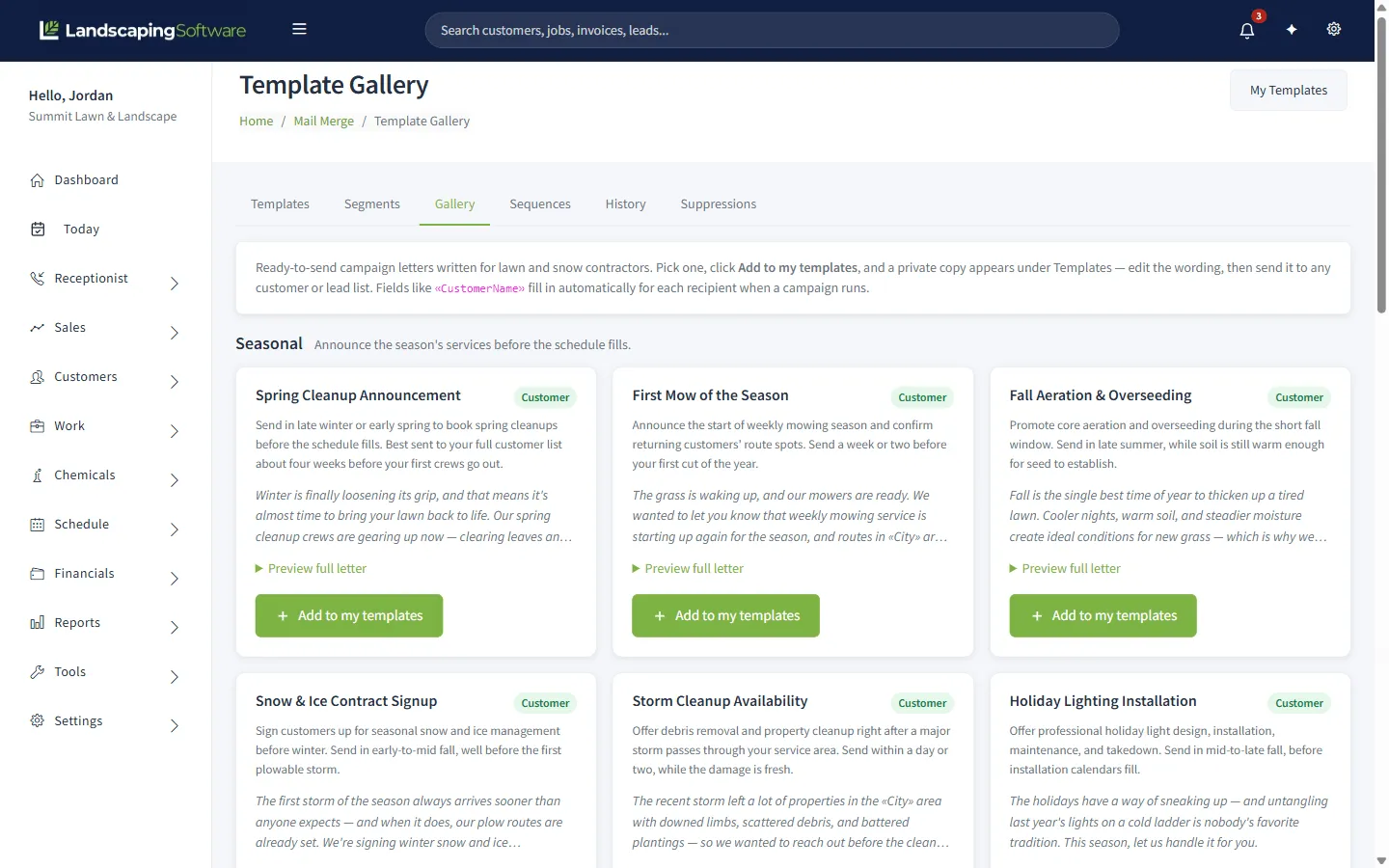
You can paste in any of the letters above, or start from our free price adjustment notice. If your customers are on contracts, a saved segment such as “contract expiring within 60 days” resolves to a fresh list each time it runs, and a renewal-reminder sequence can send a customer template 60, 30, and 14 days before a contract ends (contracts are on Professional and Premier). More on the mail merge and campaigns page.
When customers answer back
Some will reply, and most of those replies are not complaints. They are questions, and one clear answer ends them. Have the answers ready before you hit send.
| What they say | What works |
|---|---|
| “Why is it going up?” | Name the one or two real reasons from the letter. Do not add new ones. |
| “Is that the best you can do?” | Thank them, confirm the new price and date, and offer a choice that changes scope rather than rate. |
| “My neighbor pays less.” | Properties differ in size, slope, and access. Offer to re-measure theirs if they believe the price is off. |
| “I will find someone cheaper.” | Wish them well, stay courteous, and leave the door open. Do not counter with a discount. |
| “Can you hold it this year?” | Agree only if you can afford it, and give them a firm date for the new price. Never “we will see.” |
Two habits matter more than any script. Never discount on the spot, because one exception becomes the price for every neighbor who hears about it. And when a customer does leave, write down why. If three people cite the same reason, the problem is the service or the scope, not the letter.
Some cancellations are good news. An account losing you $44 an hour is one whose departure improves the business.
Put the increase in the agreement
Everything so far is a conversation you have to remember to start every year. The structural fix is to agree the increase before the work begins. An annual escalation clause, common in multi-year agreements for exactly this reason, states the percentage and the date it applies, and the yearly letter shrinks to Letter 3 above: a reminder, not a negotiation. Our snow removal contract template and landscape proposal template both have a place for term and renewal language.
In the product, this is built into contracts and renewals, available on the Professional and Premier plans:
- Every contract carries an annual uplift percentage, set from 0 to 50 percent when you create it, along with the term, the pricing model, and an auto-renew switch.
- A nightly renewal run watches active, auto-renewing contracts. As the term end approaches, inside a renewal notice window that defaults to 60 days, the contract moves to Renewing, an opt-out deadline is set, and a renewal proposal PDF is prepared. Once the deadline passes, the term rolls forward and the uplift is applied to the contract amount. Every step is written to the contract timeline, which is the first place to look if a customer disputes a price.
- The customer can see it. The customer portal shows a customer their service plan, including the annual increase percentage, so the number in your letter matches a number they have already seen.
- The Renewal Wizard handles everything that is not on a contract. It finds jobs and programs due for renewal, lets you set a price uplift from 0 to 50 percent, applies it to every copied line item, and can generate a renewal proposal PDF per customer, so a whole book can be renewed with the increase applied in one pass.
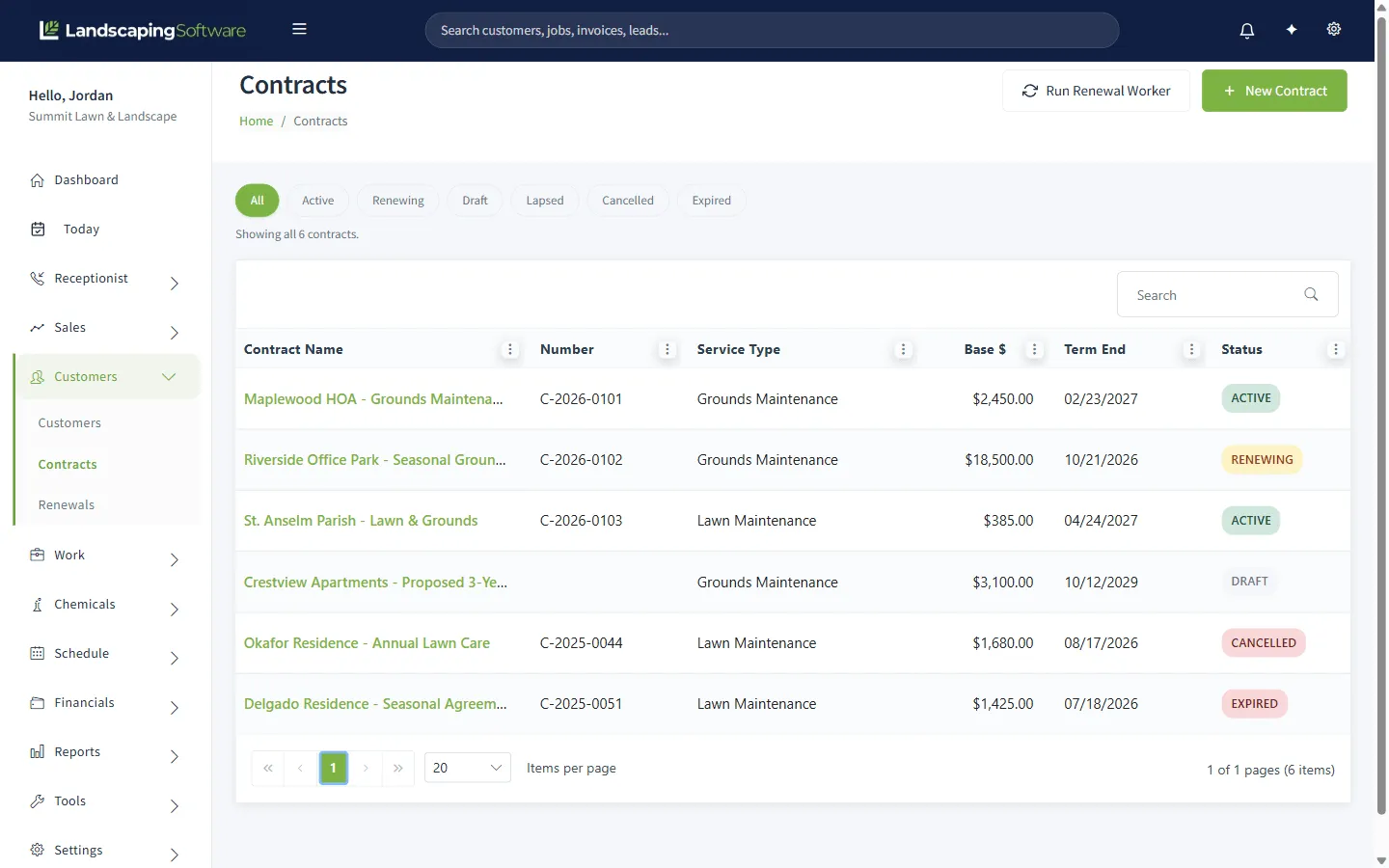
Be clear on the limits. The nightly run updates the contract and its amount; it does not create next season’s jobs or invoices, and renewing a job with new line-item prices is the Renewal Wizard’s work, done with your review. A new contract starts as a draft and does nothing until you activate it. And because the contract is only as good as the paperwork behind it, you still need the customer to agree to the escalation when they sign.
Whether a customer pays per visit, per round, or a flat monthly amount, invoicing and payments carries the new price onto the invoice, and the customer can pay it online.
What a better letter will not fix
Pricing is a lever, not a repair. A letter cannot fix a route that does not pay, because a percentage increase only makes a bad route slightly less bad. It cannot replace service quality, since an increase lands very differently on a customer with three missed visits behind them. And it cannot substitute for knowing your numbers: every table in this guide depends on honest hours, honest costs, and a margin you chose.
Where we fit
You are reading this on a vendor’s blog, so here is the plain version.
Everything above works with a spreadsheet and a mail program. What software changes is whether the increase happens every year or only the years you remember.
LandscapingSoftware runs lawn and snow in one system, with auto-renewing contracts that carry an annual price uplift, a Renewal Wizard that applies an uplift across a whole book, mail merge for the letters, and a customer portal where customers see their plan and pay their invoices. Pricing is published: Essential is $99 a month, Professional is $229, and Premier is $399, with a 14-day free trial.
What we do not have, to be direct: a field that merges each customer’s individual new price into a letter, so letters name a percentage or go to groups on the same price; and contract renewals that rewrite your open jobs on their own, since the nightly run updates the contract and the Renewal Wizard handles the jobs. Contracts and renewals are on Professional and Premier, not Essential. If any of those is a dealbreaker, better to know now.
And if you serve a few dozen customers, you do not need any of this software to do this well. A list, a calendar reminder every February, and the letter above will carry you a long way. Come back when the list outgrows the spreadsheet.
Frequently asked questions
How much should I raise prices on lawn care customers?
Start from your costs, not from a round number. Work out what each account earns per on-site hour against the hourly price your costs require, then size the increase to close that gap. Accounts already at target can take an increase near general inflation, while accounts well below target need a larger correction split across two seasons. The break-even tables in this guide show how many customers you can lose before an increase costs you money.
How much notice should I give before a price increase?
Thirty days is the practical minimum for recurring lawn care and sixty is better, sent before the season starts rather than with the first higher invoice. If you have a signed agreement with a term or a fixed price, follow the notice and timing it states, and have a lawyer review it if the wording is unclear.
Should I send a price increase letter by email or by mail?
Both work. Email is faster and you can see what happened to it, while a printed letter suits older customers and anyone without an email address on file. A practical approach is to email everyone who has an address and mail a printed copy to the rest, all in the same week. Either way, put the new price and the effective date in the first two sentences.
What do I say when a customer pushes back on a price increase?
Thank them, confirm the new price and the date, and offer a choice that changes the scope rather than the rate, such as fewer visits or dropping an add-on. Do not discount on the spot, because one exception becomes the price for every neighbor who hears about it. If the customer still leaves, that is information about the account, not a failure of the letter.
Can software handle price increases automatically?
Partly. Auto-renewing contracts in LandscapingSoftware carry an annual uplift percentage from 0 to 50 percent that is applied when the term rolls forward, and the Renewal Wizard applies an uplift to renewed jobs. The letter itself goes out through mail merge, and it can name a percentage but cannot insert the individual new price for each customer. Contracts and renewals are on the Professional and Premier plans, and mail merge is included on every plan.