CRM & leads
Where every website form lands, as a new lead you can quote.
AI Website Builder · Included on every plan
Answer five questions and it writes a complete website for your business in a few minutes. An AI website builder is software that writes and lays out a website from what you tell it. Ours is built into your landscaping software, writes only from facts you give it, and turns every contact form into a lead in your CRM. Included on every plan.
The problem
A drag-and-drop builder hands you a blank template and a hundred settings. You get the home page half done, the season starts, and the site stays half done until next winter. The site that does go up is a brochure: a contact form that emails an inbox nobody checks in July, and a list of services that has not changed since you bought the second truck.
You do not need more design tools. You need the site written for you, from facts you already have, with the leads landing where you quote and schedule.
How it works
Creating a site is a short conversation. Most answers are already filled in from your account, so it takes a few minutes, and every answer is saved as you go. Close the tab and you come back to the same question.
A card shows your business name, phone, the towns you serve, your services and the proof read from your business profile, such as the year you started, your license, insurance and guarantee. Tick Licensed or Insured if they are true, untick anything you would rather not say, and confirm. Only what you confirm is shown as proof.
Paste the address and the builder reads it. It borrows facts, never the design. Untick anything you do not want used and tick only the photos you own. No website is fine too.
Drop in photos from your phone or computer and say what each one shows: your work, your logo, your team or truck. Short on photos? Use stock photos from a library of real lawn and landscape shots. They are never shown as your work, your team or your customers.
Friendly and local, Clean and professional, or Premium. Add a logo and the builder names its colors and uses them, or you keep the style’s own.
A sentence or two in your own words, or tap an idea such as Free estimates. One honest sentence about what makes you different gives the AI far better material than a page of adjectives.
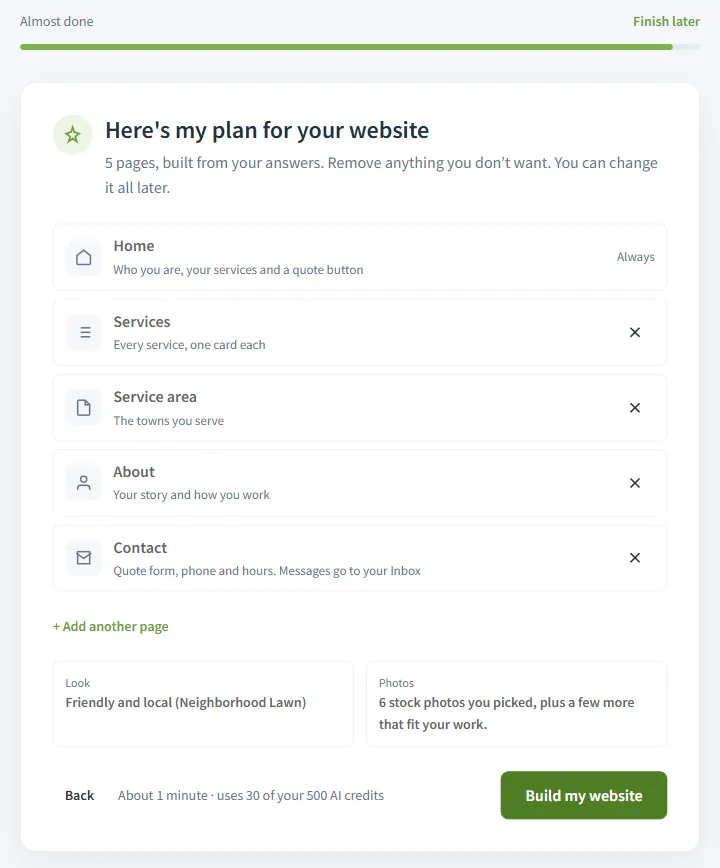
The plan lists the pages (one for each service, where the style has that), the look and the photos. Remove a page or describe one of your own. The cost line shows exactly what the build will charge before you start. The plan itself is free: it is worked out from your answers by rules, with no AI. Then the pages are written while you watch, and the editor opens with your site as a private draft.
Edit by asking
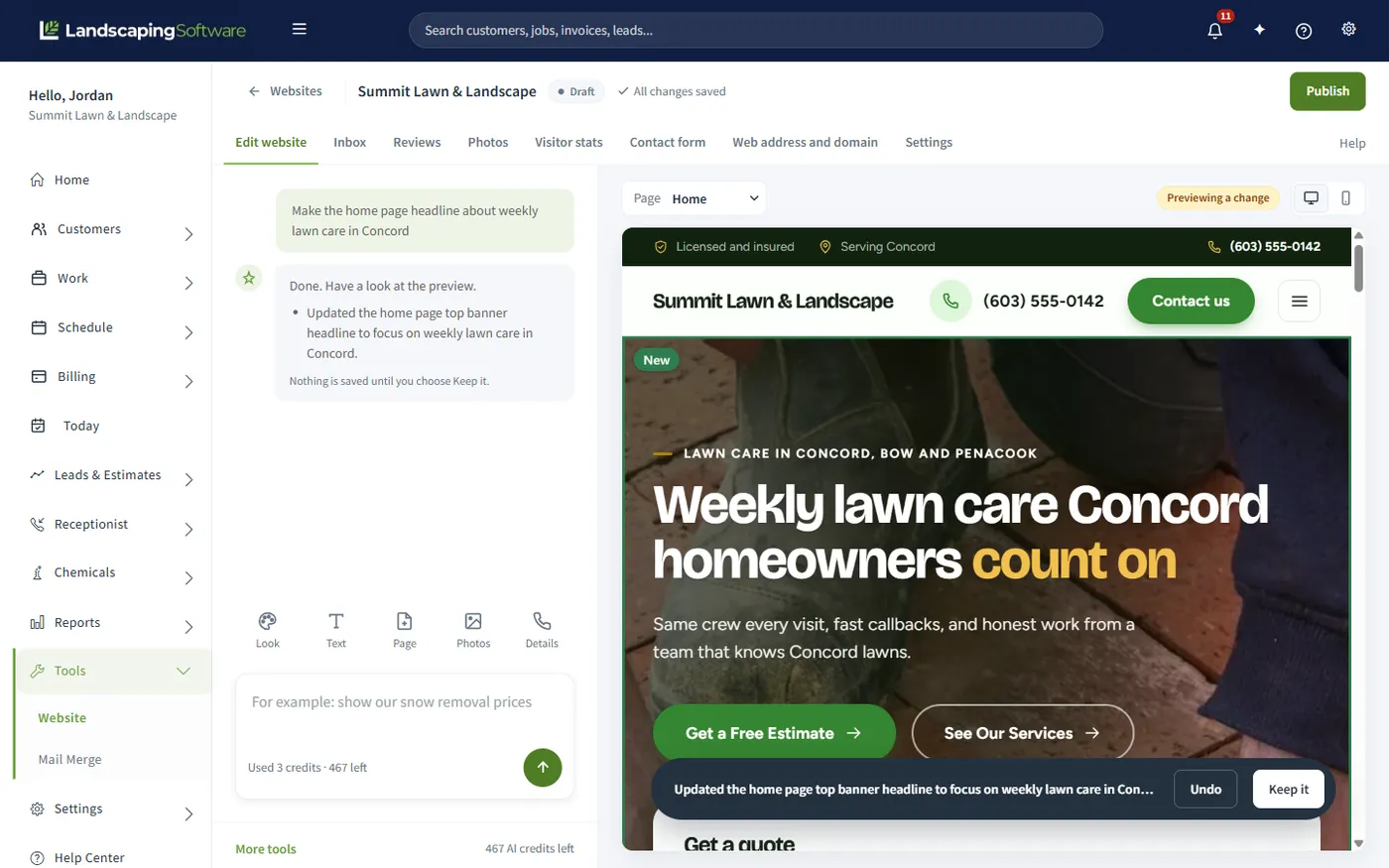
Your site fills most of the editor, with the assistant beside it asking What would you like to change? Type the way you would brief a new hire. The preview shows the change with a one-line summary, and nothing is saved until you choose Keep it. Undo leaves the site exactly as it was. If the assistant cannot make a change safely, it tells you, and you are not charged.
Prefer to type it yourself? Choose Edit text, click any part of the page and change the headline, the paragraphs or the button. It saves as you type and costs nothing. Rewrite with AI rewords a part when you are stuck. Switch the preview to phone size to see what most of your visitors see, and on your own phone the editor works from a request box and a Tools button.
Ready-made pages (Services, About, Gallery, Reviews, Service areas, FAQ, Contact) are free and appear straight away, filled in with your business details. A page for one of your services, or one you describe, is written for you and shown first.
Your AI team
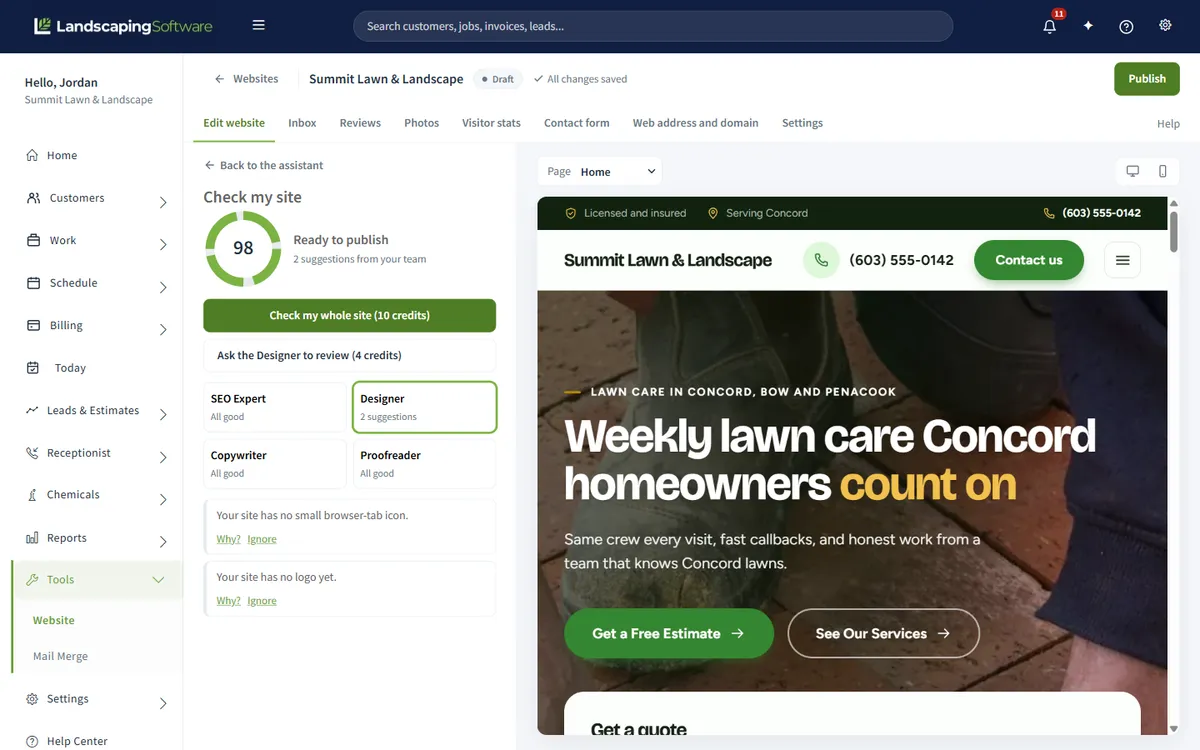
You never choose settings or write prompts. Each expert lists suggestions in plain words, with Why? to explain each one and, for most, a one-tap Fix it for me. A ring at the top shows how ready the site is and says Ready to publish when nothing important is left.
Helps people in your area find you on Google: page titles and descriptions, one clear headline per page, photo descriptions and matching contact details.
Makes the site look finished: layouts, icons for your services, a missing logo, empty sections. Never changes your words.
Improves what the pages say: placeholder text left in, sections that are too short or too long, pages with no call to action.
Catches typos, shouting in capitals and contact details that do not match, and flags claims your business information does not back up, such as “licensed and insured” or “20 years”.
The checks that run on every save are free, and so are simple fixes such as a typo or an empty section. Fixes that need writing, a single expert’s review, or Check my whole site (all four experts for one price) use credits, with the cost on the button. Tips never stop you publishing.
No made-up claims
The fastest way for an AI to make a landscaping site sound good is to make things up: “20 years of experience”, “fully licensed and insured”, five-star reviews from customers who do not exist. That is the one thing this builder will not do. It writes only from facts you gave it and your business information, and where a fact is missing it leaves a prompt for you to fill in.
Your phone, hours, towns and proof live in one place, Business details, and only you fill them in. Reviews are never written by AI: you add your customers’ real reviews and tick the ones to show.
Forms become leads
A standalone website builder gives you a form that sends an email. This one lives in the system that holds your customers, estimates and schedule. Every site comes with an Estimate Request form that asks for the visitor’s name, email, phone, the service they need and a few words about the project. Each message is emailed to you, kept in the site’s Inbox, and created as a new lead in your CRM, ready to quote, unless you switch that off. There is no integration to set up and nothing to retype.
Spam protection is automatic: a hidden check and limits on how fast one visitor can send. Visitors never solve a puzzle. A message that looks like spam is held under a Spam tab instead of becoming a lead, and Not spam brings it back as a lead with the usual email.
They see your thank-you message straight away.
At the address you choose, so it reaches an inbox someone watches.
In your pipeline, with the source Website and what the visitor typed. On unless you switch it off.
Estimate, schedule and invoice in the same system, with no copying.
Get found
The technical side of search is handled for you: fast pages, a sitemap for Google, one headline per page and your business details in the format Google reads. What only you can supply is accurate content, and the builder starts from it: your real services, the towns you serve and how to reach you.
Most styles give each service its own page, which helps someone searching for that service. Add a Service areas page from your towns: one good page beats a page for every town, because pages that only swap the town name can hurt rankings.
Set the headline (up to 70 characters) and description (up to 160) each page shows on Google, free. Or ask the SEO Expert to review the whole site, or a goal such as patios in one town, and keep only the changes you like.
Write seasonal tips and project stories yourself, or Draft with AI (up to 5 a day). The AI writes for homeowners in your area and does not invent prices, reviews or statistics. Posts publish or schedule on their own, without republishing the site.
What a site needs to turn visits into calls is in our guide to a landscaping website that gets leads and the landscaping website checklist.
Styles by trade
Each style is a complete design: header, menu, the parts of each page, colors, fonts and footer. Every style is shown with your own words and photos, and switching keeps them. Change the whole style, or just the colors and fonts, for free.
| Style | Feels | Made for |
|---|---|---|
| Neighborhood Lawn | Friendly and local, with a quote form at the top | Residential lawn care |
| Estate Studio | Calm and elegant, magazine-like | Design and build, high-end gardens and patios |
| Canopy | Sturdy and trustworthy | Tree care, with an emergency page |
| Snow Command | Dark and bold, with a status board | Snow and ice, plowing and salting |
| Clearwater | Clean and clear | Irrigation and maintenance plans |
| Grounds Commercial | Professional and calm | Commercial grounds and property managers |
| Hometown Pro | Warm and busy | Several trades under one roof |
Snow companies get a status board on Snow Command: pick what your crews are doing, such as Watching the forecast, Plowing or All clear, and the site shows when you last updated it. It hides itself after 24 hours without an update, so an old “Plowing” never stays up.
Publish
Publish checks the site first. Anything that must be fixed, such as a missing phone number or a contact form with nowhere to send messages, is listed with a button that takes you straight to the fix. Then the site goes live at a free address on sites.landscapingsoftware.com, usually in a few seconds, with a link and a QR code to share.
Connect a domain you already own by adding two records at the company you bought it from. The free address keeps working while the domain connects, so there is never a gap. After that, editing never touches the live site: visitors see the published version until you choose Publish changes, and you can take the site offline at any time without losing anything.
Compared
Three ways to get a landscaping company online.
| Question | Drag-and-drop builder | Web designer | LandscapingSoftware AI Website Builder |
|---|---|---|---|
| Who writes the pages | You, starting from a template. | The designer, usually from copy you supply. | The AI, from the facts you confirm. You approve every change. |
| Time to a first draft | As long as it takes you; varies. | Usually weeks; varies by designer. | Minutes: a short set of questions, then the build. |
| Where form leads go | Usually an email, unless you connect your software. | Whatever they wire up; varies. | A new lead in your CRM, plus an email and the site’s Inbox. |
| Claims about your business | Whatever gets typed in. | Whatever gets typed in. | Only facts you confirmed. Unbacked claims are flagged. |
| Changes later | You find the setting and do it. | A request, often billed per change or on a retainer. | Ask in plain words, or edit the text yourself for free. |
| Cost | A separate monthly subscription; varies. | A project fee plus hosting; varies. | Included on every plan. AI work uses your monthly AI credits. |
A web designer still makes sense when you want a one-off brand, custom photography or a site that does something no landscaping template does. For most companies the job is a clear site that lists the services, shows the work and brings in estimate requests.
Pricing
The builder is included on every plan, with no separate website subscription. The AI work uses AI credits, and every paid plan comes with a monthly allowance.
| Plan | Price | AI credits each month |
|---|---|---|
| Essential | $99 a month | 500 |
| Professional | $229 a month | 1,500 |
| Premier | $399 a month | 4,000 |
Every AI action shows its exact cost before you start, and you are charged only when it succeeds; a one-page site costs less to build than a five-page one. Run low and buy a top-up pack of 500 credits for $10 or 1,500 credits for $25. Top-up credits never expire. AI starts when your paid subscription starts, so building a site is not part of the 14-day free trial.
Works together
Where every website form lands, as a new lead you can quote.
The other front door. Calls fill the same pipeline the website does.
The same AI credits draft estimates, emails and review replies.
See how the whole platform fits together, from first click to renewal.
Step by step in the help center: the website builder overview, building your first site and publishing and connecting a domain.
Questions
Software that writes and lays out a website from what you tell it, instead of handing you a blank template. Ours asks five questions about your business, shows you a plan, then writes every page. You change it afterwards by asking in plain words or by editing the text yourself.
No. You answer questions, pick a feel for the site and approve a plan. The styles are complete designs made for landscaping businesses, so there is no layout to assemble and no code to touch.
No. It writes only from facts you gave it and your business information. It never writes reviews, prices, ratings, awards, licenses or years in business you did not give it. Where it is missing a fact it leaves a prompt such as “Add your phone number” for you to fill in, and your Proofreader flags any claim your business information does not back up.
Every site comes with an Estimate Request form. Each message is emailed to you, kept in the site’s Inbox and, unless you switch it off, created as a new lead in your CRM. Spam protection is automatic, and visitors never solve a puzzle.
Yes, and it is free. Click any part of a page and type. Your edits save as you type. Design changes, ready-made pages, photos and publishing are free too. Only the AI writing or reviewing something for you uses credits.
The AI website builder is included on every plan. The AI work uses AI credits from your plan’s monthly allowance (500 on Essential, 1,500 on Professional, 4,000 on Premier). The exact cost of each AI action is shown before you start, and you are charged only when it succeeds. Top-up packs are 500 credits for $10 or 1,500 credits for $25, and they never expire.
Building a site uses AI, and AI starts when your paid subscription starts, so it is not part of the 14-day free trial. You can try the rest of the platform during the trial and build your site once you are on a paid plan.
Yes. Paste its address during setup and the builder reads it for facts, never its design. You untick anything you do not want used and tick only photos you own, up to 12. Reading a site uses a small number of credits, and if it cannot be read you are not charged.
Yes, a domain you already own. Your site goes live straight away at a free address on sites.landscapingsoftware.com. When you are ready, add your domain and copy two records (a TXT and a CNAME) into its DNS settings. The free address keeps working while the domain connects, so there is no gap.
The technical parts are handled: fast pages, a sitemap, one headline per page and your business details in the format Google reads. Your SEO Expert checks titles, descriptions and photo descriptions. New sites take a few weeks to appear, and linking to your site from your Google Business Profile helps.
Yes. On a phone the editor shows the request box and a Tools button at the bottom, with everything else behind it. You can also switch the preview between computer and phone sizes, because most of your visitors will see the site on a phone.
Yes. There are seven styles made for different kinds of landscape work, from residential lawn care to commercial grounds. Snow Command adds a status board that tells visitors what your crews are doing, and hides itself after 24 hours without an update.
14-day free trial · No credit card required