Customer portal
Where the activity comes from: payments, approvals and document views.
Reviews & customer comms
The two things that quietly decide whether a maintenance customer renews: whether they believe you turned up, and whether anyone listened the one time they were unhappy. This is the half of the product that handles both, automatically.
The problem
Maintenance customers rarely complain. They go quiet, they do not renew, and once a season they write something public that costs you the next three prospects who search your name. Meanwhile the customers who are perfectly happy never think to say so anywhere it would help you.
Reviews, with a safety valve
A review request goes out after work is completed or paid. Customers who are happy are pointed at your public review profiles. Customers who are not are routed into a private feedback inbox, where you see it with the unread count on your dashboard.
The point is not to hide the bad ones. It is to get a chance to fix the problem while the customer is still your customer. That only works if you answer them, so treat the feedback inbox as a queue, not an archive.
A "we were there" email when a visit is finished, with the crew’s photos where you share them.
After completion or payment, routed by how the customer answers.
A Morning Brief and a Yesterday Recap, for the people who subscribe.
Portal payments, approvals, declines and first logins, into your inbox as they happen.
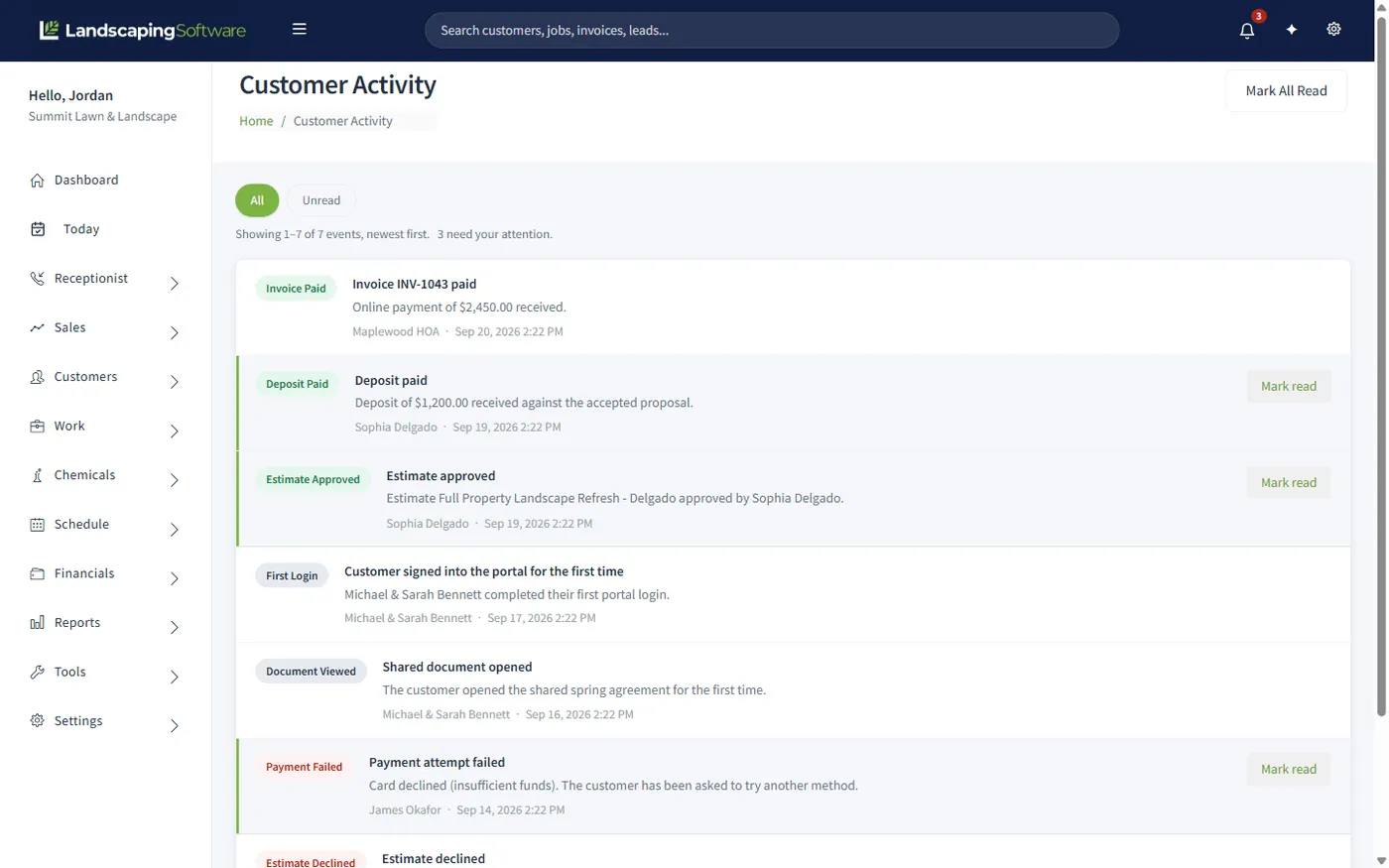
The activity inbox
When a customer's payment is declined, the invoice looks exactly as it did before: still open, nothing happened. The customer, meanwhile, thinks they have paid. The activity inbox is the only place that difference shows up, which is why it is worth working daily.
It is also where an estimate approval lands, usually well before the customer thinks to phone you about it.
A branded email shell wraps every customer-facing send, so an invoice, a review request and a work-completed notice all look like they came from one company rather than from three different systems.
Works together
Where the activity comes from: payments, approvals and document views.
The outbound half: letters, segments and automated sequences.
The photos that make a work-completed email worth opening.
See how the whole platform fits together, from first visit to renewal.
Not sure how to answer a review? Draft with AI writes a first reply for you to edit before it goes anywhere. See AI assistant and drafting, included on every paid plan.
See where review requests fit in a year of sends in our landscaping marketing calendar.
Questions
A request goes out automatically after work is completed or paid. Happy customers are pointed at your public review sites. Unhappy ones are routed into a private feedback inbox instead, so you hear it first and get the chance to fix it.
Asking every customer for feedback and acting on the bad ones is. What you must not do is ask only the happy ones for public reviews. The feature is an early-warning system for service problems, and it works because you actually answer the private feedback.
An automatic "we were there" email when a visit is finished, with the photos your crew took, where you have chosen to share them. It answers the question customers ask most about maintenance work: did anyone actually come?
Two subscribable emails: a Morning Brief with what today looks like, and a Yesterday Recap with what actually happened. You subscribe the people who want them, rather than everyone getting mail they ignore.
Yes. A branded email shell wraps every customer-facing send, so invoices, review requests, work-completed notices and campaign emails all carry your name rather than looking like software output.
The customer activity inbox records portal events as they happen: payments, estimate approvals and declines, deposits, failed payments, first logins and first document views, with an unread count in the top bar.
Work-completed emails, daily briefs, the branded email shell and the customer activity inbox are in every plan. The reviews and feedback engine is on Pro and Scale.
14-day free trial · No credit card required