AI Receptionist · Paid add-on

AI Receptionist for Landscaping and Lawn Care Companies

It answers at 2am on a storm night and at 10am while you are on a mower. An AI receptionist is software that answers your business phone in a natural voice, talks to the caller and writes down what they need. Ours says it is an AI, answers from your business facts, and files the lead in your Leads module. Emergencies, and callers who need a person, are transferred live to the numbers you choose. A paid add-on, on any plan.

Start your 14-day free trial Get in touch

14-day free trial · No credit card required

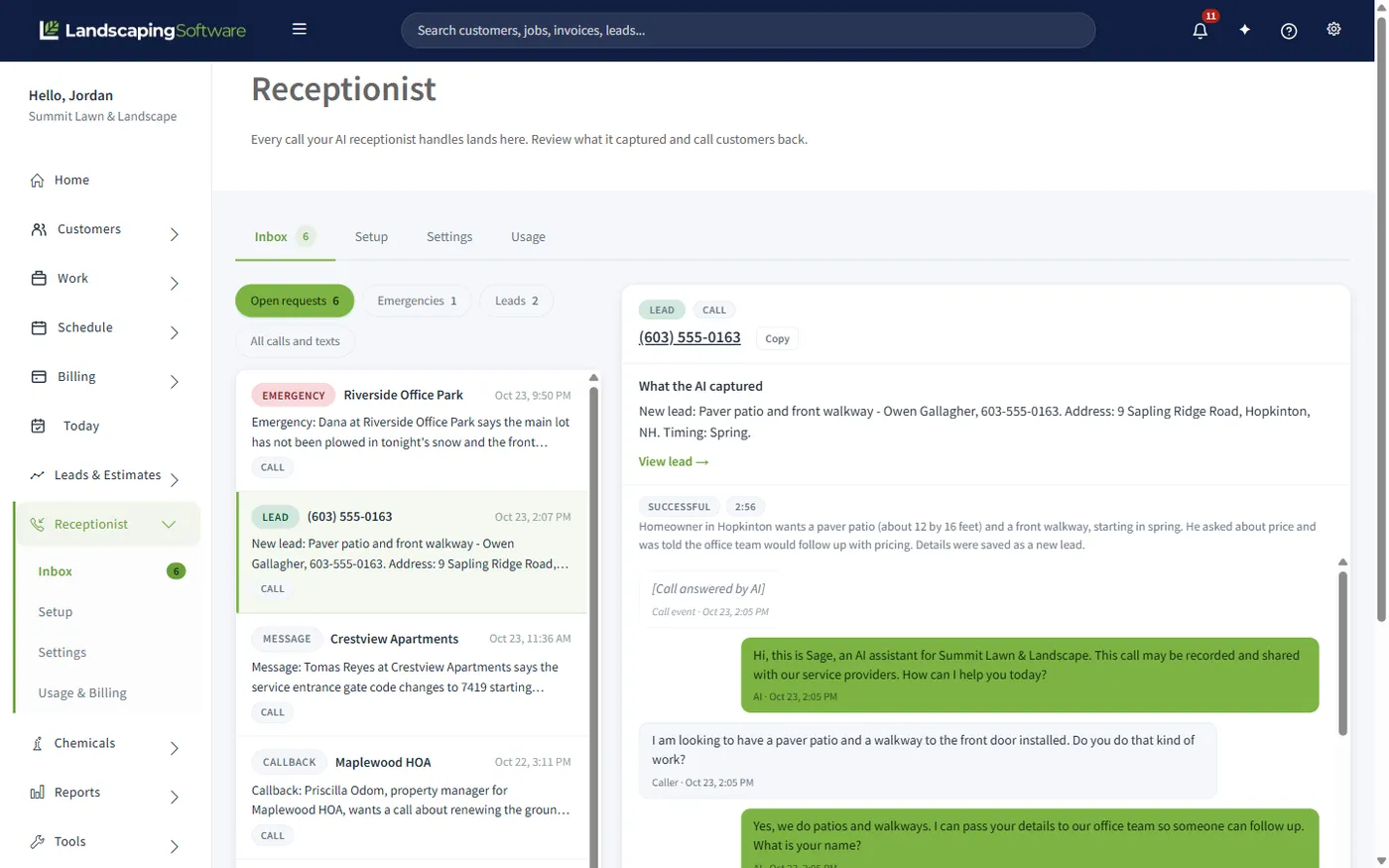
Receptionist Inbox with an emergency, a new lead, a message and a callback filed by the AI receptionist, and a paver patio lead open with its call transcript

The problem

The job goes to whoever picks up.

A homeowner with a dead lawn calls three companies. The one that answers gets to quote. You were in the field, so you got the voicemail, and by the time you call back they have said yes to somebody else. Nobody counts the jobs lost this way, because they never became leads.

Live transfer

It does not just take a message. It can put the caller through.

You decide who gets which call. Add a route for each: a phone number and a condition in plain words, such as “emergency”, “existing customer” or “wants to speak to the owner”. When a caller matches, the AI tells them it is connecting them and transfers the live call to that number.

  • Emergencies ring through

    A tree on a house or a flooded yard goes to your phone, at 2am if you switch the route on for after hours. The AI also files an emergency request and alerts you.

  • Your hours are respected

    Routes are off after hours unless you mark them available, so a Saturday mulch question does not ring your foreman at midnight. The check runs on our server before the call is dialed.

  • Nobody answers? You still know

    Every transfer files a callback request in your Receptionist Inbox, so a call that rings out is a task to return, not a lost caller. With no matching route, it takes a message and captures the lead.

How it works

Four steps, and you keep your number.

Setup is a checklist in the app.

  1. 1

    Keep your number and forward the calls you miss

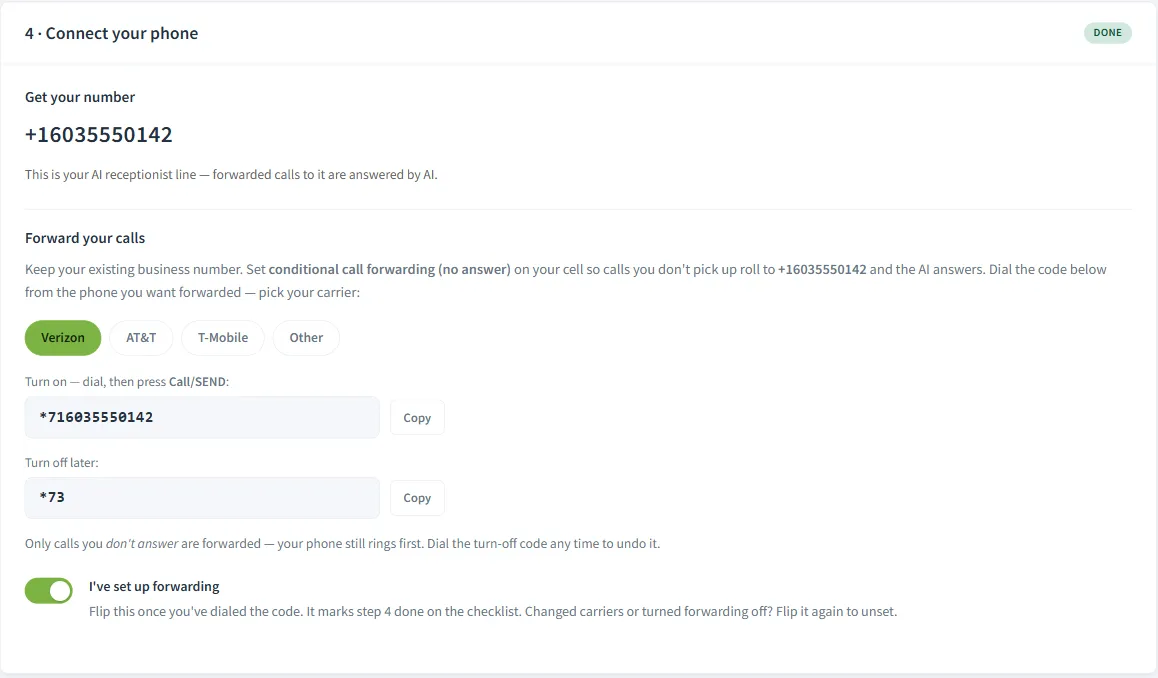
    Pick a local US number for the receptionist; it is included. Set conditional no-answer forwarding on your business phone, so your phone rings first and a missed call rolls to the AI. Choose Verizon, AT&T, T-Mobile or Other and the page shows the code to dial.

  2. 2

    Tell it your business

    It answers from your business facts: hours, the towns you serve, the Top services you type in (the services it offers callers), licenses, years in business and seasonal offerings. Enter your website address and it can read the site to fill these in. Add up to 15 knowledge documents or paste text in.

  3. 3

    Set your hours and transfer routes

    Choose a voice, name the agent, write the greeting. Set business hours for each day. Add up to 8 routes, each a phone number, a plain-language condition such as “emergency”, and an after-hours switch. Enter the email that gets new leads.

  4. 4

    Place a test call and read the transcript

    Switch on Answer my calls with AI, call the number from your cell, and read the transcript in your Receptionist Inbox as soon as the call ends. Changes apply to the next call, so fix a wrong answer and call again.

Receptionist Setup step 4, Connect your phone, with the receptionist number and the codes to forward unanswered calls on Verizon, AT&T or T-Mobile

What it does

It answers, it listens, and it writes it down.

The receptionist answers in a natural voice and says it is an AI. It answers from your business facts, including the Top services you type in, from what it read on your website, and from the knowledge documents you upload. If a fact is missing it does not invent one; it says your team will confirm.

Then the useful part. A new lead is saved to your Leads module with the source “AI Receptionist”: name, phone, address, service wanted, timing and notes. Every other request lands in the Receptionist Inbox, filed as what it was, with the transcript attached. Switch on Email me every new lead and each new lead is emailed to you right away.

What lands in your inbox

  1. 1

    New lead

    Someone who wants work done, linked to the lead record.

  2. 2

    Reschedule

    An existing customer who needs a different day.

  3. 3

    Callback

    Someone who needs a person, with the reason attached.

  4. 4

    Message

    Anything that just needs passing on.

  5. 5

    Emergency

    The ones that cannot wait. They sort to the top, and you are alerted right away.

Smart answering

Built into your landscaping software, not bolted on.

A standalone answering app usually knows your business from a form you filled in once, and unless it is wired into your software, hands you a message to retype. This receptionist lives inside the system that holds your leads, customers, seasons and storm events, so there is no integration to set up.

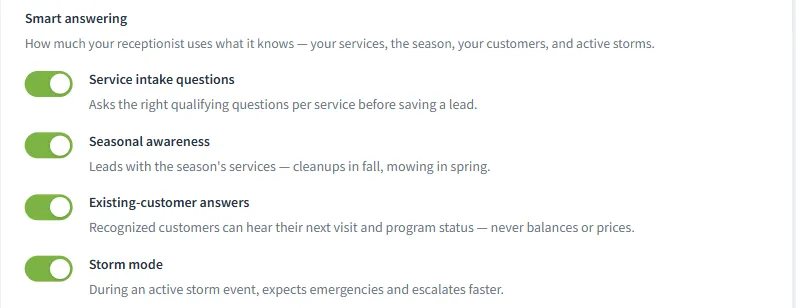
Service intake questions

Asks the qualifying questions for each service before it saves the lead, so a patio inquiry and a mowing inquiry capture different details.

Seasonal awareness

Leads with the season’s services, so what it mentions first follows the season.

Existing-customer answers

A recognized customer is greeted by first name and can hear their next visit and program status. Never balances or prices.

Storm mode

During an active storm event it expects emergencies and escalates faster. The storm you are dispatching is the storm the phone knows about.

A What your receptionist knows panel on Settings shows what the AI will use on the next call.

Receptionist Settings with the four Smart answering switches on: Service intake questions, Seasonal awareness, Existing-customer answers and Storm mode

Hours and routing

After hours, weekends and storm nights.

Set business hours for each day, in your company time zone. During hours, a caller who matches a route is transferred live, with a spoken heads-up first. Anyone else gets a message taken and the lead captured. Up to 8 routes, each a label, a number, a condition written the way you would brief a new hire, and an after-hours switch.

After hours, callers hear your after-hours greeting and it takes a message. Routes are off after hours by default; switch Available after hours on for the ones that should still transfer, typically your emergency line, so a Saturday mulch question does not ring your foreman at midnight.

The AI decides from the conversation when to file an emergency request, and you are alerted right away. Emergencies sort to the top of the inbox, and every after-hours call carries an After hours tag.

By trade

An AI receptionist for every kind of landscape work.

The same receptionist earns its keep differently depending on what you sell.

Lawn care and mowing

Most mowing calls are short: a new customer who wants a look at a weekly cut, or a regular who needs Thursday moved. The first becomes a lead with the address and timing, the second a reschedule request linked to the customer. A regular asking “when are you coming” hears their next visit date.

Fertilization and weed control

A caller with brown patches asks what to put on them. The receptionist takes the message and never gives chemical, fertilizer or treatment advice. That is deliberate: a treatment call belongs to a trained applicator on the lawn. Program customers can hear their program status.

Landscape installs and hardscape

A patio or wall lead is worth far more than a mowing lead. With Service intake questions on, it asks the qualifying questions for that service before saving the lead, so the lead carries the project details. It never quotes, and it never turns a caller away for being outside your area.

Snow and ice removal

The phone rings hardest at 2am in a storm. With Storm mode on, during an active storm event it expects emergencies and escalates faster. Set an emergency route to the number that gets answered on a storm night and mark it Available after hours.

Compared

AI receptionist vs answering service vs voicemail.

Three ways to handle the call you cannot pick up.

Comparison table
Question Voicemail Human answering service LandscapingSoftware AI Receptionist
Answers 24/7 Records a message. Nobody talks to the caller. Usually, depending on the plan you buy. Yes, around the clock, in a natural voice.
How you pay Included with your phone line. Varies by provider. Often by the minute or the call. A monthly plan with conversations included, from $39 a month.
Where the caller ends up A voicemail box somebody has to check. Usually a relayed message you retype into your own system. In your Leads module, tagged “AI Receptionist”, and in your Receptionist Inbox with the transcript.
Knows your existing customers No. Only what you give the operators; varies. Yes. Recognized customers hear their next visit and program status, never balances or prices.
Says what it is It is plainly a recording. A person, often answering under your company name. Always says it is an AI, and that the call may be recorded.
Books or quotes No. Some will book from your calendar; varies. No. Your team schedules and prices.

A human answering service still makes sense when callers need a long conversation, when you want someone booking from your calendar, or when your customers would rather talk to a person. It usually costs more per call.

What it will not do

The limits are the feature.

It will not book, it will not quote, and it will not send or answer a text. Those are the three places where an AI getting it wrong costs real money: a double-booked crew, a quarter-acre price on an acre lot, a written promise you never made. It records the preferred day as a request; your team schedules the visit.

Also on purpose

  • Never turns a caller away for being outside your service area. It files the request; you decide.
  • Never gives chemical, fertilizer or treatment advice.
  • Keeps a transcript, not a recording.
  • Says it is an AI every time, with a disclosure you can reword but not remove.

Pricing

AI receptionist pricing.

Three plans, on every subscription tier, each with conversations included every calendar month.

AI Receptionist plans and prices
Plan Price What is included
Basic $39 a month 30 conversations a month included, then $0.75 each
Plus $69 a month 75 conversations a month included, then $0.65 each
Max $109 a month 150 conversations a month included, then $0.55 each

How the billing works

  • Each answered call is one conversation, however many questions the caller asks.
  • Hang-ups and silent calls under 15 seconds that capture nothing are not counted or billed.
  • Extra conversations are on by default at your plan’s rate. Turn them off and the line pauses once your included conversations are used.
  • Safety ceiling: even with extras on, the line stops at twice your included amount for the month. Paused callers are told your team will call back, and those calls are not billed.
  • Emails at 80% and 100% of your included conversations.
  • One call is limited to 5 minutes. After about 3 it wraps up and saves a callback request.
  • Upgrades are charged today, prorated; downgrades take effect at your next billing date. Deactivate any time and unused time is credited.
  • Only the account owner changes the plan. It needs an active paid subscription, so it is not part of the free trial.

A worked example

One answered call against the Basic plan

An example, not a promise; your numbers will differ. Our lawn mowing pricing guide prices a 25-minute lawn at $54.55 a visit, and our crew scheduling guide runs a weekly customer for 28 weeks.

One weekly customer, 28 visits × $54.55
$1,527.40
Basic plan for the same 7-month season, 7 × $39
$273.00
Season revenue divided by season plan cost
5.6×

One call that becomes a weekly customer covers the Basic plan for the season several times over. Count how often you miss that call.

Works together

A caller becomes a customer

CRM & leads

Where a captured caller becomes a lead you can quote, not a note on a pad.

All features

See how the whole platform fits together, from first call to renewal.

Read what an AI receptionist can and cannot do for a landscaping company, then the setup checklist before you forward your line. The full setup guide in the help center covers every setting; the pricing page shows the add-on beside the plan tiers. For questions about your own numbers there is a separate AI assistant; it never takes calls.

Questions

AI Receptionist FAQ

Does it pretend to be a person?

No. It says it is an AI assistant when it answers, and that the call may be recorded and shared with service providers. You can reword the greeting around those facts, not remove them.

Can it book the job?

No. It records the caller’s preferred day and time as a request for a person to schedule. Booking would mean it decides your crew capacity, drive time and pricing from a phone call.

Will it quote a price?

Never. It takes down what the caller wants and hands it to you. Pricing a property over the phone is how you end up mowing an acre for a quarter-acre price.

What does it actually do with a call?

It answers from your business facts (including the Top services you type in), your website and your knowledge documents. Then it files what the caller needs: a new lead in your Leads module tagged “AI Receptionist”, or a reschedule, callback, message or emergency in the Receptionist Inbox, with the transcript.

What happens with an urgent call?

You set up to 8 transfer routes, each a phone number and a plain-language condition such as “emergency”. A matching caller is transferred live, with a spoken heads-up. The AI also files an emergency request when the conversation calls for it, and alerts you right away.

Does it text?

No. It is voice only. It will not send a text to a caller or answer one.

What does it cost?

Three plans: Basic $39 a month (30 conversations a month included, then $0.75 each); Plus $69 a month (75 conversations a month included, then $0.65 each); Max $109 a month (150 conversations a month included, then $0.55 each). Hang-ups and silent calls that capture nothing are not billed, the line pauses at twice the included amount for the month, and one call is limited to 5 minutes.

How do I turn it on?

Yourself, in the app: choose a plan on Receptionist, Setup, or from Settings, Plan & Features, Add-ons. Only the account owner can change it. It needs an active paid subscription, so it is not part of the free trial.

Do I keep my business number?

Yes. The receptionist gets its own local US number, included. You set conditional no-answer forwarding on your existing phone, so your number rings first and missed calls roll to the AI.

What is the difference between an AI receptionist and an answering service?

A human answering service puts a person on the line, often billed by the minute or the call, who relays a message. An AI receptionist is software: it answers every call, around the clock, for a monthly plan. This one writes the lead into your Leads module with nothing retyped, always says it is an AI, and will not book or quote.

Does it work nights and weekends?

Yes, it answers 24/7. Outside the hours you set, callers hear your after-hours greeting and it takes a message. Routes marked available after hours, typically an emergency line, still transfer live.

Can it answer questions from my existing customers?

Yes, within limits. With Existing-customer answers on, a recognized customer is greeted by first name and can hear their next visit date and program status. It never reads out a balance or a price.

Stop losing jobs to voicemail.

14-day free trial · No credit card required