Programs & seasons
The recurring book that contracts and renewals roll forward every year.
Contracts & renewals · Professional and Premier
Landscape contract management software is software that keeps each customer’s service agreement as a record with a term, a price and a renewal rule, and tells you when that term is about to end. Ours lives in the same system as the customer, the job and the invoice: put a standing customer on a contract and a nightly run gives notice, prepares the renewal proposal and rolls the term forward with the price increase you agreed at signing. Everyone else comes up on the Renewals list as their season ends. Available on the Professional and Premier plans.
The problem
A signed maintenance agreement goes into a folder in March. By the next March, fuel, labor and fertilizer have all moved, the customer is still paying the old number, and the line about an annual increase has never been used because nobody remembered it was there.
Then there is the customer who lapsed quietly. Not unhappy, not fired, just never re-signed. The season ended, the reminder fell on a busy Tuesday, and by the time you noticed they had found someone else. Renewal is a workflow problem more than a sales problem, so the software holds the agreement, watches the date, prepares the proposal and applies the increase. You make the call on who stays.
How a contract runs
A contract is a standing service agreement with one customer at one job site: an agreed price, a term with a start and an end, and a rule for what happens when the term runs out. Both steps of the renewal run use your company’s local dates, so the customer gets their full opt-out day.
Under Customers, Contracts, click New Contract. Pick the customer and the job site the agreement covers, name it in plain words (“Smith Estate - Annual Maintenance”), add your own contract number if you use one and a service category to group it by.
Choose the pricing model: Per Visit, Per Round, Seasonal Flat, Monthly Flat, Time & Materials or T&M with Cap. Enter the Base Amount, the cap for a capped T&M contract, and an optional PrePay Discount % for paying the term up front.
Term Start, Initial Term in months (12 by default, 1 to 60), Annual Uplift % (0 to 50), Auto-renew at term end (off by default) and Renewal Notice days (60 by default, 0 to 180). The contract saves as a Draft and does nothing until you activate it.
On the contract summary click Activate. The contract moves to Active, the event is written to its timeline, and from that night on the renewal run watches it.
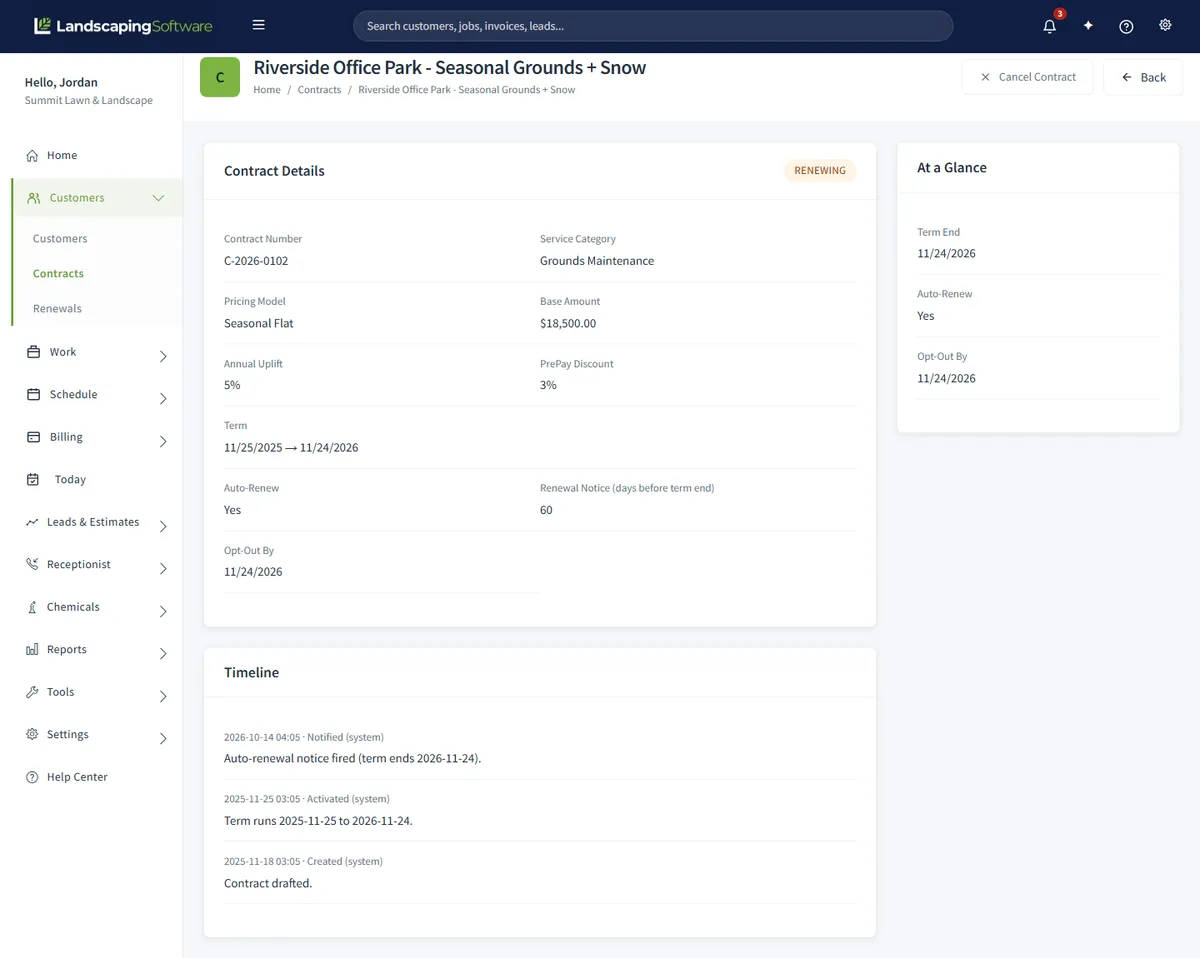
When an Active, auto-renew contract’s term end comes inside its notice window, it moves to Renewing. The opt-out deadline is set to the term end date, a notice event goes on the timeline, and a renewal proposal PDF is prepared from the current job.
Once the opt-out deadline passes, the new term starts the day after the old one ended, runs the same number of months, and the Annual Uplift % is applied to the base amount. A three-year snow agreement with a 4% bump just continues.
Want the result now instead of tomorrow morning? The contracts list has a Run Renewal Worker button. It runs exactly what the nightly job would, for your company only, and running it twice is safe. It reports what it noticed, what it rolled forward and how many proposals it prepared.
Multi-year contracts
The initial term is anywhere from 1 to 60 months, and with auto-renew on the agreement keeps rolling in terms of the same length until somebody cancels. Each roll-forward applies the Annual Uplift % to the base amount, so a five-year agreement with a 3% step is five lines on the timeline, not five conversations.
The contract summary answers “when does this roll?” at a glance: term end, whether it auto-renews and the Opt-Out By date. The Timeline is the record to open when a customer disputes a price increase or a renewal, because every event the run took is on it with its date.
Already running the work as a job? Open the Job Summary and click Convert to Contract. The job becomes a draft contract carrying the customer, job site and billing terms; you add the pricing and term and activate it. From then on the job page shows View Contract.
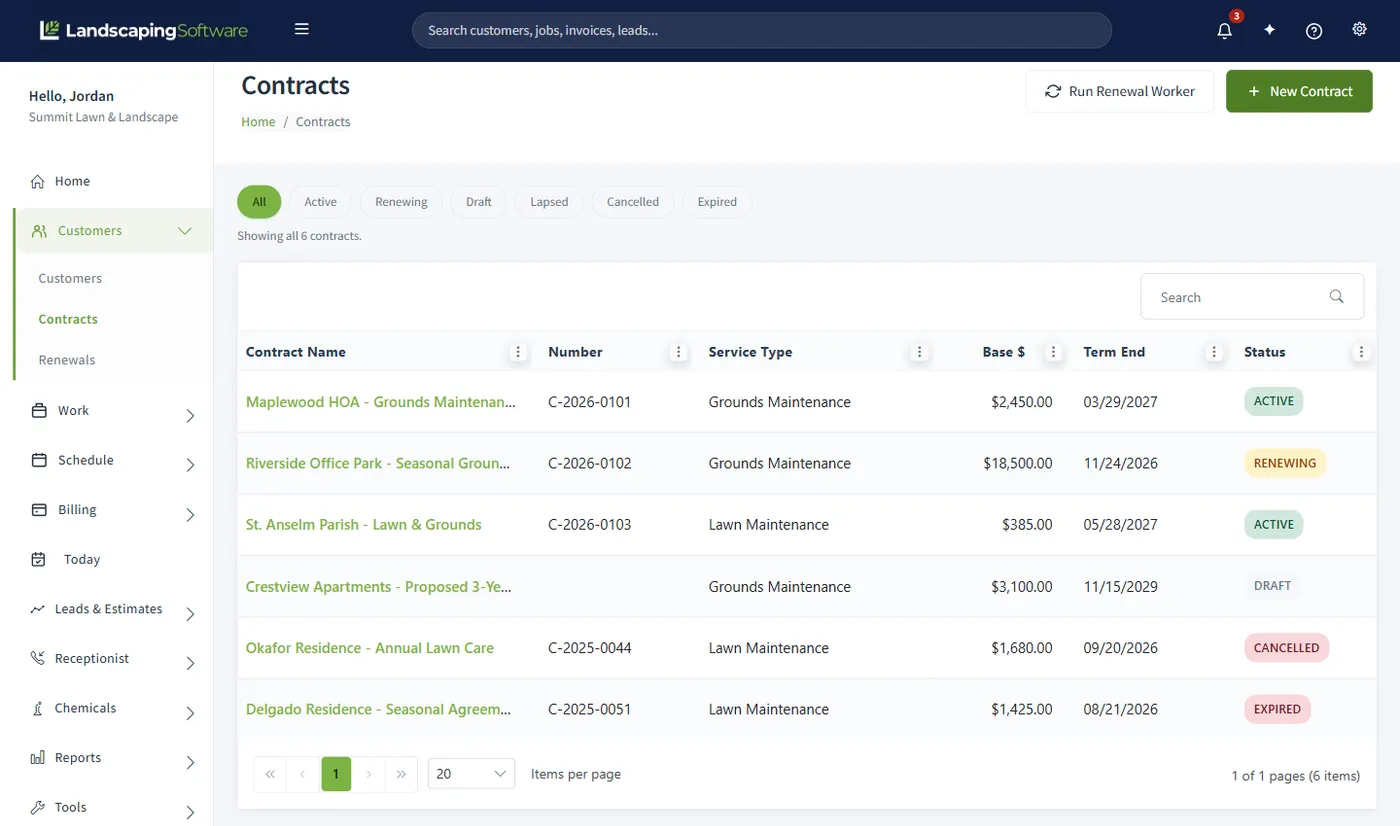
The chips along the top of the Contracts list filter by status.
Renewals
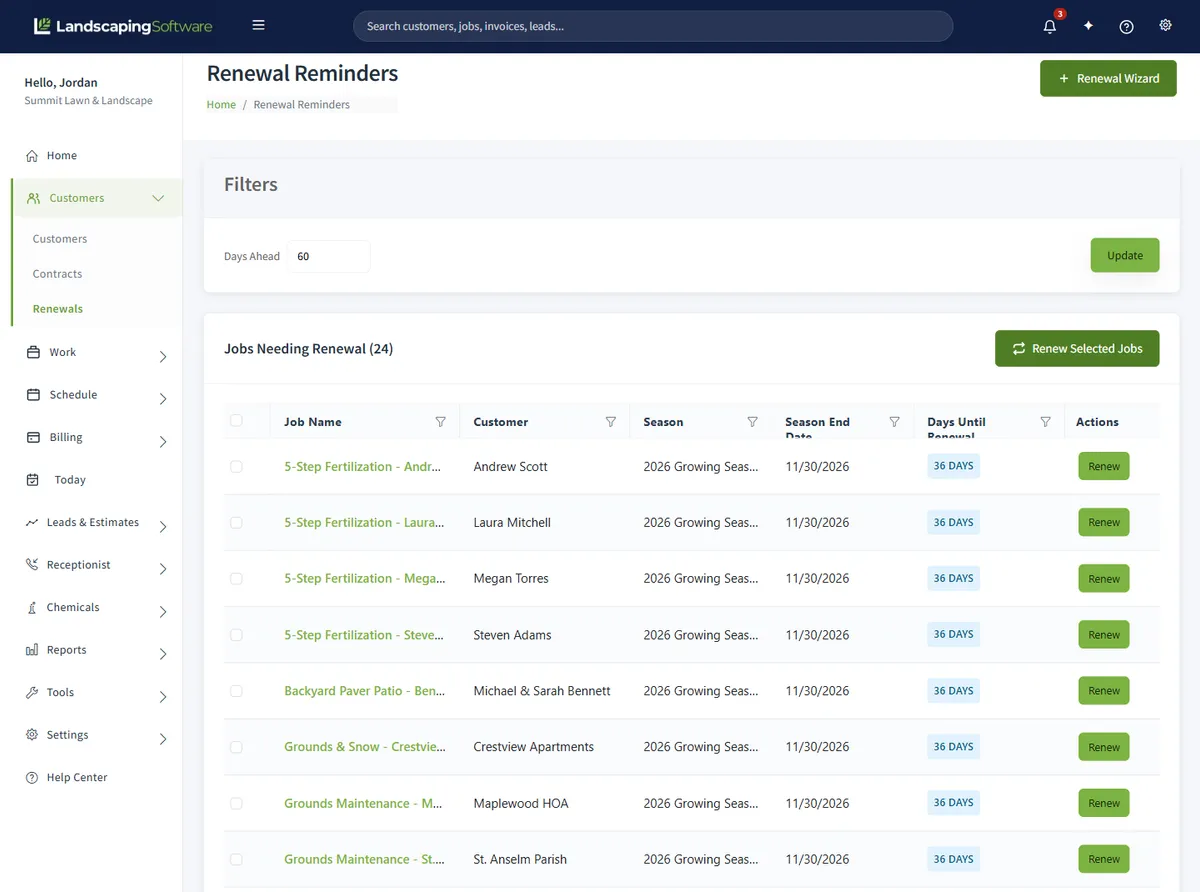
Not every customer wants a multi-year agreement. For them, Renewal Reminders under Customers, Renewals is the list: Jobs Needing Renewal shows every active job whose season ends inside your Days Ahead window (30 days by default, 1 to 365), with the customer, the season end date and the days until renewal. Programs Needing Renewal shows programs from a past year or whose season has ended.
Click Renew on one row, or tick several and click Renew Selected. A renewed job keeps the customer, job site, description and billing setup, points at the target season and the renewed program, carries its line items with the uplift applied, and resets its workflow status so you treat it as a fresh sale to confirm.
The proposal PDFs are the outreach: one per customer, showing next year’s pricing, with a time-limited download link to email or print. Pair them with a plain price increase letter. Anything you renew drops off the lists; customers who have not said yes stay on them, because the list never expires anyone.
Seasons and programs
Seasons move through Planned, Active, Suspended and Ended. An overnight process ends any Active season whose end date has passed, and never activates one for you. Once a season is Ended, its jobs and programs become candidates on the Renewals lists for next year. Verify the new year before you end the old one, because Ended is permanent.
Renew programs before jobs. A renewed program is copied into the new year with the same rounds, every window shifted to the target year and all rounds reset to Not Started, and renewed jobs then link to it so their visits land in the new round windows. The new program’s summary also offers Renew enrollments from last year’s program, with a percent increase you can override row by row.
Standing agreements that continue every year unless somebody cancels. The price increase and the roll-forward happen without a yearly decision.
Season-driven work where you hand-pick each year which jobs and programs roll into the new season, with a price uplift and proposal PDFs.
A whole season’s recurring work in bulk: the source season’s jobs become service plans, and the ones you tick are renewed into the target season with their first visits.
Three paths, and you can mix them: steady recurring customers on contracts, the Renewal Wizard for everyone else. All three need a target season, and the wizard can create it. See Programs & Seasons for the rest of the year.
Billing a contract
A contract does not create invoices by itself. It records the pricing model and the base amount; the work is billed through the job, where you pick the rhythm. For a monthly maintenance agreement, turn on Set Job Invoicing on the job and choose Monthly Fixed: a daily background run creates one invoice at the start of each month for each opted-in, active Monthly Fixed job, priced from the job’s most recent accepted estimate, never twice for one month.
Per Visit jobs get a draft invoice each time a visit is marked completed, priced from the job’s product and service lines. Every automatic invoice is a draft under the Not sent chip until you send it, and cancelling a contract does not touch invoices that already exist.
Base Amount is required, up to $99,999,999.99. The cap is required on T&M with Cap. A PrePay Discount % of 0 to 50 is optional on any model.
By trade
A mowing account on a standing agreement goes on a contract with a Per Visit or Monthly Flat pricing model and auto-renew on. The job bills itself, the notice fires 60 days out, and the uplift you agreed at signing is applied at roll-forward.
Renew the program first so next year’s round windows exist, then re-enroll last year’s properties with a percent increase, or renew the jobs through the wizard. A Per Round contract fits a multi-year treatment agreement.
Winter seasons overlap summer ones on purpose, and an Ended winter season puts its snow jobs on the Renewals list for next winter. A Seasonal Flat or Per Visit contract carries the agreement across calendar years.
How you price a snow agreement, per push, per inch, per event or a seasonal flat rate, is up to you. Our guide to snow removal contract pricing walks through the trade-offs, and Snow & Storm, on the same plans, turns a storm into a visit for every active snow job.
Compared
Three ways to keep track of who is signed, for how long, and at what price.
| Question | Paper and a calendar reminder | Generic contract app | LandscapingSoftware Contracts & Renewals |
|---|---|---|---|
| Where the agreement lives | A folder, or a scan somewhere. | A document store, separate from your customers and jobs; varies by app. | A contract record on the customer and job site, linked from the job page. |
| Who is up for renewal | Whoever the reminder was set for, if it was set. | Usually an expiry date and a reminder; varies. | Renewing contracts by status, and every job whose season ends inside your Days Ahead window. |
| The annual price increase | A clause nobody applies. | Typically not something the app does; varies. | Annual Uplift % applied at roll-forward, or an uplift on copied line items in the wizard. |
| Next year’s work | Re-entered by hand. | Not connected to scheduling; varies. | Renewed jobs and programs land in the target season, round windows shifted, visits generated when the season is Active. |
| Cost | Free, paid in lapsed customers. | A separate subscription; varies. | Included in the plan price on Professional and Premier. |
A folder works for ten accounts. The question is what happens at eighty, when the person who remembers the terms is also running a crew.
What it will not do
The renewal run gives notice, prepares the proposal and rolls the term; the customer has the whole notice window to opt out and you have the same window to cancel. The software removes the remembering, not the relationship. For the agreement itself, start from our lawn care contract template for recurring work or the landscaping contract template for projects, and have an attorney review what you sign.
Pricing
Included in the monthly price on Professional and Premier, alongside programs, seasons and the Season Planner. Customers, jobs, estimates and invoicing are on every plan, including Essential.
| Plan | Price | Contracts & Renewals | Crews |
|---|---|---|---|
| Essential | $99 a month | Not included | Up to 2 crews |
| Professional | $229 a month | Included | Up to 10 crews |
| Premier | $399 a month | Included | Unlimited crews |
New accounts start on a 14-day free trial of the plan picked at signup, no card needed, with Professional preselected, so you can set up a contract, run the renewal worker and see the timeline fill before you pay. See the pricing page for every feature.
Works together
The recurring book that contracts and renewals roll forward every year.
Where the agreement starts, and what the renewal proposal is built from.
Monthly Fixed, Per Visit and per-round billing for the work under the agreement.
Seasonal snow agreements span calendar years and renew the same way.
Step by step in the help center: contracts, renewal reminders and the Renewal Wizard, rolling seasons and programs into a new year, the season lifecycle and automatic invoicing. For the paperwork: the lawn care contract template, the landscaping contract template and the price increase letter.
Questions
Software that keeps each customer’s service agreement as a record with a term, a price and a renewal rule, and tells you when that term is about to end. Here a contract is attached to one customer at one job site, carries a pricing model, base amount, term, uplift, auto-renew switch and notice window, and a nightly run watches it.
Two steps, both overnight. Inside the notice window the contract moves to Renewing, the opt-out deadline is set to the term end date and a renewal proposal PDF is prepared from the current job. Once that deadline passes, the new term starts the day after the old one ended, runs the same number of months, and the annual uplift is applied to the base amount.
Start by never missing one. Standing customers go on contracts, so notice and the price increase happen on schedule. Everyone else appears on Renewal Reminders as their season end comes inside your Days Ahead window, and the wizard copies them into next year with a proposal PDF per customer. Customers who have not said yes stay on the list.
Yes, two ways. A contract’s Annual Uplift % (0 to 50) is applied to the base amount at each roll-forward, so agree it when the customer signs. The Renewal Wizard’s Annual Price Uplift % (0 to 50) is applied to each copied line item’s rate. Set either to 0 to hold pricing flat.
No. The contract holds the agreement: price, term and renewal rule. Work is still scheduled through jobs and visits and billed through invoicing. Next year’s jobs come from your normal renewal run, and the contract’s service plan shows up in the Season Planner like any other.
Through the job. Turn on Set Job Invoicing and pick Monthly Fixed: a daily background run creates one invoice at the start of each month for each opted-in, active Monthly Fixed job, priced from the job’s most recent accepted estimate, never twice for one month. Every automatic invoice is a draft under the Not sent chip until you send it.
Open the contract and click Cancel Contract before the Opt-Out By date on its summary. A reason is required and goes on the timeline. Cancelling stops the renewal run, keeps the history and leaves existing invoices alone. A cancelled contract stays cancelled; if the customer comes back, create a new one.
Contracts and Renewals are on the Professional and Premier plans (Professional $229 a month, Premier $399 a month). New accounts start on a 14-day free trial of the plan picked at signup, no card needed, with Professional preselected.
14-day free trial · No credit card required