Software
Landscaping CRM Software: A Practical Buyer's Guide
It’s Thursday afternoon and a customer calls asking about the quote you sent a few weeks ago. You don’t remember sending it. You definitely don’t remember whether you followed up. Somewhere in your phone, your email, or a stack of sticky notes is the answer, and finding it is going to cost you five minutes you don’t have.
That’s the gap landscaping CRM software is built to close: not a sales pipeline built for software companies, but a record of every customer, every property, every lead, and every quote, searchable in one place instead of scattered across a phone, a spreadsheet, and your memory.
Here’s what these systems actually do, how they differ from a generic CRM or a plain contact list, and how to tell if your lead volume and customer count justify one.
What landscaping CRM software actually is
Landscaping CRM software is a customer and property database built for service work: it holds every customer’s contacts, service addresses, and job and payment history, plus every lead from first call to signed estimate, connected to the same system that schedules and bills the work, not a separate sales tool bolted on afterward.
The distinction that matters is what it’s built around:
- A general-purpose CRM is built for an outside sales team closing one deal per contact, then moving on. It has no idea what a “property” is, let alone that one customer might have three of them.
- A customer spreadsheet holds a name, a number, and an address, until the address becomes two addresses, or the note about the gate code gets overwritten by someone else’s note about the dog.
- A scheduling app tells a crew where to go today. It rarely tells you which lead went cold last month or whether last month’s invoice got paid.
A landscaping CRM is built around a property that gets serviced repeatedly, for a customer who may have more than one of them, and it stays connected to the estimate, the job, and the invoice instead of stopping the moment a deal is “won.”
What it replaces
| Today | Takes over | What changes |
|---|---|---|
| Spreadsheet of customers | Searchable customer and property records | One customer, several properties, not a repeated row |
| Memory (or sticky notes) for gate codes and gotchas | Notes attached to the property record | Whoever picks up the phone knows what you know |
| Text threads with prospects | A lead pipeline with a status | Nothing goes quiet without you noticing |
| A folder of estimate PDFs | Estimates tied to the record, tracked to a decision | You can see who never answered |
| Mail merge from a spreadsheet export | A merge run off the live, filtered list | The letter list is never stale |
None of that is glamorous. All of it is the difference between remembering and guessing.
What a landscaping CRM actually does
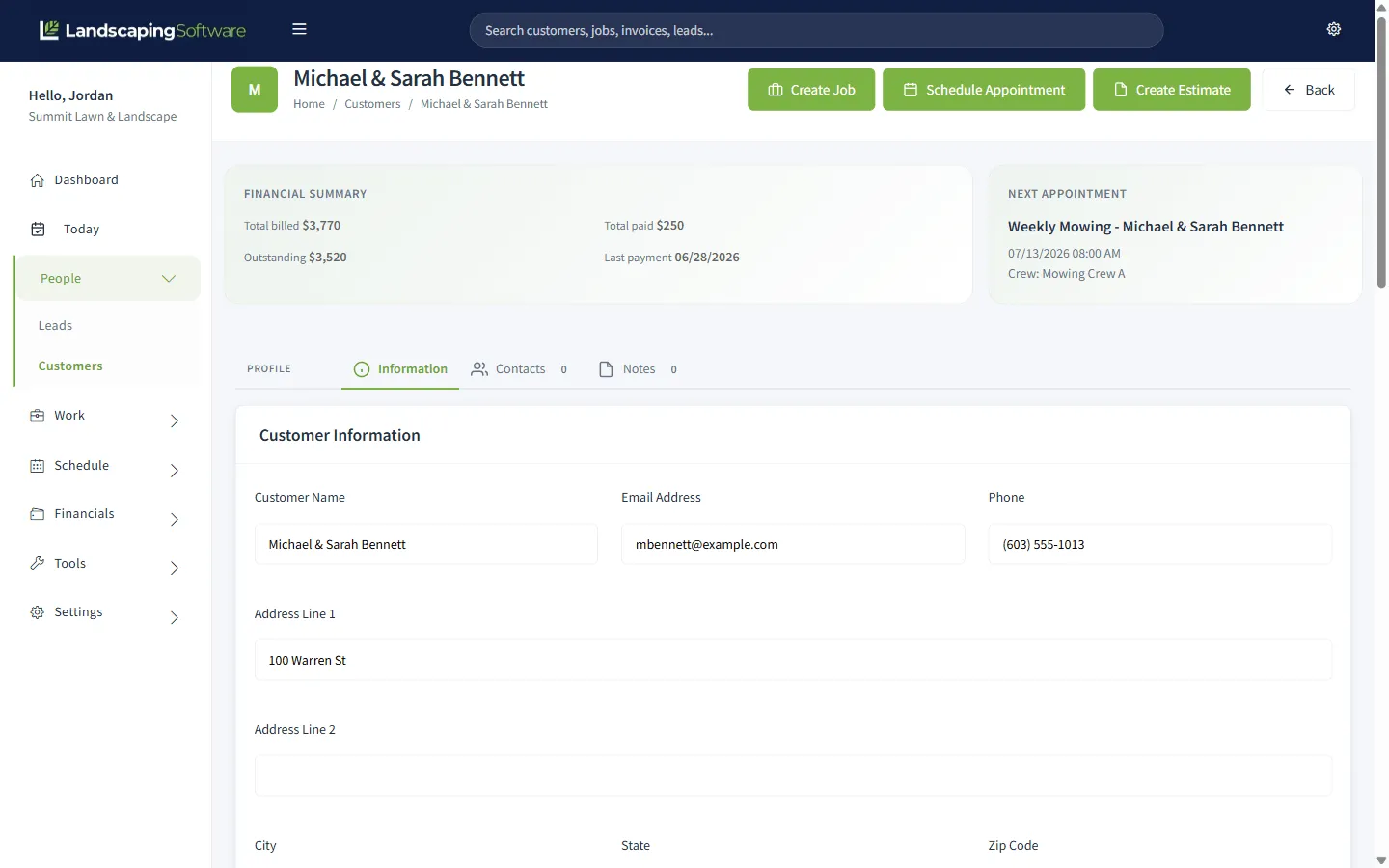
It holds one record per customer, however many properties they have
Multiple contacts and multiple service addresses under a single customer record (a spouse, a property manager, a lake house and a home), each with its own job history, instead of being crammed into one address field or duplicated as a second “customer.”
Notes travel with the property, not just the person
The gate code, the dog, which zones get treated, the neighbor who complains about early starts: attached to the property record, visible to whoever answers the phone or shows up to mow, not locked in one person’s head.
Here’s what that looks like in practice. A customer’s full history in one place, not spread across three tools:
A lead pipeline catches follow-up before it goes cold
Prospects move through statuses: new, contacted, estimate sent, won, lost. A morning scan tells you exactly who’s waiting to hear back. A lead that’s gone quiet for two weeks should be visible at a glance, not something you notice by accident three weeks later.
Estimates are tied to the record and tracked to a decision
The quote lives with the customer, not in a separate folder or a text you sent from your truck. When someone says yes, the estimate becomes the job without you retyping a name, an address, or a line item you already wrote once.
Winning a lead and scheduling the job are one motion, not two
A pipeline that dead-ends at “won” just moves the bottleneck downstream: someone still has to manually turn that win into a scheduled visit. The point of keeping the CRM and the schedule in the same system is that converting a lead to a customer and an accepted estimate to a job doesn’t require re-entering anything.
Mail merge and email work off the live list, not an export
Filter to exactly who you mean (every customer on one street, every lead who went quiet after an estimate) and run a personalized letter or email merge over it. The list is never stale because it’s the same record the rest of the business runs on, not a spreadsheet you exported three months ago and forgot about.
The record follows the customer into billing and renewals
A customer’s history doesn’t dead-end at “job complete.” It should carry into invoicing so you’re not re-explaining who they are at billing time, and into next season’s renewal so a repeat customer doesn’t have to be re-sold from scratch.
What it won’t fix
It won’t win the estimate for you. A visible pipeline makes it obvious when a lead has gone quiet. It doesn’t make your price more competitive or your pitch more convincing.
It won’t fix a chaotic price sheet. If your quotes vary by whoever’s writing them, a CRM will just track the inconsistency more visibly.
Migrating years of scattered contacts is real work. Someone has to clean up duplicate customers, guess which sticky note belongs to which property, and decide what’s worth keeping. Budget an evening or two, not an afternoon.
It won’t decide which leads are worth chasing. It surfaces the list. You still have to work it.
Six signs you’re ready for one
- You’ve retyped the same customer’s address into more than one place this month.
- A repeat customer calls and you can’t immediately tell if last visit’s invoice got paid.
- You’ve found an estimate you never followed up on.
- Leads go quiet and nobody notices until the customer calls somebody else.
- You’re not sure which properties belong to which customer once there’s more than one.
- Renewals happen because you remembered, not because anything reminded you.
The counter-test: if you can hold your whole customer list in your head accurately, you likely don’t need this yet. Most owners cross that line earlier than they expect, usually right around the point where a second employee starts fielding calls and needs the same information you have.
How the pricing models differ
The model matters more than the sticker price.
Per user. You pay for each person with a login: cheap at three people, expensive at fifteen. Ask whether office staff and seasonal hires count.
Per crew. Priced by capacity rather than headcount, usually the better deal for larger crews.
Flat tier. One price for a band of features and records. Easiest to forecast and compare.
A percentage of payments. A cut of every card payment on top of what the processor already charges. It never shows up as a monthly number, but it scales with your revenue.
A few questions specific to CRM tools are worth asking before you compare pricing: Is there a cap on how many records a mail merge or email campaign can run against at once? Does the price change based on how many customers or leads you store, separate from how many people log in? What does exporting your list cost, if anything? Our own pricing is published with none of those caveats hidden in a call.
How to evaluate one in a week
- Monday: import your messiest twenty real customers. The multi-property account, the one with the odd billing note, the one you’re not sure is still active. If the import handles those, it will handle the rest.
- Tuesday: run one real lead through the pipeline. From first contact to a sent estimate. Time it against how you’d normally do this.
- Wednesday: pull up a repeat customer. Can you see their full history (jobs, invoices, whether they paid) in one screen, or are you still hunting across tools?
- Thursday: run a mail merge or email campaign against a filtered slice of the list. Try “everyone on one street” or “every lead who went quiet.” See what it actually took.
- Friday: try to break it. Add a second property to an existing customer. Convert a lead. Merge two records that turn out to be the same person.
Do all of that before anyone talks to you about a contract.
Where we fit
You’re reading this on a vendor’s blog, so here’s the plain version.
Our CRM for landscapers isn’t a separate sales tool bolted onto the schedule and the invoices. It’s the same system, so a won lead becomes a customer, an accepted estimate becomes a job, and none of it gets retyped. The lead pipeline, one-click conversion, and mail merge and email campaigns are included on every plan, not gated to a higher tier. You can filter your list and run a personalized letter merge over up to 5,000 records in one pass.
What we don’t have: two-way texting with customers. If that’s a must-have for you today, it’s worth knowing before you spend a week on a trial.
Frequently asked questions
What is landscaping CRM software?
It is a customer and property database built for service work: every contact, every service address, every job and payment, and every lead from first call to signed estimate, in one searchable record. The distinction from a generic CRM is that it is built around properties and recurring service, not a one-time sale.
How is a landscaping CRM different from a general-purpose CRM?
A general-purpose CRM is built for an outside sales team closing one deal per contact. A landscaping CRM is built around a property that gets serviced over and over, often for a customer who has more than one of them, and it connects straight into scheduling and billing instead of stopping at “deal won.”
Do I need a CRM if I already use scheduling software?
Scheduling tells you where a crew goes today. It does not usually tell you which leads went cold last month, what you quoted a customer in March, or whether the invoice from their last visit got paid. If your scheduling tool cannot answer those three questions, you are running a CRM out of your memory.
Can a landscaping CRM handle a customer with more than one property?
A real one, yes: multiple contacts and multiple service addresses under one customer record, with job history tracked per property. If a system only has one address field per customer, it was not built for this industry.
How much does landscaping CRM software cost?
It depends more on the pricing model than the sticker price: per user, per crew, a flat tier, or a percentage of the payments you process. A per-user price looks cheap at three people and expensive at fifteen. Ask what a mail merge or email campaign limit is too. Some CRMs cap how many records you can message at once.
What happens to my customer data if I switch CRMs?
Ask before you sign, in writing. You want a plain export of customers, properties, and job history in a standard format, without a fee or a support ticket standing between you and your own list.