AI Assistant & Drafting · Every paid plan

An AI Assistant That Answers From Your Own Books

Ask a question about your business and get an answer built from your own records. Click Draft with AI and get a first draft of the estimate, the email, or the review reply. You read it, edit it, and decide. Included on every paid plan.

Start your 14-day free trial Get in touch

14-day free trial · No credit card required. AI switches on when your paid plan starts.

The problem

The answer is in there somewhere.

Which customers are overdue? What did we invoice this month? What is on the schedule this week? Every answer is already in your records, but getting it means opening a report, setting filters, and reading a grid. And the writing never stops: estimate descriptions, customer emails, review replies. None of it is hard. All of it takes time you would rather spend on the work.

The assistant

Ask it the way you would ask your office manager.

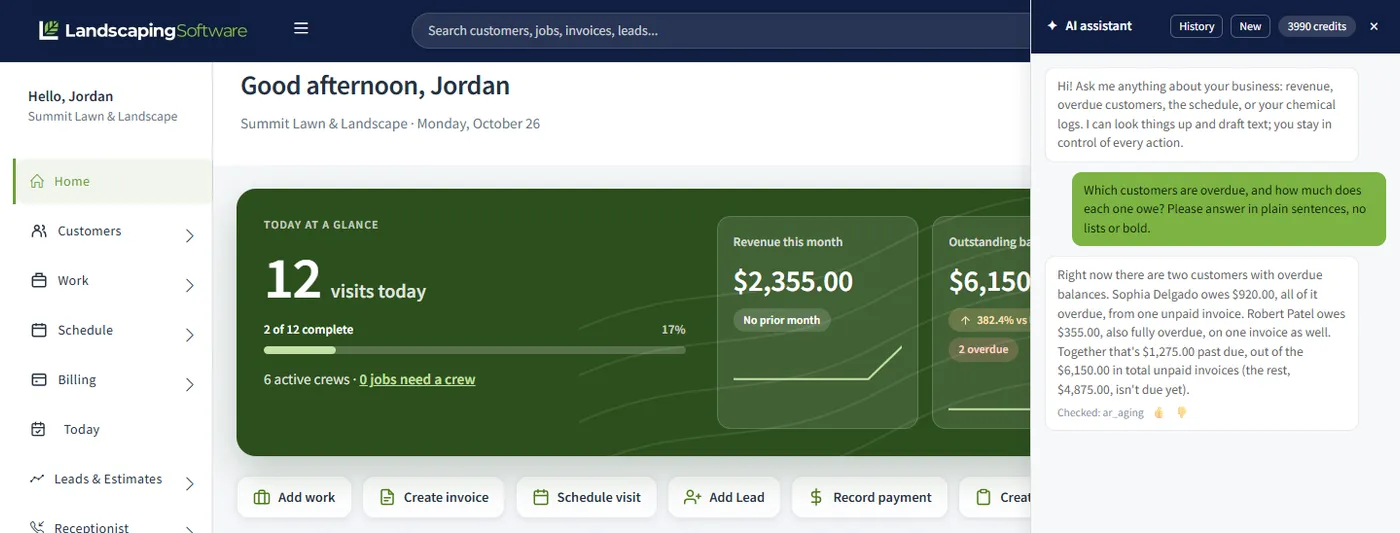
Open the assistant from the spark icon in the top bar and ask about your business in plain language: revenue, overdue customers, the schedule, your chemical logs. It looks the answer up in your own records and tells you what it found.

It answers; it does not act. Nothing is sent, scheduled, billed, or changed because you asked it something. And the panel says what you should keep in mind: answers are drafts based on your data, so verify before acting.

Questions people start with

  • How much did we invoice this month?
  • Which customers are overdue?
  • What is on the schedule this week?
  • What chemical applications were logged this month?

Drafting

A first draft, never a sent message.

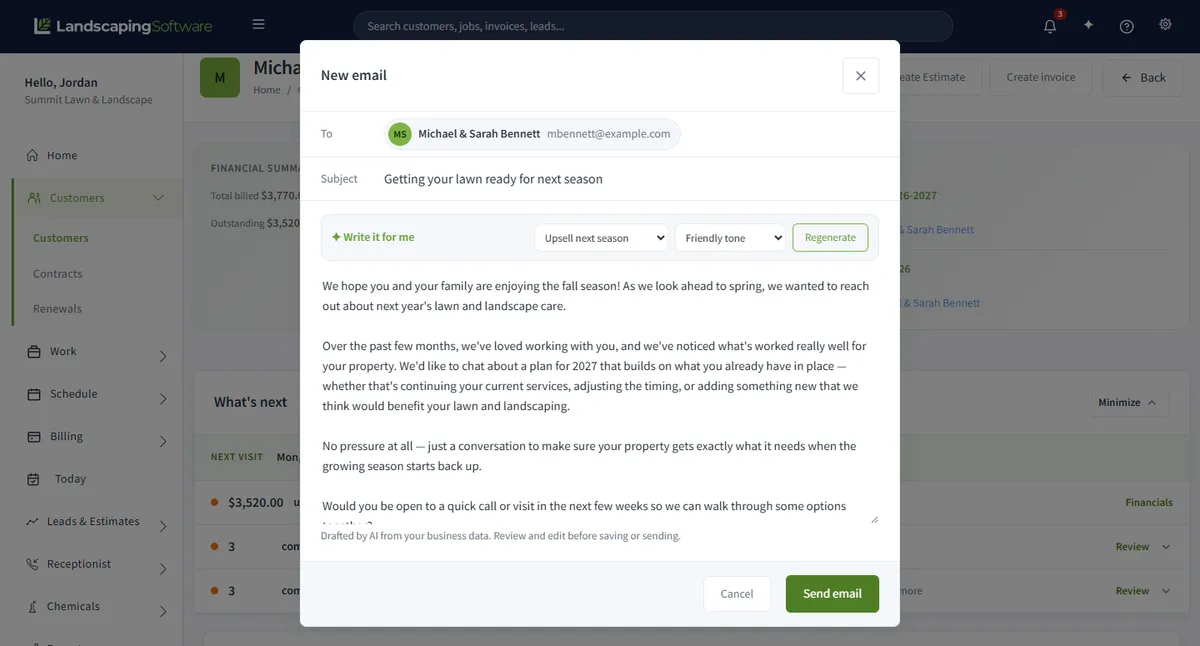
Look for the Draft with AI buttons. Each one writes a starting point and hands it to you. Read it, change what is wrong, and send it yourself. Pay particular attention to anything that reads like a commitment about timing, price, or warranty.

Estimate descriptions

The scope in plain words, ready to adjust.

Customer emails

A first draft for the message you keep putting off.

Review responses

A reply to a customer review, in a tone you can edit.

Customer summaries

A short read on one customer from the records.

Campaign emails

A first draft of the email for your next send.

Program suggestions

A starting point for a recurring service program.

Website page copy

Page text, section rewrites, and search tags.

Credits, plainly

A monthly allowance, and a page that shows where it went.

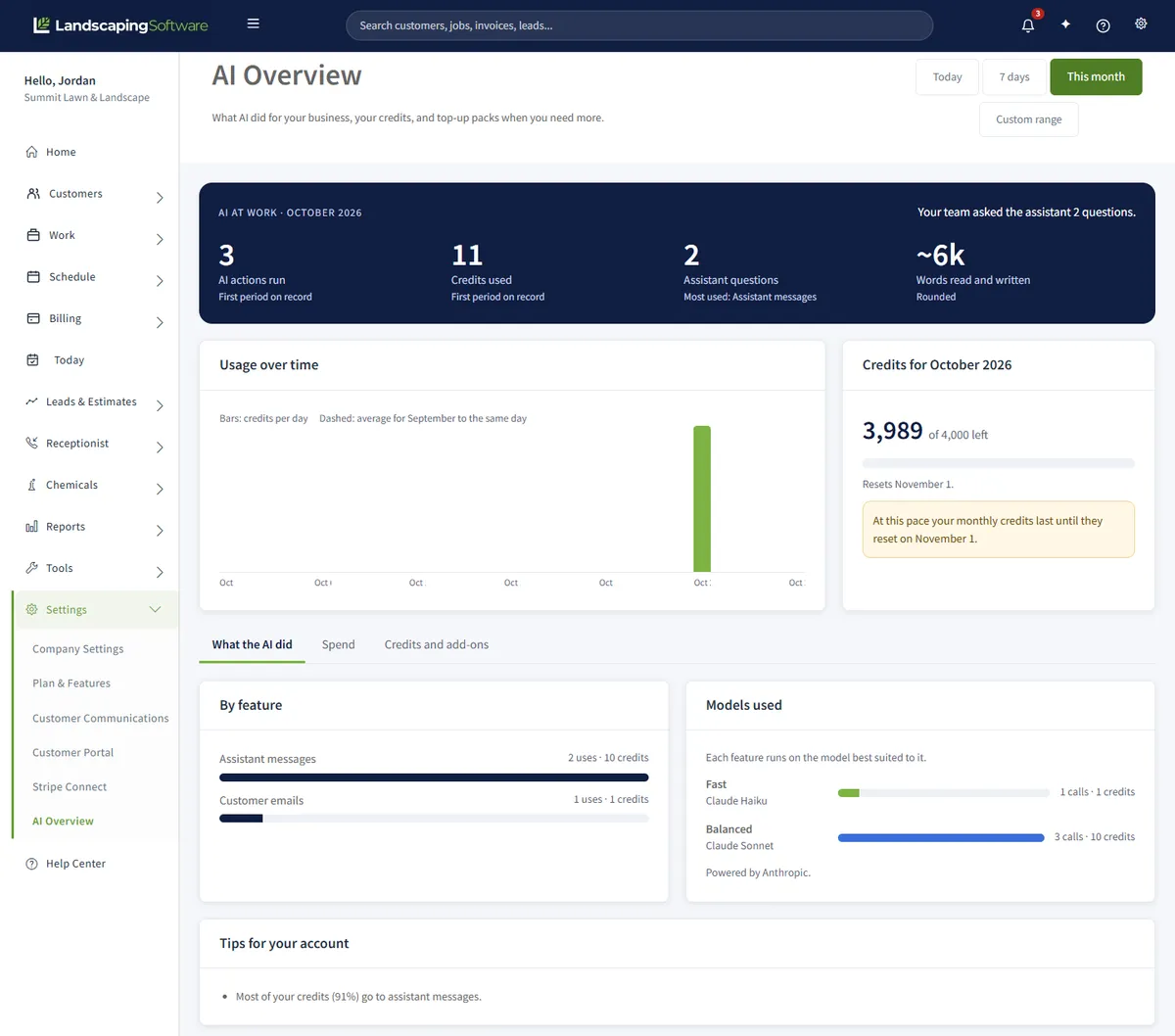
Questions and drafts spend credits from a monthly allowance that comes with your plan. The AI Usage page shows what is left, when it resets, what each kind of action costs, and where the credits went.

Starter

500

credits a month

Pro

1,500

credits a month

Scale

4,000

credits a month

What typical actions cost

  • 1 credita short draft: a customer email, an estimate description, a review reply, or search tags
  • 2 creditsa campaign email or a customer summary
  • 3 creditsa program suggestion, or rewriting one website section
  • 5 creditsan assistant question, or a blog post draft
  • 10 creditsa proposal packet draft, or rewriting a whole website page
  • 25 creditsa first draft of a whole website

AI receptionist calls do not use credits; that add-on is billed per conversation. The AI Usage page lists the exact cost of every action and is the source of truth, because prices can change.

Need more in a busy month? A top-up pack adds 500 credits for $10 or 1,500 for $25. Top-up credits never expire, and they are used only after your plan credits run out.

AI is included on every paid plan. It is not part of the 14-day free trial: it turns on when your paid subscription starts.

The AI Usage page showing monthly credits, usage by action, which model powers what, and the credit cost per action

What it will not do

Kept in its lane on purpose.

  • It does not send, schedule, bill, or change anything. It answers and drafts.
  • It does not give chemical dosing advice. The Dose Calculator does the label maths, deterministically.
  • It does not replace your judgment. Its answers are drafts based on your data, to be checked before you act.
  • It does not work during the free trial. It turns on with your paid subscription.

Works together

Drafting shows up where you already write

Website builder

First-draft page copy and search snippets for your site.

Not sure how far to trust AI in a trade business? Our guide, AI for landscaping businesses: what it can and cannot do, goes through where it helps and where it does not. The phone side is a separate add-on, the AI receptionist.

Questions

AI assistant FAQ

What can the AI assistant do?

It answers questions about your own business data, such as revenue, overdue customers, the schedule, and your chemical logs. You open it from the spark icon in the top bar and ask in plain language. It can also look things up and draft text for you.

Can it change anything in my account?

No. It answers; it does not act. Nothing is sent, scheduled, billed, or changed because you asked the assistant about it. You stay in control of every action.

Can I trust its answers?

Treat them as drafts. The assistant reads your records and can misread them, the same way a new office hire can. The panel itself says to verify before acting, so check anything that drives a decision against the real screen.

Does it give chemical or dosing advice?

No. For label rates and tank totals, use the Dose Calculator, which does the maths deterministically instead of generating it. The assistant is deliberately kept out of that job.

What does Draft with AI write?

Estimate descriptions, customer emails, review responses, customer summaries, campaign emails, program suggestions, and website page copy. Every draft is handed to you to read, edit, and approve. Nothing goes out on its own.

How do credits work?

Every paid plan includes a monthly credit allowance (500 on Starter, 1,500 on Pro, 4,000 on Scale). Both questions and drafts spend credits, and the AI Usage page shows where they went. If you run out, a top-up pack adds more: those credits never expire and are used only after your plan credits are gone.

Is AI included in the free trial?

No. AI turns on when your paid subscription starts. To start paying before the 14-day trial ends, use Subscribe now on the Plan & Features page.

Which plans include it?

Every paid plan. The only difference is the size of the monthly credit allowance.

Ask your books a question.

14-day free trial · No credit card required