Scheduling & Routing · Every plan

Route Optimization for Landscaping Crews

Load a crew’s day, set the depot, and let the optimizer put the stops in a sensible drive order. Adjust it with what you know, save it as a template, and never solve the same puzzle twice. Included on every plan.

Start your 14-day free trial Get in touch

14-day free trial · No credit card required

The problem

The efficient route is rarely the one in your head.

A route built from memory is built around the customers you remember first. Add a stop, lose a stop, or take on a new neighborhood, and the order that worked in April stops working in June. The cost is drive time that you pay a crew for and never bill. Our pricing guide works through a made-up example of the same crew, on the same paid day, costing $104.73 per billable hour on a dense route and $144.00 on a scattered one.

How it works

Six steps, and the last one pays for the rest.

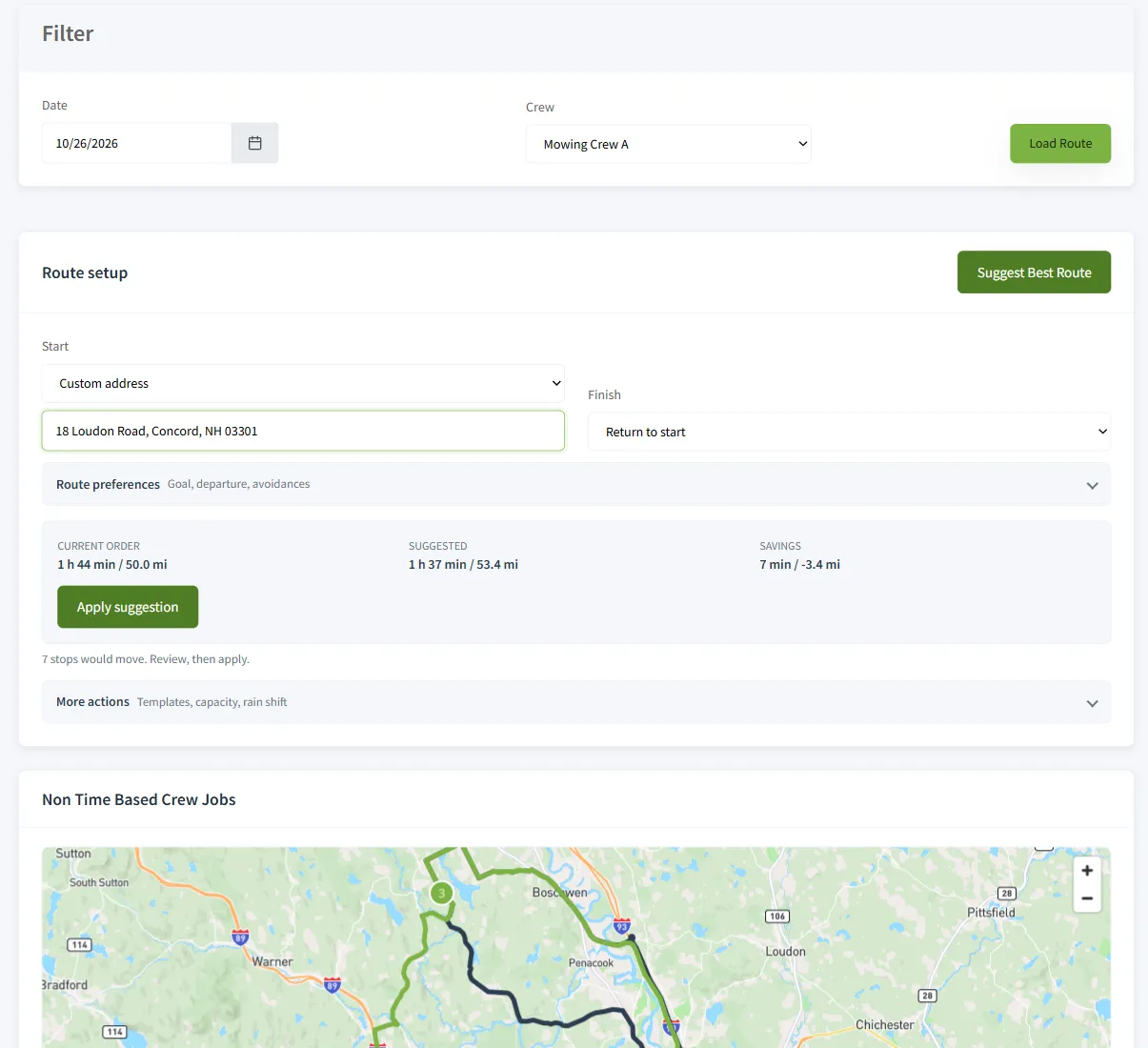
Route Management is the planner for route-style crews. You load a crew’s day, optimize it, tweak it, and save it. Every reorder, optimization, template apply, and batch shift is written to the schedule history, so you can see why a stop moved.

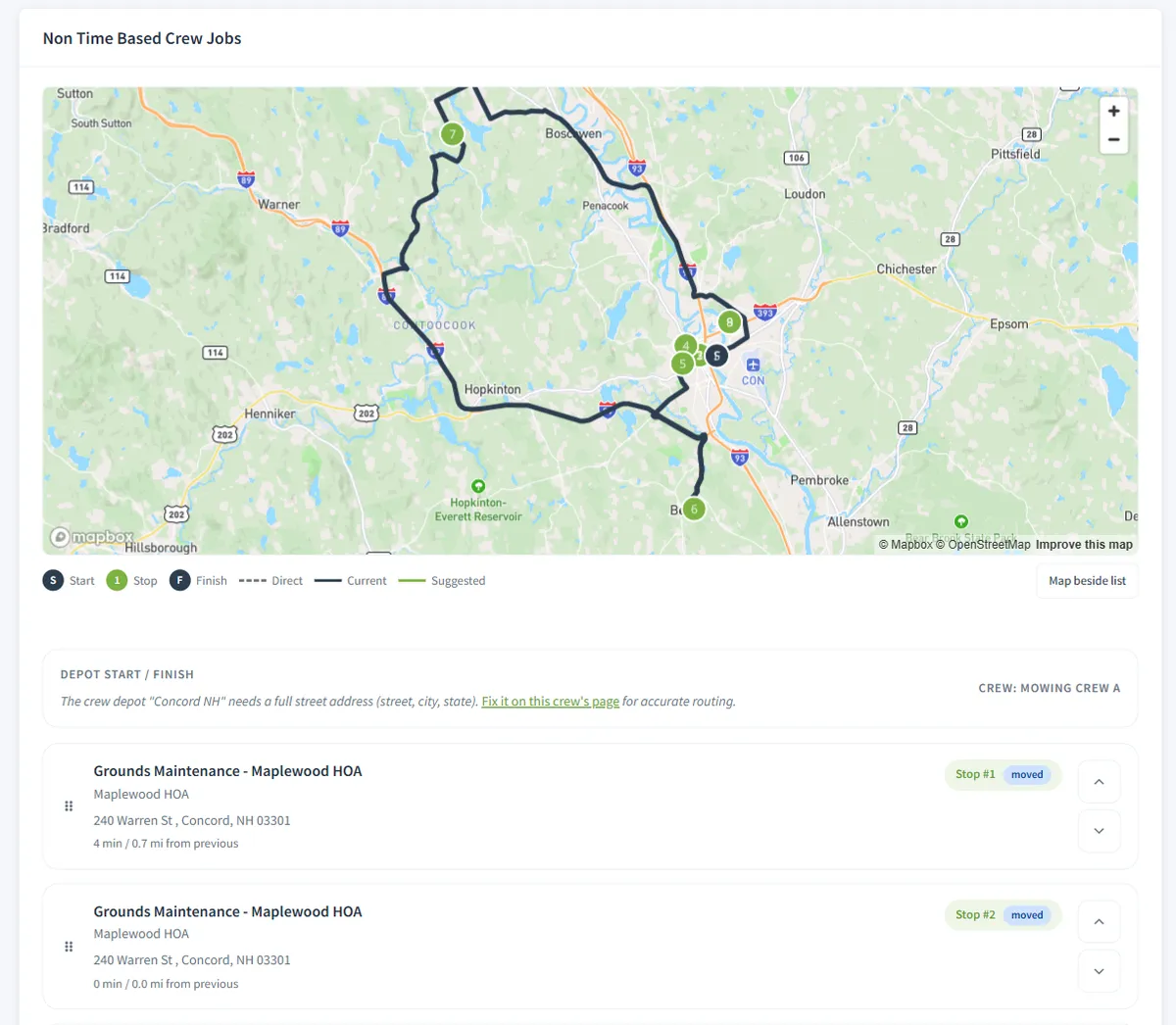
When the mapping service is configured for your account and the crew has a depot, the optimizer orders stops by real drive distance. If it is not available, you get a simpler fallback ordering, and the page says which one you got, so a rough guess never passes for a drive-distance route.

From depot to saved route

  1. 1

    Set the depot.

    On the crew’s page, enter the address the route starts and finishes at.

  2. 2

    Load the day.

    Pick the crew and the date on Route Management to see the stops in their current order.

  3. 3

    Click Optimize Route.

    Optionally untick the return-to-depot box if the crew ends the day at the last property.

  4. 4

    Read the result.

    The page says whether the order came from the mapping service or from the simpler fallback.

  5. 5

    Adjust it.

    Reorder any stop by hand. You know which customer has a dog, a gate code, or a school pickup.

  6. 6

    Memorize and save.

    Save the order as a template and click Save Route to lock it in.

Solve it once

Optimize once, then memorize.

Let the optimizer find the efficient loop, adjust it with local knowledge, then save it as a memorized route. On a later day, pick the template and click Apply Template: the stops rearrange to match, and any stop that was not in the template drops to the end for you to place. The route puzzle for a Tuesday gets solved once, and every week after that it is a template, a glance, and a save.

Does the day fit?

Check Capacity compares the route’s total estimated hours with the crew’s capacity and warns you when the day is over. It assumes an 8-hour crew day, which makes it a quick sanity check before you add another stop, not a payroll tool.

Rain day?

Rain / Delay Shift moves a batch of visits in one action instead of dragging each one. See scheduling and routing for how it fits with recurring visits.

Honest scope

What to know before you rely on it.

  • It plans the order of stops for route-style crews. Crews that run on clock times use the calendar.
  • It needs a depot address on the crew. Without one, it falls back to a simpler ordering.
  • Drive-distance optimization needs the mapping service configured for your account. The page tells you which method it used.
  • Check Capacity assumes an 8-hour crew day.
  • There is no live GPS tracking of trucks. The crew app sends statuses and photos back, not a moving dot.

Works together

The route is only the start of the day

Scheduling & routing

Route days and timed days on one scheduler, with recurring visits and rain-day shifts.

Crew mobile app

The crew sees the optimized day in order, with Map, Arrived, Job, and Complete on every stop.

All features

See how scheduling connects to billing, programs, and the customer record.

For the longer story, our guide to scheduling landscaping crews covers route days, recurring visits, and checking whether a day actually fits.

Questions

Route optimization FAQ

What is route optimization for a landscaping company?

It puts a crew’s stops for the day into an efficient drive order, so less of the paid day is spent driving between properties. You load a crew’s day, click Optimize Route, and the stops are reordered. You can still move any stop by hand afterwards.

Does it use real drive distances?

Yes, when the mapping service is configured for your account and the crew has a depot address. The page tells you when the route was optimized with the mapping service. When it is not available, the page uses a simpler fallback ordering and says so, so you always know which one you got.

What is the depot, and why does it matter?

The depot is the crew’s start and finish point, taken from the address on the crew’s own page. Without it the page shows a warning with a link to fix it, and the optimizer falls back to the simpler ordering. You can untick “Return crew to depot after final stop” if a crew ends its day at the last property.

Can I save a route and reuse it?

Yes. Memorize Route saves a favorite order as a reusable template, and Apply Template puts a future day’s stops into that order. Stops that were not in the template drop to the end of the list. Click Save Route to lock in exactly the order shown.

How does it know whether the day fits?

Check Capacity compares the route’s total estimated hours with the crew’s capacity and warns you if the day is over. The check assumes an 8-hour crew day, so treat it as a quick sanity check before you add a stop, not a payroll calculation.

Does it work for crews that run on clock times?

Route Management is the planner for route-style crews, the ones that work through an ordered list of stops rather than fixed appointment times. Crews that run on clock times use the calendar and the Daily Dispatch view instead.

Does it track my trucks live?

No. There is no live GPS tracking of trucks. Route optimization decides the order of the stops. The crew app shows the crew their day in that order and sends statuses and photos back to the office.

Which plans include it?

Scheduling, routes, and route memorization are part of the core product on every plan.

Stop paying crews to drive in circles.

14-day free trial · No credit card required