Estimates & proposals · Included on every plan

Landscaping Estimating and Proposal Software for Lawn Care and Landscape Companies

Landscaping estimating software is the part of your business software that prices a job from your own products and services, puts a proposal in front of the customer and records what they agreed to. Ours builds the estimate from your catalog, lets the customer choose options and e-sign in your portal, collects the deposit in the same step, and turns the accepted estimate into a job with nothing retyped. Included on every plan.

Start your 14-day free trial Get in touch

14-day free trial · No credit card required

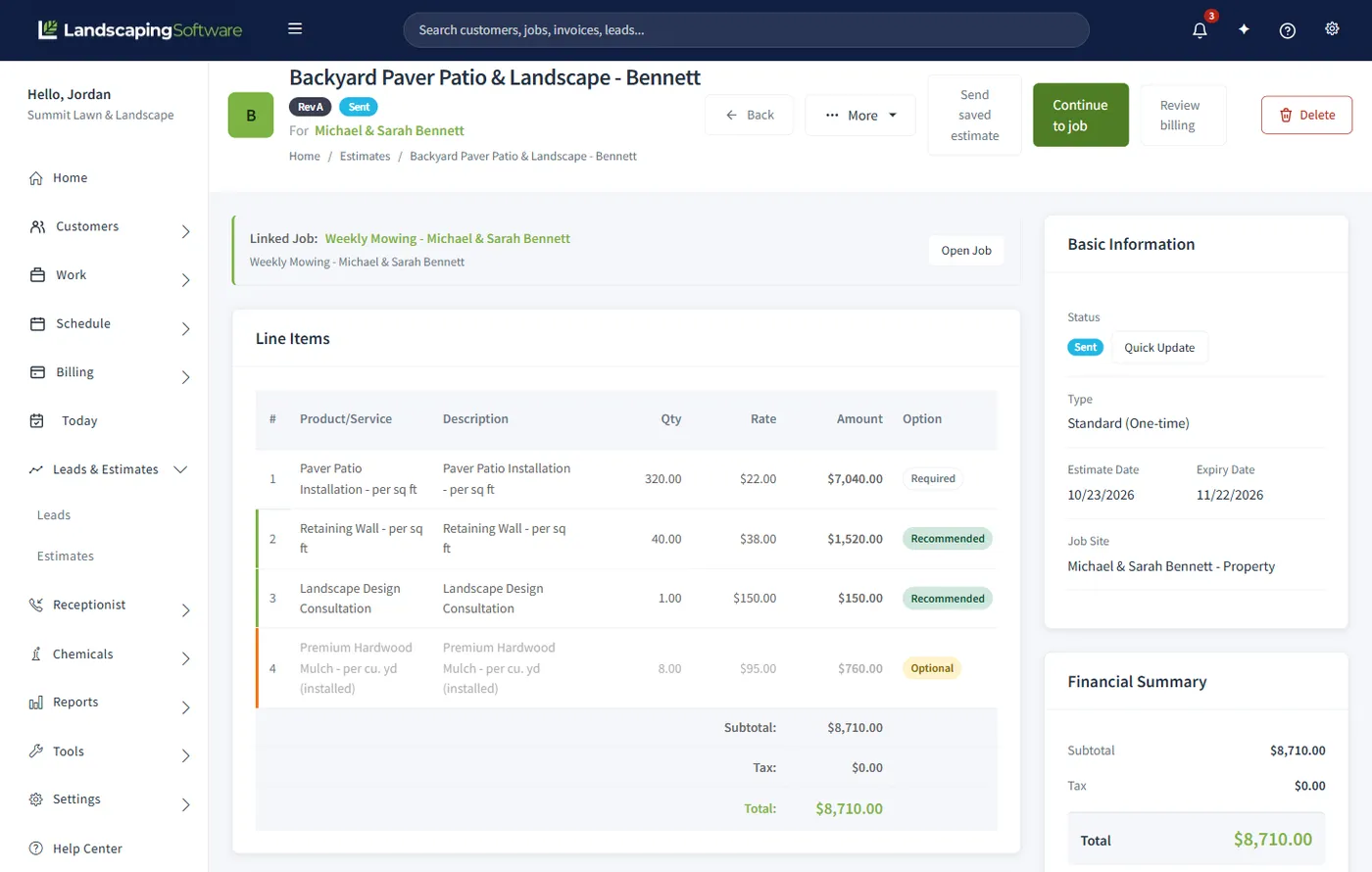
Estimate for a backyard paver patio with line items marked Required, Recommended and Optional, the subtotal, tax and total, and a financial summary

The problem

The quote gets typed at night, and then it waits.

You walked the property at four. At nine you are at the kitchen table typing the same mowing line you typed last week, guessing the square footage, and sending one number with a shrug. The customer has nothing to compare it to but the cheapest quote they got, so the conversation is about your price instead of the work. Then it sits in an inbox and nobody follows up, and the ones that did say yes get typed again into a job and again into an invoice.

How it works

From lead to signed job in six steps.

Every estimate lands in the same Estimates list with a status badge: Draft, Sent, Viewed, Accepted, Declined or Expired. Chips filter it to Open, Expiring soon, To convert, and the rest.

  1. 1

    A lead comes in

    A call, a website form, a referral. Add the lead with a name; the rest can wait. The pipeline runs New, Contacted, Estimate Sent, Won, Lost, and the Leads list counts each lead’s estimates, so the one you talked to and never quoted stands out.

  2. 2

    Build the estimate from your price list

    Standard for a one-time project, Service for recurring maintenance. Add a line, pick a product or service from your catalog and its unit price fills the rate. Type a free-text line when there is no catalog item.

  3. 3

    Mark the options

    Every line is Required, Recommended or Optional. Required is the core scope. The rest are the customer’s to choose in the portal, and you decide which start ticked.

  4. 4

    Set the deposit and send it

    No deposit, Requested, or Required to accept, as a percent or a fixed amount, pre-filled from your company defaults. Send saved estimate emails the branded PDF, or move the status past Draft and it appears in the customer’s portal.

  5. 5

    The customer approves and pays the deposit

    In the portal they tick the options they want, type their name to e-sign and approve. A Required deposit is paid in the same step. The estimate flips to Accepted on its own and locks, and you get an activity record and an email.

  6. 6

    Convert it to a job

    Convert to Job copies the name, description, billing mode and season into a new job with the lines the customer included. Schedule it, invoice it, and apply the deposit on file to the invoice.

Options proposals

Change the question from “how much?” to “which one?”

An options proposal is an estimate where some lines are the customer’s to choose. The core scope stays Required. The seating wall, the lighting, the second application are Recommended or Optional, and the customer ticks the ones they want in the portal. They are no longer deciding whether to buy from you; they are deciding what to buy from you.

The total you see, and the total on the PDF, is the as-proposed selection: Required lines plus whatever starts ticked. If the customer unticks an option before signing, the accepted total drops, and a percent deposit scales down with it.

When they sign, the system keeps a signed snapshot: every line, including the ones they declined, marked Included or Declined; the accepted total beside the proposed total; the typed name, the date and time, and the IP address. The estimate locks, because it is now a contract record, and Convert to Job builds the job from the included lines alone.

The three kinds of line

  1. 1

    Required

    Always in the proposal. The customer cannot remove it; it shows a locked Always chip instead of a switch.

  2. 2

    Recommended

    A customer-selectable add-on that starts ticked. The customer opts out rather than in. Green marker on the row.

  3. 3

    Optional

    A customer-selectable add-on. You choose whether it starts ticked. Amber marker on the row.

An Include switch beside each Recommended or Optional line sets what the customer sees ticked. Lead with Recommended: the customer opts out rather than in.

Proposal packets

For the jobs where a price sheet is not enough.

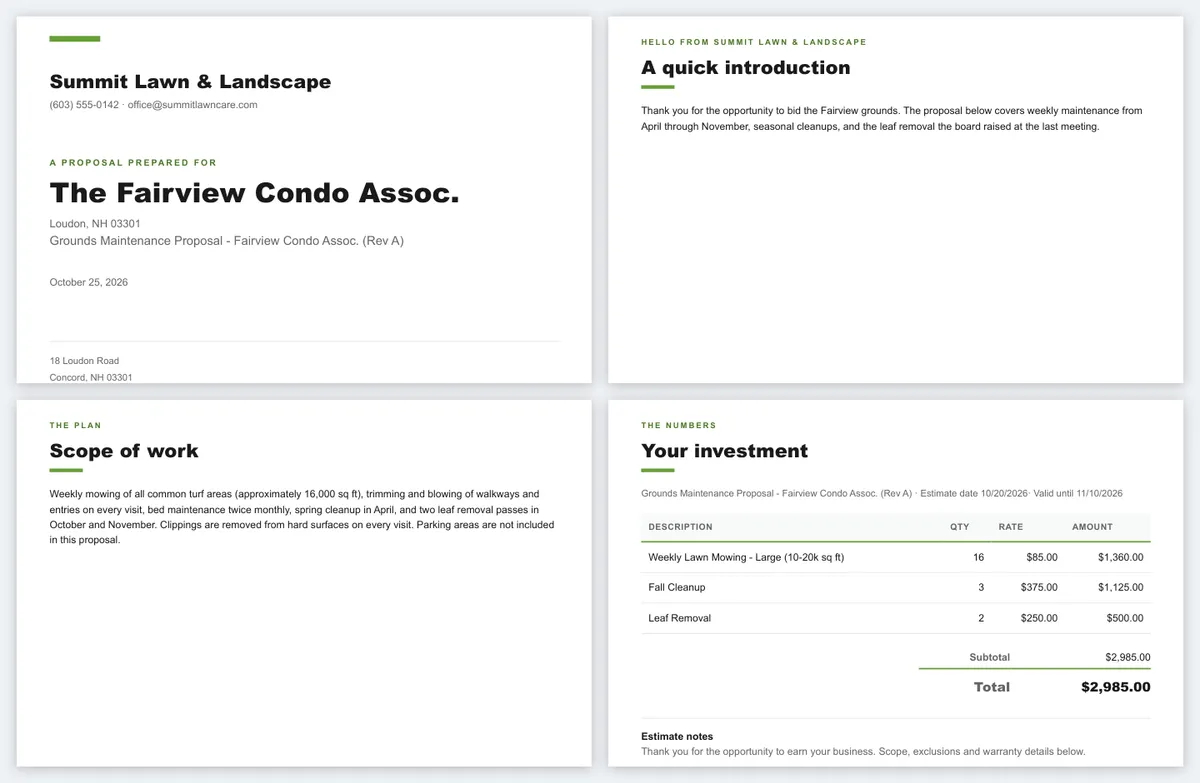
An estimate is a price. A proposal packet is the document you send when the price alone will not win it: commercial maintenance, an HOA contract, a large install. It opens from the estimate’s More menu and wraps the numbers in a cover letter, who you are, the scope in the customer’s language, your terms, photographs of work you have done, and the property map, as one branded PDF. Built from the estimate, so the numbers are never retyped.

The guided setup walks five steps, cover letter to review and create, with a Use this example button at every text step. The document editor is for when you would rather write straight into it. Start in one and finish in the other.

Where the AI helps write a section, the builder asks you to review the draft before it goes anywhere. It writes words, not prices. Read anything that sounds like a promise about timing, price or warranty before it leaves the building.

What goes in the packet

Saved templates
Save any section under a name you choose and drop it into the next packet. About us and terms almost never change, so write them once. The cover letter is the section worth writing fresh.
Photos
Add photos pulls from work you have done for this customer, or from all past work. On a commercial bid, photographs of comparable work do more than another paragraph.
The property map
If the job site has one, the packet can include it as an image, so what is maintained and what is not is a picture instead of an argument.
Classic or Modern
Two layouts, same content. Classic reads as more formal, Modern as more visual. Pick one, then Download PDF.
Four pages of a proposal packet: a branded cover, an introduction letter, the scope of work and an investment table with the total

Approval, signatures and deposits

They sign and pay the deposit at nine on a Sunday.

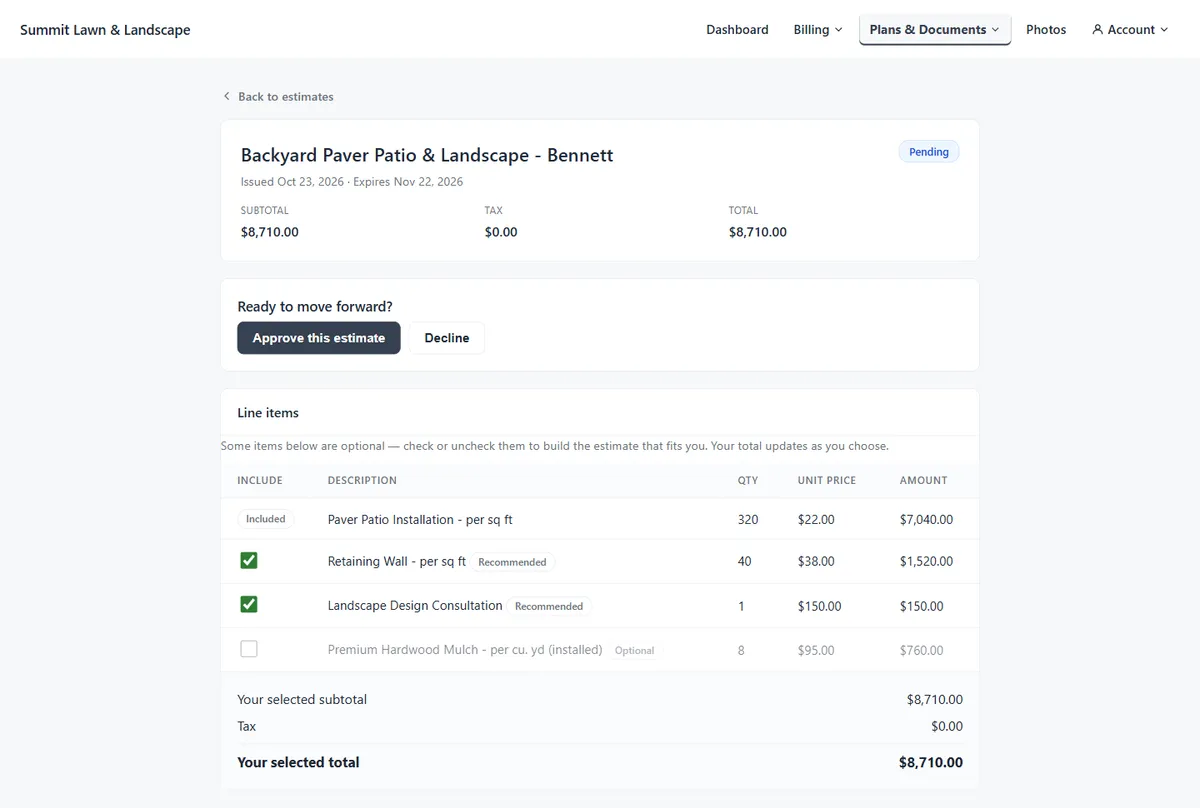
Once an estimate is linked to a customer and past Draft, it is in their portal, under your logo and colors. They open it, tick the options they want, type their name to e-sign, and approve or decline. The status flips on its own. You get an activity record, an email if yours is set up, and the estimate waits under the To convert chip and on the dashboard until you turn it into a job. A decline comes back with the reason, if they gave one.

Deposits start on the estimate: No deposit, Requested, or Required to accept, as a percent of the accepted total or a fixed amount. Company defaults pre-fill every new estimate, and you override per estimate. The PDF states the deposit in words.

With Requested, the customer signs, the acceptance completes, and the confirmation page offers the deposit to pay or skip. With Required, they sign and go straight to the payment page, and the acceptance is not final until the payment succeeds; until then the estimate reads Signed, awaiting deposit. A paid deposit becomes credit on the customer’s account until you apply it from the invoice’s Customer deposit on file card. Online deposits run through your own Stripe account, and a refund made there is recorded here on its own.

What the Accepted selections card shows

  • Who signed and when, in your company time zone.
  • The accepted total beside the proposed total, when the customer dropped options.
  • Every line marked Included or Declined.
  • Deposit status: requested or required, paid or unpaid, with the date.
  • A note that converting copies the included lines, and a Void acceptance link.

Use Required to accept for work you want skin in the game on before a crew day is held for it. Use Requested when you would like a deposit but not the friction.

The customer's view of the estimate in the portal, with Approve this estimate and Decline buttons and checkboxes to include or skip the recommended and optional lines while the selected total updates

Estimate to job to invoice

The thing you quoted is the thing you invoice.

An accepted estimate is not scheduled work until it is a job, and the conversion is one click. Convert to Job carries the name, description, billing mode and season into a new job with every line as quoted, free-text lines and fractional quantities included, and links the two. If the customer has no job site, one is created from their address. If the estimate is still on a lead, Create customer and continue makes the customer and brings you back.

From there the job goes to scheduling and routing like any other, and it bills by the mode the estimate set: Per-Visit invoices each completed visit, Monthly Fixed invoices at the start of each month from the accepted estimate. See invoicing and payments. Review billing on the estimate opens the job’s Financials tab, where the deposit on file waits to be applied.

Every create, edit and delete is kept in an audit trail with who did it. Revise with a new version, not a silent edit: bump A to B and write the change in the change log.

Two kinds of estimate

Standard: one-time or project
A patio, a cleanup, a planting. Lines, options, a deposit, a date and an expiry.
Service: recurring maintenance
Adds frequency, billing mode (Per-Visit, Monthly Fixed or Seasonal Prepay), a route intent note and a season that fills the start and end dates. All of it rides into the job.
Both carry
Client notes that print on the PDF, crew notes that stay internal, a version letter and a change log. The expiry defaults to 30 days out.

Measuring and pricing

Price from a number, not a windshield guess.

Your Products & Services catalog is the price list every estimate draws from. Each item is a Service or a Product, with a unit price, an optional unit cost, a Priced per basis and a Taxable switch. Picking it on an estimate fills the rate, which you can override on that line. Sales tax calculates on its own when your company charges it, the customer is not tax-exempt and the item is taxable. A discount is its own line with a negative price. Lines copy the price when added, so you can raise a catalog price for next season without disturbing quotes already out.

With property maps, the quantity fills itself in. Trace the job site once for turf, beds, edging and boundary. Set a product to auto-measure from one of those, and every estimate for that site reads the measurement and divides it by the Priced per basis: 12,000 square feet of turf is 12 on a Per 1,000 sq ft line and 0.28 on a Per acre line. A Per hour product uses a production rate, so the same lawn at 8,000 square feet an hour is 1.5 hours. Any quantity cell has a Measure button, the number never locks, and two estimators quoting the same property get the same number. Property maps are on Professional and up.

Set a product up once

Worked examples of measurement-priced products
Product Priced per Reads
Fertilizer application Per 1,000 sq ft Turf
Mulch install Per sq ft Beds
Edging Per linear ft Edging lines
Spring cleanup Per hour, 8,000 sq ft/hr Turf

Next season the map is still there. Change the rate, not the takeoff.

By trade

Estimating for every kind of landscape work.

Lawn care and mowing contracts

A Service estimate carries the frequency (weekly, bi-weekly, monthly, quarterly or yearly), the billing mode (Per-Visit, Monthly Fixed or Seasonal Prepay), a route intent note and the season. The job inherits the billing mode, so the weekly cut you quoted per visit bills per visit without anyone setting it again.

Fertilization and plant health programs

Set the application up once as Per 1,000 sq ft reading the turf measurement, and every estimate for a mapped site fills its own quantity. When a customer asks why the line went up, the answer is a square-foot number and a rate. Measurement pricing needs property maps, on Professional and up.

Hardscape and installs with deposits

A Standard estimate with the patio as Required and the lighting and seating wall as Recommended. Set the deposit to Required to accept, and the customer signs and pays before the job exists. Back it with a proposal packet carrying photographs of comparable work and the property map.

Snow and ice

A seasonal plowing contract is a Service estimate on Seasonal Prepay or Per-Visit, with an expiry date so last winter’s price cannot be accepted in January. Version B with a change log when the salt price moves, and the customer approves the new one in the portal.

Bidding a commercial maintenance contract? Read how to bid commercial landscape maintenance contracts before you open the packet builder.

Compared

Word processor vs generic quoting app vs landscaping estimating software.

Three ways a landscaping company gets a quote out the door.

Comparison table
Question Word processor or spreadsheet Generic quoting app LandscapingSoftware estimating
Where the prices come from Whatever you type, from memory or last year’s file. A product list you maintain in the app; varies. Your Products & Services catalog, the same list your jobs and invoices use.
Quantities Typed, usually guessed. Typed. Typed, or filled from the property map’s turf, bed and edging measurements.
Options for the customer Two or three separate documents. Sometimes optional lines; varies. Required, Recommended and Optional lines on one estimate, chosen in the portal and recorded in the signed snapshot.
How the customer accepts A reply email or a phone call, if they remember. Often an online approval; varies. E-signed in your branded portal, with the deposit paid in the same step.
After they say yes You retype it into a schedule and later an invoice. Usually an export or a retype into whatever runs the schedule. Convert to Job, with the included lines, billing mode and season carried over.
Cost Usually free or part of an office suite. A separate subscription; varies. Included on every plan, from $99 a month.

A word processor still makes sense at a handful of quotes a month, and our free landscaping estimate template is built for it.

What it will not do

Nothing is priced, sent or scheduled without you.

No part of this prices a job for you. The rates are yours, from your catalog; the quantities are yours, typed or read from a map you drew; the AI in the packet builder drafts a cover letter for you to read, never a number. An estimate reaches a customer when you send it or move it past Draft, and an accepted estimate becomes scheduled work when you convert it.

Also on purpose

  • Approval does not create a job. You convert on purpose, after reading the Accepted selections card.
  • Accepting an estimate in the office never collects the deposit. The app warns you; cancel and send it if you want the deposit paid online.
  • A portal-signed estimate is locked. To edit it, void the acceptance, which discards the signature, and send it again.
  • A proposal packet is a document. It does not change the estimate, its lines or its status.
  • Raising a catalog price does not rewrite estimates already sent. Lines keep the rate they had when added.
  • An expired estimate cannot be signed in the portal. Set the expiry date on purpose.
  • If a deposit cannot be collected at acceptance, say online payments are off, the customer may accept without it and your notification says so.

Pricing

Estimating and proposals are on every plan.

There is no estimating add-on. Everything on this page comes with Essential, except measurement-based pricing, which needs property maps on Professional and up.

Plans, prices and the estimating each includes
Plan Price Estimating included
Essential $99 a month Leads; Standard and Service estimates from your catalog; Required, Recommended and Optional lines; proposal packets; portal approval with e-signature and deposits; Convert to Job.
Professional $229 a month Everything in Essential, plus property maps, so estimate quantities fill from the site’s measurements.
Premier $399 a month Everything in Professional, plus visual report dashboards.

Online deposits need online payments turned on and your own Stripe account connected. Deposit terms can be saved on an estimate before that; they are collected once it is.

Works together

From quote to signed to scheduled

Property maps

Trace the site once and estimate quantities fill in from the measurement.

Customer portal

Where the customer picks options, e-signs and pays the deposit.

Invoicing & payments

The job bills by the mode the estimate set; the deposit is applied to the invoice.

Still quoting by hand? Download the free landscaping estimate template, and read how to bid commercial landscape maintenance contracts when the job is bigger than a lawn. The estimate came from a lead in the CRM. The help center has the step by step: leads, creating an estimate, managing estimates, options proposals, proposal packets, deposits, approval in the portal, converting an estimate to a job, the products and services catalog and pricing from measurements.

Questions

Landscaping estimating and proposal FAQ

What is landscaping estimating software?

Software that prices a landscaping or lawn care job from your own products and services, puts a proposal in front of the customer, records their acceptance and hands the work on to scheduling and billing. Here the estimate is built from your catalog, e-signed in your customer portal, and converted into a job with its lines intact.

What is an options proposal?

An estimate where some lines are the customer’s to choose. Each line is Required, Recommended or Optional; the customer ticks what they want in the portal and e-signs. The signed snapshot records every line as Included or Declined, the accepted total beside the proposed total, and who signed when.

How does the customer approve an estimate?

In your customer portal. Once the estimate is linked to their customer record and past Draft, they open it, tick any options, type their name to e-sign, and approve or decline. The status flips on its own, and a decline reason is recorded if they give one.

Can I take a deposit when they accept?

Yes. Set it on the estimate as a percent of the accepted total or a fixed amount, Requested or Required to accept. A Required deposit is paid as part of approving in the portal, and the acceptance is not final until the payment succeeds. The paid deposit sits on the customer’s account as credit until you apply it to an invoice. Deposits need online payments and Stripe set up.

What is a proposal packet?

The document you send when the price alone will not win the job: a cover letter, who your company is, the scope in plain language, your terms, photographs of past work and the property map, as one branded PDF in a Classic or Modern layout. It is built from the estimate, so the numbers are never retyped.

Do I have to write the proposal from scratch each time?

No. Any section can be saved as a template and dropped into the next packet. About us and terms rarely change, so write them once. The guided setup offers an example at every text step, and the AI draft writes a section for you to review before it goes anywhere.

Does the AI price the job?

No. The AI draft in the proposal builder writes words for a section such as the cover letter and asks you to review them. Prices come from your catalog and the quantities you or the property map put on the estimate.

Where do the prices come from?

Your Products & Services catalog. Each item has a unit price, an optional unit cost, a Priced per basis such as Each, Per 1,000 sq ft or Per hour, and a Taxable switch. Picking it on an estimate fills the rate, which you can override on that line. Sales tax calculates on its own when your company charges it and the customer is not tax-exempt.

Can the estimate measure the property?

If the job site has a property map, yes. A product set to auto-measure reads the turf, bed, edging or boundary measurement and fills its own quantity, divided by its Priced per basis. Per-hour products use a production rate. Quantities stay editable. Property maps are on Professional and up.

What happens after the customer says yes?

The accepted estimate waits under the To convert chip and on the dashboard until you click Convert to Job. The job gets the estimate’s name, description, billing mode, season and the included lines, and the two stay linked. Then you schedule it, invoice it, and apply the deposit on file.

Can I revise an estimate after sending it?

Yes, until the customer signs it. Bump the Version from A to B, note the change in the change log, and send again. Once e-signed in the portal the estimate is locked; void the acceptance to edit it, which discards their signature.

Which plans include estimating?

Every plan. Leads, estimates, options proposals, proposal packets, portal approval with e-signature and deposits, and Convert to Job are all in Essential at $99 a month. Measurement-based pricing needs property maps, which start on Professional.

Give them something to choose, not something to refuse.

14-day free trial · No credit card required