Invoicing & payments
The invoices the portal collects, created from completed visits, months, rounds or jobs.
Customer portal · Included on every plan
A customer portal is a website where your customers sign in to see their invoices, pay online, approve estimates and view the documents and photos you have shared with them. Ours carries your logo and colors, takes card and bank payments through your own Stripe account with no platform fee, and is included on every plan.
The problem
You finished the work. Now the invoice is in a mailbox somewhere, the check is coming back by the same route, and the office is answering emails about what someone owes. The patio estimate is waiting on a yes that will arrive by phone, after three rounds of voicemail, and get typed in as Accepted with nothing signed.
How it works
The portal is off until you enable it, and no customer sees it until you invite them.
Settings, Customer Portal. Type a short slug or let one be generated from your company name, then flip Enable the customer portal on. Plan about 15 minutes for the whole setup.
Upload your logo (PNG, JPG or WebP) and a favicon (PNG), set your primary color and write the login page text. A live preview updates as you type. Do this before you invite anyone.
Sign in to an existing Stripe account or create one. When Charges enabled and Payouts enabled both show green, turn on Allow online payment and choose cards, ACH, or both.
Toggle Invoices, Payment history, Estimates, Documents, Service plans and the rest. A section you turn off disappears from the menu and the page itself.
On the customer record, turn on Portal access enabled and click Send Temporary Password. The customer sets a password of their own on first sign-in.
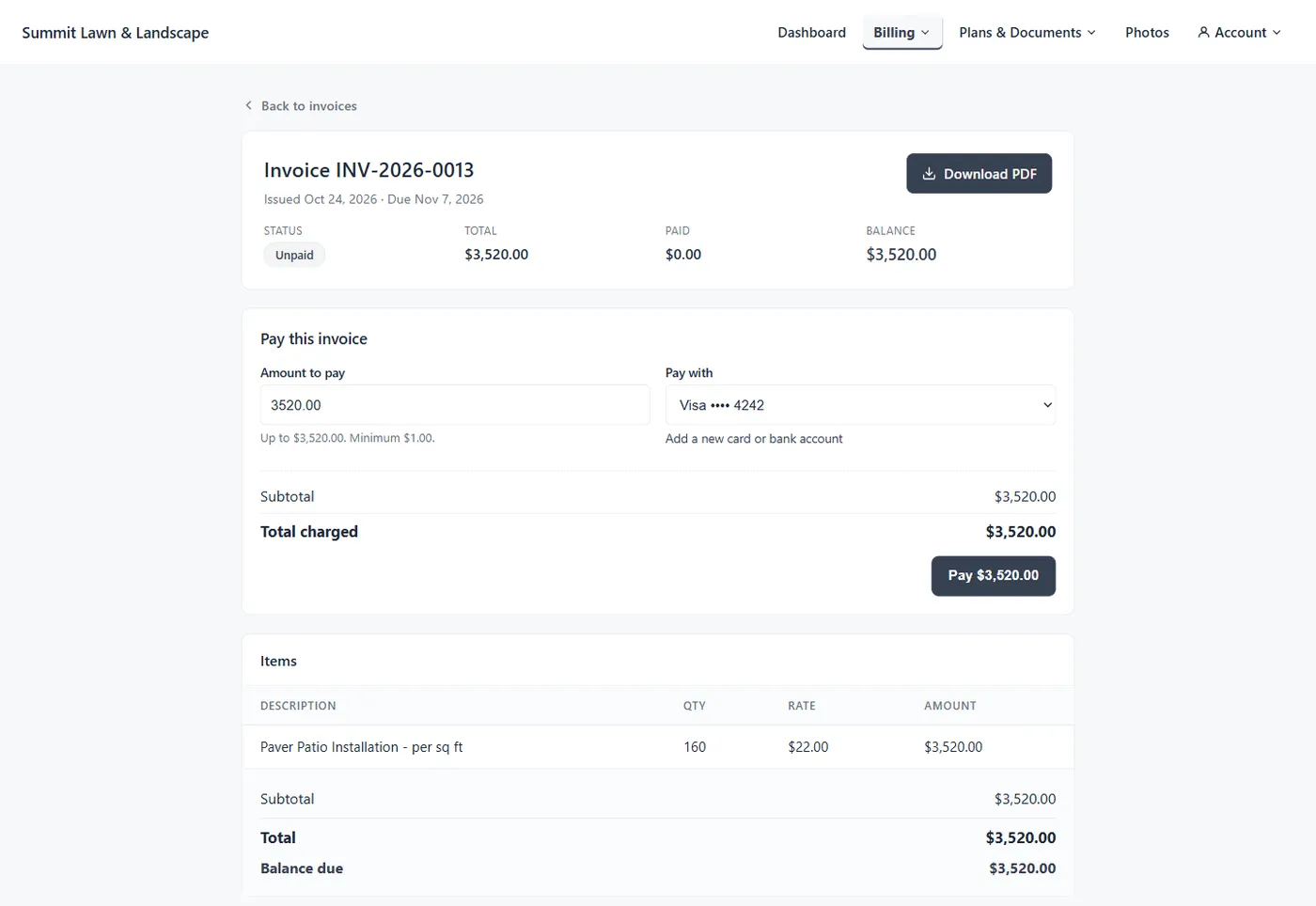
The customer opens an invoice, clicks Pay, picks a saved card or bank account or adds one, and pays in full or in part. The payment records itself on your list with an Online badge.
They e-sign estimates, pay a deposit if you require one, download statements and open the documents and photos you flagged. Each action lands in your Customer Activity inbox.
What your customers can do
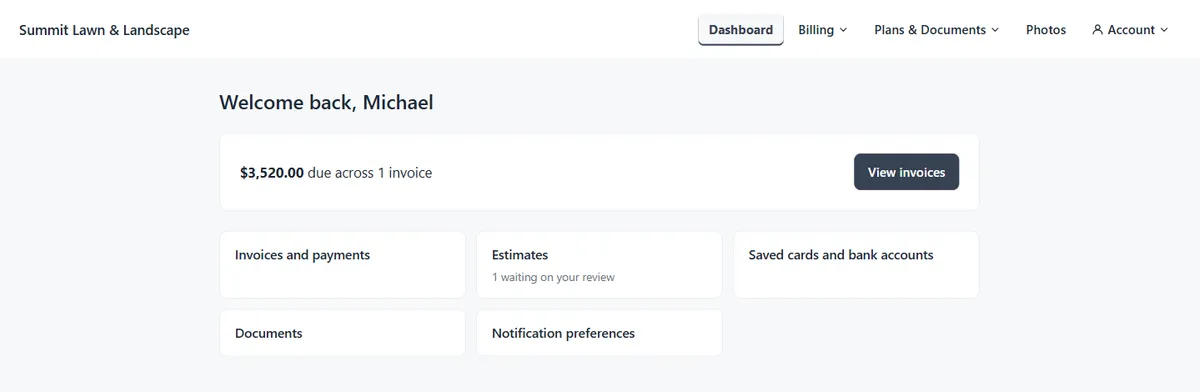
You choose which sections customers see, section by section. Invoices, Payments, Payment Methods and Statement share a Billing menu; Estimates, Service Plans and Documents share a Plans & Documents menu. Turn a section off and both the menu item and the page are gone.
The portal is mobile-friendly, and most customers open it on a phone, where they can add it to their home screen under your company name.
Getting paid
Online bill pay for your lawn care customers runs on Stripe Connect Standard: your own full Stripe account, payouts to your bank, and refunds, disputes and tax reports in your own Stripe Dashboard. We do not hold your money and take no platform fee; every dollar a customer pays, less Stripe’s own processing fee, lands in your account.
Accept credit and debit cards, US bank accounts (ACH), or both, with a minimum online payment that defaults to $1.00. Customers pay the full balance or part of it, and can save a card or link a bank through Stripe’s instant verification for next time. ACH has lower fees, which matters on larger invoices.
On Stripe’s default schedule, card money arrives about 2 business days after the charge clears and ACH 5 to 7 business days after authorization. A bank payment shows as submitted right away and takes up to 4 business days to clear; until then the customer can pay the rest of the balance but not the amount already on its way.
Turn on Charge customer the processing fee for card payments, ACH or both. The fee is grossed up so you net the full invoice, and the customer sees it broken out at checkout with disclosure text you can edit.
Stripe’s default US rates; you net the full amount each time. Surcharging credit cards is restricted or prohibited in several US states and subject to card-network rules; confirming it is legal where your customers are is your responsibility.
Estimates, approvals and deposits
With Estimates on, a customer sees every estimate you have sent them (drafts stay hidden), opens one, chooses any Recommended or Optional add-ons, types their name to e-sign, and approves or declines, with a reason if they give one.
The moment they sign, the estimate in your app flips to Accepted and locks. An Accepted selections card shows who signed, when, the accepted total against the proposed one, each line marked Included or Declined, and the deposit status. It waits under the To convert chip until you click Convert to Job, which builds the job from the lines the customer included; approval never creates a job on its own. To change a signed estimate, Void acceptance unlocks it for a fresh signature, unless it is already a job or the deposit is paid.
Deposit terms are pre-filled from the defaults you set once and can be overridden per estimate: a percent of the accepted total (tax included) or a fixed amount. A percentage scales down if the customer drops optional lines.
A paid deposit becomes credit on account, shown beside the customer’s balance in your app and in their portal, and a Customer deposit on file card applies it to the invoice with one click. Accepting an estimate in the office skips the deposit; only a customer accepting in the portal, or signing on site in the crew app, pays it.
Statements, documents and photos
A customer can download a PDF of any invoice, and a printable statement of invoices, payments and balance for any date range, which ends the “what do I owe for the year?” call before it starts. With Service Plans on, they also see their plan, its term and its renewal date.
Documents are shared one at a time with a Show in portal checkbox, today on single-customer mail merge runs. The customer’s Portal docs tab shows what they can see, when they first viewed each document and how many times, with a Revoke button per document; revoking hides it immediately and never deletes the file.
Crew photos stay private until you click Share with customer on a job’s photo page, and Stop sharing pulls one back. Shared photos appear in the Photos section and, if you have turned it on, in the work-completed email.
Your brand
Upload your logo and a favicon and pick your colors, and the customer-facing surfaces show your brand: the header on every portal page, the browser tab and home-screen icon, the login page, and the emails and receipts the portal sends. There is no “powered by” text. Until you upload them, the header shows your company name as plain text and the browser tab shows a default icon rather than yours, so upload both before you invite anyone.
A live preview of the login page updates as you type. Your support email and phone show in portal footers and on receipts, and you can add your own Terms and Privacy Policy links. Logos are PNG, JPG or WebP and SVG is rejected, colors are hex values only, and login page text is plain text. Branding is set once for the company; access is granted customer by customer.
On a phone, the home-screen shortcut is named after your company and takes your favicon as its icon, or your logo if you have not uploaded a favicon.
What you see
The Customer Activity inbox is what your customers have been doing in the portal, newest first, from the bell in the top bar or the Customer Activity card on your Dashboard. Each line reads as a sentence: who did what, when. Filter to Unread, mark lines read, or clear the lot with Mark All Read.
Two matter most. Payment Failed is a customer who thinks they have paid and an invoice that is still open; nothing else in the product will tell you. Estimate Approved is a customer who has said yes and is waiting to be scheduled. A run of invitations with no First Login usually means your emails are landing in spam.
A customer pays an invoice in the portal.
A customer pays the deposit on an accepted proposal.
With the options they chose.
With their reason, where they gave one.
A card or bank payment was rejected.
A customer signs in for the very first time.
A customer opens a shared document for the first time.
The customer record’s Portal tab also shows Last invite sent and Last portal sign-in.
Security and privacy
Card numbers go from the customer’s browser straight to a Stripe-hosted form, which keeps you in the lowest-friction PCI category, SAQ-A.
No public sign-up. You issue a one-time temporary password; the customer sets their own on first sign-in. Forgot password? sends a single-use link good for 15 minutes.
A 15-minute cooldown slows password guessing while a real customer can still retry within the hour.
Every portal query filters by your company and the signed-in customer from the session cookie, never from a URL. A guessed link to someone else’s invoice returns 404 and is logged.
No upload routes exist in the portal, and your own logo uploads are checked by their bytes, with SVG rejected.
For each portal customer we store their email, a hash of their password, sign-in timestamps, and only the metadata of saved payment methods (card brand, last four and expiration, or bank name and last four). Full numbers stay with Stripe; we store no SSNs, government IDs or full bank account numbers. If something looks wrong, turn off one customer’s access or the whole portal, and sessions are revoked at the next request.
Compared
Three ways a landscaping company gets paid and gets a yes.
| Question | Paper invoices and checks | Generic payment link | LandscapingSoftware customer portal |
|---|---|---|---|
| Where the customer sees the invoice | In the mailbox, if they kept it. | Usually one link per invoice in an email; varies. | A signed-in portal with every invoice, what is paid and owed, and a PDF of each. |
| How they pay | A check in the mail, then a trip to the bank. | Card, sometimes bank; varies by provider. | Card or US bank account (ACH), in full or in part, with a saved method for next time. |
| What it costs you | Paper, postage and the time to chase it. | The provider’s rate, sometimes with a platform markup; varies. | Stripe’s processing fee through your own account, no platform fee, optional passthrough. |
| Estimate approval | A phone call or a signed sheet of paper. | Usually not part of it. | E-signed online with optional lines chosen, a deposit if you require one, and a timestamped record. |
| Cost | Supplies and office time. | Often a separate subscription or a per-payment fee; varies. | Included on every plan, from $99 a month. |
Paper still makes sense for the customer who prefers it. Access is per customer, so that one can stay on mailed invoices and checks while everyone else pays online.
What it will not do
The portal shows customers what you have shared and lets them pay and approve. It does not let them change your records, send you files or move your schedule, and it never puts a job on your calendar by itself.
Pricing
No portal add-on and no platform fee on payments. Everything on this page comes with Essential.
| Plan | Price | Customer portal |
|---|---|---|
| Essential | $99 a month | Included: branded portal, online card and bank payments, estimate e-signature and deposits, statements, documents and photos. |
| Professional | $229 a month | Included. Everything in Essential, plus programs, contracts and renewals in the rest of the product. |
| Premier | $399 a month | Included. Everything in Professional, plus visual report dashboards. |
14-day free trial · No credit card required. Payments run on your own Stripe account at Stripe’s standard processing rate.
Works together
The invoices the portal collects, created from completed visits, months, rounds or jobs.
The estimate a customer e-signs in the portal, with optional lines and deposit terms.
The customer record that holds portal access, the invite and the last sign-in.
See how the whole platform fits together, from the first call to the paid invoice.
The help center has the step by step: the portal overview, setting up the portal, inviting customers, payments and documents, how Stripe Connect works, branding and white-label, security and privacy, estimate approval in the portal, deposits on estimates, the Customer Activity inbox and portal troubleshooting. Your customers get their own quickstart and password reset guide.
Questions
A branded, self-service website where the homeowners and businesses you service sign in to see their invoices, pay online, approve estimates and view the documents and photos you have shared.
Every plan. It is part of Essential at $99 a month and of every plan above it, with no portal add-on and no platform fee on payments.
No app; it works in any browser. You send a temporary password from their record, they set their own on first sign-in, and from then on it is email and password with a self-serve Forgot password? link.
Yes. They open the invoice, click Pay, pick a saved card or bank account or add one, and confirm the full balance or a partial amount. A receipt is emailed within a minute or so.
Stripe’s processing fee, nothing else. You connect your own Stripe account and we take no platform fee.
Optionally, for cards, ACH or both, grossed up so you net the full invoice: on $100, a card payer sees $103.30 and an ACH payer $100.81 at Stripe’s default US rates. Surcharging credit cards is restricted or prohibited in several US states, so confirm it is legal where your customers are.
On Stripe’s default schedule for new US accounts, card payments in about 2 business days and ACH in 5 to 7. You can change the schedule in your Stripe Dashboard.
Once you upload your logo and a favicon and pick your colors, the customer-facing surfaces show your brand: the header, the browser tab, the login page, and the emails and receipts the portal sends. There is no “powered by” text. Upload both before inviting anyone; without a favicon the browser tab shows a default icon rather than yours.
Yes. They choose any optional lines, type their name to e-sign and approve or decline. A Requested deposit is offered after signing; a Required deposit is paid as part of accepting.
No. Customers see only what you have shared, cannot upload anything, and there is no in-portal chat. Your support email and phone are at the bottom of every page.
Yes. Turn off Portal access enabled on their record and they are signed out at their next request.
The Customer Activity inbox, from the bell in your top bar, lists payments, deposits, estimate decisions, failed payments, first logins and documents viewed, newest first.
14-day free trial · No credit card required