AI website builder
Your site’s forms feed this pipeline automatically, included on every plan.
Customers & CRM
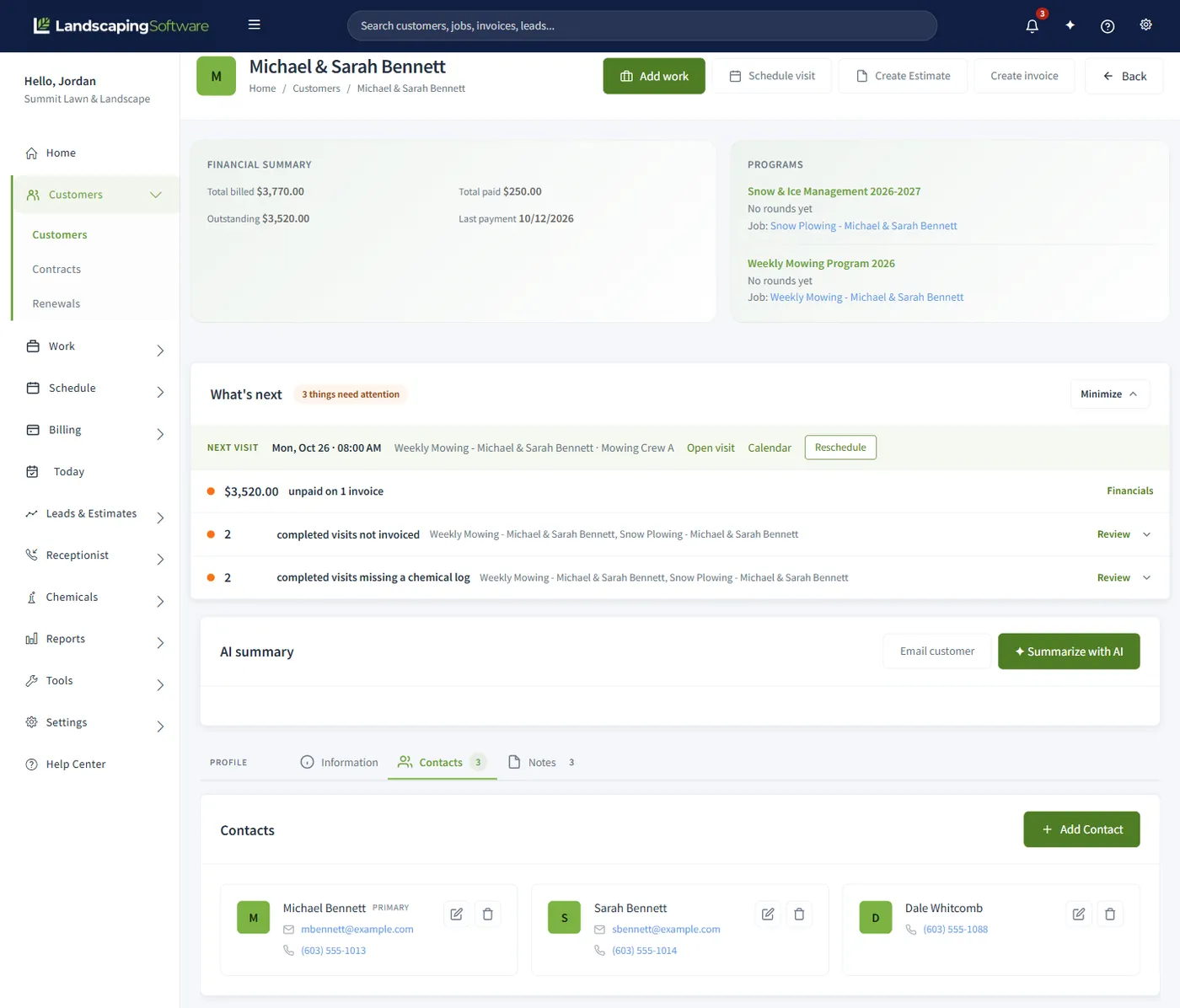
Every customer, job site, and visit in one place. Nothing scattered. Track prospects from first call to converted customer, and answer any customer question from one profile instead of three tools.
Built for the work
A landscaping CRM is the customer record for a lawn, landscape, or snow company: every customer account, the job sites where the work happens, the people attached to the account, the leads that have not become customers yet, and the estimates, jobs, visits, invoices, and notes that build up on each account over time.
A generic contact list assumes one person, one address, and a sale that ends at the invoice. Landscaping doesn’t work that way, so the customer record has to hold up under the situations you meet every week.
| The situation | What the CRM has to do | How it works here |
|---|---|---|
| A customer has a lake house and a home | Keep two properties under one customer, each with its own work history. | Multiple job sites per customer, and every job is tied to a specific job site. |
| The spouse books it and a property manager pays | Hold more than one contact, with their own phone and email. | Multiple contacts per customer, each with a phone and an email. |
| A quote turns into the work | Carry the quote forward instead of retyping it. | Estimates carry over when a lead converts, and an accepted estimate becomes a job in one click. |
| A prospect fills in your website form | Capture it without anyone copying from an inbox. | Form submissions from the built-in website builder create a lead with the source Website. |
| You want to reach everyone on one street | Filter the list and send to exactly that group. | Filter any grid, then run a mail merge over up to 5,000 records, on every plan. |
| Someone asks whether the Hendersons paid | Answer from one screen. | The customer summary shows jobs, visits, invoices, payments, and notes together. |
One profile, whole story
"What did we do at the Hendersons’ last year, and did they pay?" should take one click, not an archaeology dig. The customer summary is the hub: all of a customer’s jobs, visits, invoices, payments, contacts, and notes on one page.
The customer list itself is searchable and filterable across the whole book, with Excel, PDF, and CSV export when your accountant asks. Multiple contacts and multiple service addresses per customer are first-class, because real customers have a spouse, a property manager, and a second property.
Leads & estimates
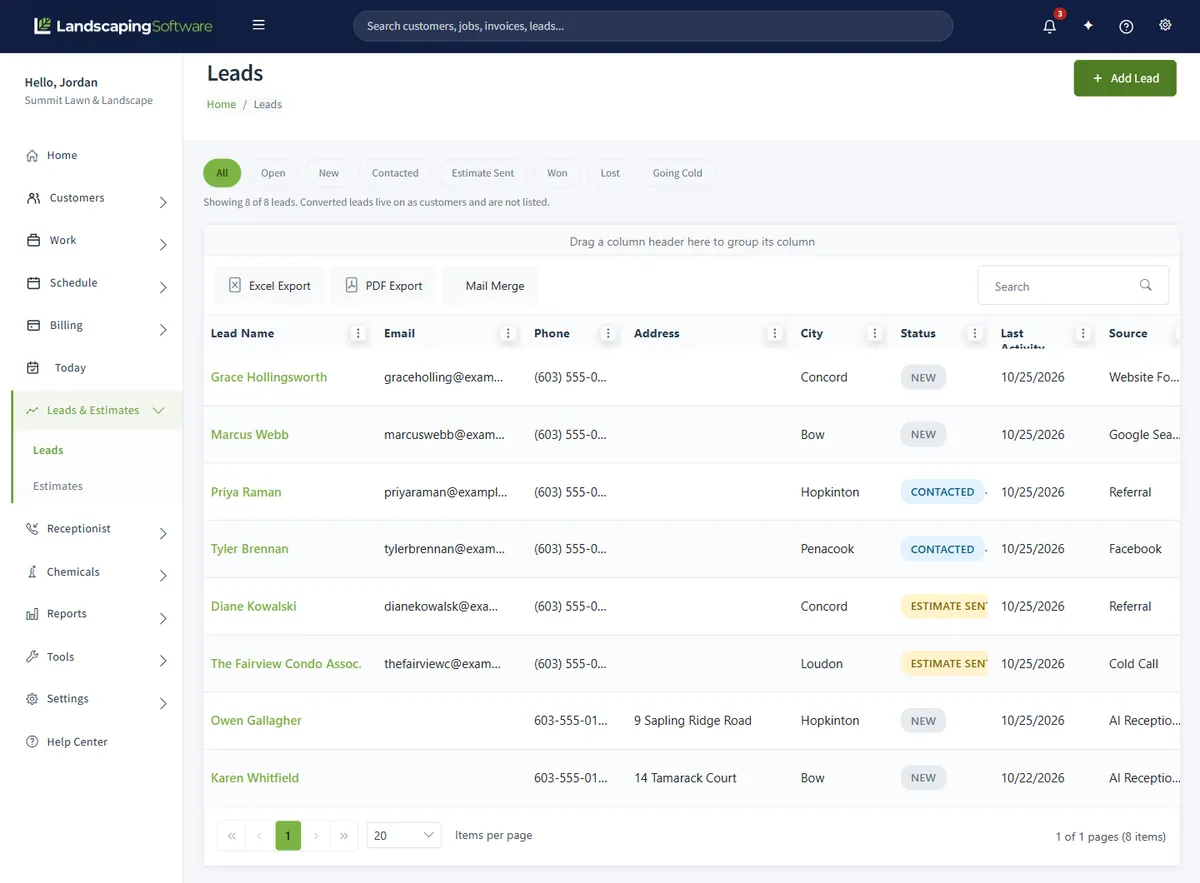
Every prospect gets a pipeline card: status, source, notes, and estimates. Statuses run New → Contacted → Estimate Sent → Won or Lost, color-coded so the morning scan takes seconds. Estimates carry line items and totals, so the quote already contains the job.
When they say yes, one click converts the lead into a customer: name, contact info, and estimates carried over. One more click converts the accepted estimate into a job. The quote becomes the work without anyone re-keying it.
First contact logged: website form, call, or referral
You’ve reached out; property details in notes
Quote out the door, estimates tab tracks it
Converted to a customer in one click
Start to finish
When the CRM is separate from scheduling and billing, the customer gets retyped at every handoff. Here the same customer record follows the work all the way through.
A lead arrives. A website quote form creates it automatically with the source Website, or you log it yourself with its source: referral, Google Ads, yard sign, phone call, and more.
You work it. Move it through New, Contacted, and Estimate Sent, with notes on each lead. The pipeline shows where every prospect stands.
You quote it. Build the estimate on the lead’s own Estimates tab, with line items and totals, so the quote already contains the job.
They say yes. Convert to Customer creates the customer record from the lead’s details, marks the lead Won, and carries its estimates over.
The quote becomes the work. One more click turns the accepted estimate into a job, with nothing re-keyed.
The crew does it. The job is scheduled and routed, and crews see their day on the crew mobile app.
The invoice follows. Invoicing generates per visit, per round, or monthly, and customers can pay online through your own Stripe account.
Stay in front of customers
Filter the list to exactly who you mean (every customer on one street, every lead who went quiet after an estimate) and run a personalized merge over it, up to 5,000 records at a time. Design email templates in a visual builder and send campaigns to your customer list, from the same system that holds the records.
You write the letters right in the app: the template editor is a full word processor with merge fields one click away, no Microsoft Word required. Already have a letter as a .docx? Upload it and it opens in the same editor, ready to personalize.
Because your website builder, portal, and CRM share one database, the spring-letter list is never out of date and a form fill never dies in an inbox.
Not sure a CRM pays off at your size yet? Our buyer’s guide to CRM for landscapers covers what one actually does, how it differs from a spreadsheet, and when your lead and customer volume justify it.
Compared
Three ways to keep the customer list. Generic CRMs differ a lot from one another, so those cells say what is typical, not what any one product does.
| Question | Spreadsheet | Generic CRM | LandscapingSoftware CRM |
|---|---|---|---|
| Customers with several properties | Usually one row per customer. A second property is another row or an extra column, and nothing links the two. | One account with one address is the usual shape. Extra addresses vary by product. | Any number of job sites per customer, each with its own address, and every job belongs to a job site. |
| The people on an account | Extra columns for a second phone or email. | Usually several contacts per account. | Multiple contacts per customer, one marked Primary, each with click-to-call and click-to-email links and a note. |
| Lead to estimate to job | Separate tabs you keep in step by hand. | A pipeline with stages. The estimate and the job usually live in other tools; varies. | A lead carries its estimates. Convert to Customer marks it Won and carries them over, and an accepted estimate converts to a job in one click. |
| Visit and invoice history on the profile | Whatever someone remembered to type in after the fact. | Varies. Scheduling and billing data usually come from a connected app, if at all. | Jobs, visits, estimates, invoices, payments, contracts, contacts, and notes on one Customer Summary, with total billed, paid, and outstanding at the top. |
| Crew access | A shared file or a printout. | Varies. A field app is often a separate purchase. | The job site address is what your crews and the route map use, and estimates carry internal crew notes. The crew mobile app is included on every plan. |
| Website and call leads | Copied in from an inbox or a voicemail. | Varies. Usually needs a form integration, and calls are a separate service. | Form messages from the built-in website builder become leads with the source Website. Calls the AI Receptionist answers become leads tagged AI Receptionist, with the transcript in its inbox. |
| Writing to the list | Export, then a merge in a word processor. | Varies. Email campaigns are often an add-on. | Filter the list, then run a mail merge to editable documents, print-ready PDFs, or a personalized email campaign, up to 5,000 records a run. |
| Cost | Free or close to it. The cost is the hours spent keeping it current. | Varies. Often priced per user, per month, with scheduling and invoicing bought separately. | Included on every plan, from $99 a month, in the same system as scheduling and invoicing. |
Plainly
A few limits worth knowing before you move your list over.
No two-way texting. There is no two-way customer SMS today. The AI Receptionist handles voice calls and does not send or answer text messages.
A mail merge run stops at 5,000 records. If your filter matches more, narrow it and run the merge in batches.
Address suggestions cover US addresses. Start typing a street and up to five matches drop down after three characters. If the lookup is unavailable, type the address by hand; saving still works.
The Customer Activity inbox shows what customers do, not what your staff do. Portal payments, estimate decisions, and first logins land there. Calls, promises, and complaints your team handles are recorded as dated notes on the account.
Works together
Your site’s forms feed this pipeline automatically, included on every plan.
The estimate becomes the job, the job becomes the invoice: no re-keying.
Customers view invoices, approve estimates, and pay online under your brand.
Turn won customers into a book that renews itself year over year.
Questions
At minimum: several properties and several contacts per customer, a lead pipeline with a source on every lead, estimates that turn into jobs without retyping, a way to filter the customer list and send to exactly that group, and a link to scheduling and billing so the customer record shows the whole history. That is what this one is built around.
No. Customers, jobs, visits, invoices, and payments live in one system and one database, so a won lead becomes a customer, an accepted estimate becomes a job, and a completed visit can become an invoice without anything being retyped.
The CRM, lead pipeline, one-click conversion, and mail merge are included on every plan, starting at $99 a month, with a 14-day free trial and no credit card. There is no separate charge for the CRM.
Yes. Every customer record holds multiple contacts, multiple service addresses (job sites), and internal notes. Jobs are tied to a specific job site, so "the Hendersons’ lake house" and "the Hendersons’ home" each get their own work history.
Leads move through five statuses (New, Contacted, Estimate Sent, Won, Lost) with color-coded badges so you can scan the pipeline at a glance. Each lead carries its source (referral, website, Google Ads, yard sign, phone call, and more), notes, and its own estimates tab.
Click Convert to Customer and the system creates the customer record from the lead’s details, marks the lead Won, and carries its estimates over. No re-typing a name and address you already have. From there, an accepted estimate converts to a job in one click too.
If you publish a site with the built-in website builder, each contact and quote-request form submission creates a lead in your pipeline automatically, with "Website" as the source, and a notification email goes to the address you set on the form. Lead creation is on by default and can be turned off per form. No inbox-to-spreadsheet copying.
The form checks every message with a hidden field and a limit on how fast one visitor can send. A message that looks like spam is not emailed to you and does not become a lead; it waits under the Spam tab in your site’s Inbox, with the reason it was held. Choose Not spam and it moves to your inbox, a lead is created in your CRM, and you get the usual email. Junk you mark as spam is cleared automatically after about a month.
Yes. The AI Receptionist captures new leads (name, phone, address, service wanted, timing, and notes) into your Leads module, tagged with the source "AI Receptionist". Callback, reschedule, message, and emergency requests go to the Receptionist Inbox with the transcript. It never books an appointment or quotes a price; your team schedules the work. It is a paid add-on from $39 a month, available on every plan, and it needs an active paid subscription, so it is not part of the free trial.
Yes. The Customer Activity inbox, opened from the bell in the top bar, lists portal events newest first: Invoice Paid, Deposit Paid, Estimate Approved (with the options chosen), Estimate Declined (with the reason, where given), Payment Failed, First Login, and Document Viewed. Each line carries the customer’s name and a timestamp, unread events are highlighted, and the bell shows the unread count from anywhere in the product.
Mail merge runs a personalized letter or email merge over the currently filtered list: for example, every customer in one neighborhood, or every lead marked Estimate Sent. It handles up to 5,000 records in a run, and it’s included on every plan, along with email campaigns.
No. Templates are written in a built-in document editor (a full word processor inside the app) with every merge field one click away: pick «CustomerName», «CustomerFirstName» or «Address1» from the panel and it drops in at your cursor. Already have a letter as a .docx? Upload it and it opens in the same editor, ready for merge fields.
Yes. The customers and leads grids support search, filtering, sorting, and export to Excel, PDF, or CSV from the toolbar.
No. We don’t offer two-way customer SMS today, and we’d rather tell you that plainly than imply otherwise. What’s live: the full lead pipeline, one-click conversion, mail merge, email campaigns, and website lead capture.
14-day free trial · No credit card required