How to Use Schedule History
Last updated October 16, 2026 · Owners and office staff
Schedule History is the audit log of every change made to the schedule: what changed, when, who did it, and from where. It is the answer to “that visit was on Tuesday, who moved it?”
Find it at Schedule > Schedule History.
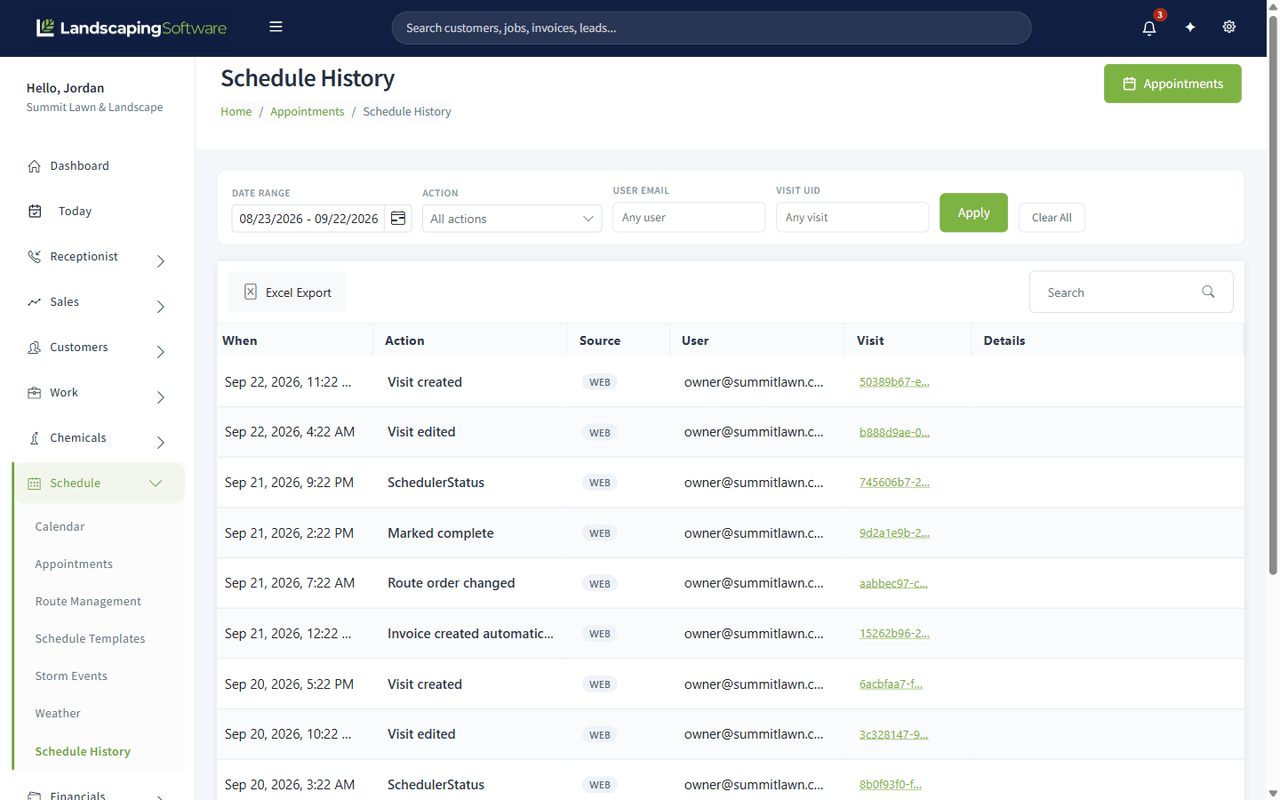
What a row tells you
| Column | What it is |
|---|---|
| When | Date and time of the change, in your company’s time zone |
| Action | What happened, in plain words |
| Source | Where it came from, for example WEB for the office app |
| User | The account that made the change |
| Visit | The visit it happened to |
| Details | The fields that changed |
The actions you will see
| Action | Means |
|---|---|
| Visit created | A new visit was placed on the schedule |
| Visit edited | Times, date, crew or description changed |
| Marked complete | Someone completed the visit |
| Route order changed | The stop order on a route was rearranged |
| Invoice created automatically | Completing the visit drafted an invoice, because the job is opted in to per-visit billing |
| SchedulerStatus | A status change made from the dispatch board |
Filtering
Four filters, then Apply:
- Date Range
- Action
- User Email
- Visit UID, when you are chasing one specific visit
Clear All resets them. Excel Export exports what is currently filtered.
The list pages with Newer and Older rather than a page-number pager, because an audit log only grows.
When to reach for it
- A visit “disappeared”. It was almost certainly moved or completed. The log says by whom.
- A customer says nobody came. Check whether the visit was completed, and when.
- An invoice appeared that nobody remembers creating. Look for Invoice created automatically against that visit: the job is opted in to per-visit billing.
- Training a new dispatcher. The log shows what they actually changed, which is a kinder conversation than guessing.
What it does not cover
Schedule History covers the schedule. Changes to customers, jobs, invoices and estimates are not in here. Contract changes have their own timeline on the contract, and customer portal activity has its own activity inbox.