How to Use Today (the Crew Day View)
Last updated October 16, 2026 · Crew leads, office staff
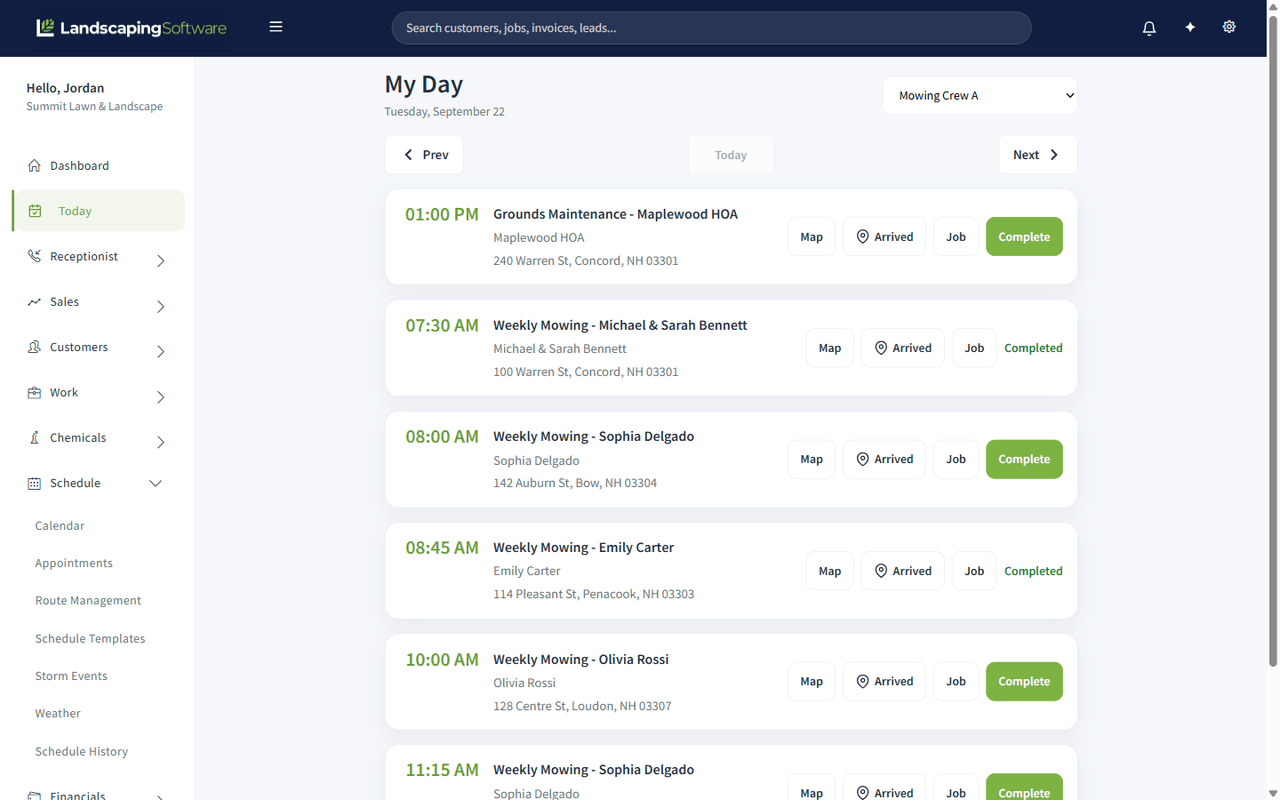
Today is one crew’s day, as a list of stops in order. It is the screen a crew lead works from, and the screen the office opens to answer “where are they up to?” without reading the whole calendar.
Find it at Today in the menu.
Before you start
- Crew mobile features must be switched on for your company. If Today is not in your menu, check Settings > Plan & Features.
- The day only shows visits that already have a crew and a date. Anything still sitting in Non Scheduled Jobs will not appear until it is placed. See Calendar Scheduling.
Pick the crew and the day
- The crew selector at the top switches between crews. It opens on the first crew. With no crews yet, Today says so and links to add one.
- Prev, Today and Next move a day at a time. Today greys out when you are already on today, so the button doubles as a “where am I?” indicator. “Today” is your company’s today, in the company time zone set in Company Settings.
What each stop shows
Each stop is one card, in time order:
- the start time, or Any time for a route stop with no set time
- the job name and the customer
- the service address
- the visit’s description, if it has one
and four actions:
| Action | Does |
|---|---|
| Map | Opens directions to the address |
| Arrived | Records arrival on site |
| Job | Opens the full Job Summary, for line items, history and notes |
| Complete | Marks the visit done |
A stop that is already finished shows Completed in place of the Complete button, so you can see at a glance how far into the day the crew is.
If a stop is missing required documentation (for example a treatment visit with no chemical log), Complete asks “This visit is missing: … Complete anyway?” first.
When every stop is done, the page says All stops are complete. with a Bill this day’s visits button that opens batch billing on the Sales page for that day.
Working with a weak signal
If the connection drops while you tap Arrived or Complete, the page saves the action on the device and sends it when you are back online (“Saved offline, will sync when reconnected.”). If a saved completion needs a decision when it syncs, such as the missing-documentation question, it is listed under Offline completions need confirmation at the top of the day.
What completing a stop sets off
Completing a visit is not just a tick. Depending on how the job is set up it can also:
- roll the job up to Completed once every visit on it is done
- create an invoice automatically, if the job is opted in to per-visit invoicing (see Automatic Invoicing)
- clear the job off the “completed, not billed” tile on the Dashboard once it is billed
Because of that, complete stops as they happen rather than in a batch at the end of the week. The billing follows the completions.
Today versus the dispatch board
| Use | When |
|---|---|
| Today | One crew, one day, in order. Running the day. |
| Daily Dispatch | All crews, drag and drop, placing work. Planning the day. |
| Appointments | Every visit across every crew and date. Finding and fixing. |