How to Build a Proposal Packet
Last updated October 16, 2026 · Owners and estimators
An estimate is a price. A proposal packet is the document you send when the price alone will not win the job: a cover letter, who you are, what you are going to do, your terms, photographs of work you have done, and the property map.
It is built from an estimate, so the numbers are never re-typed.
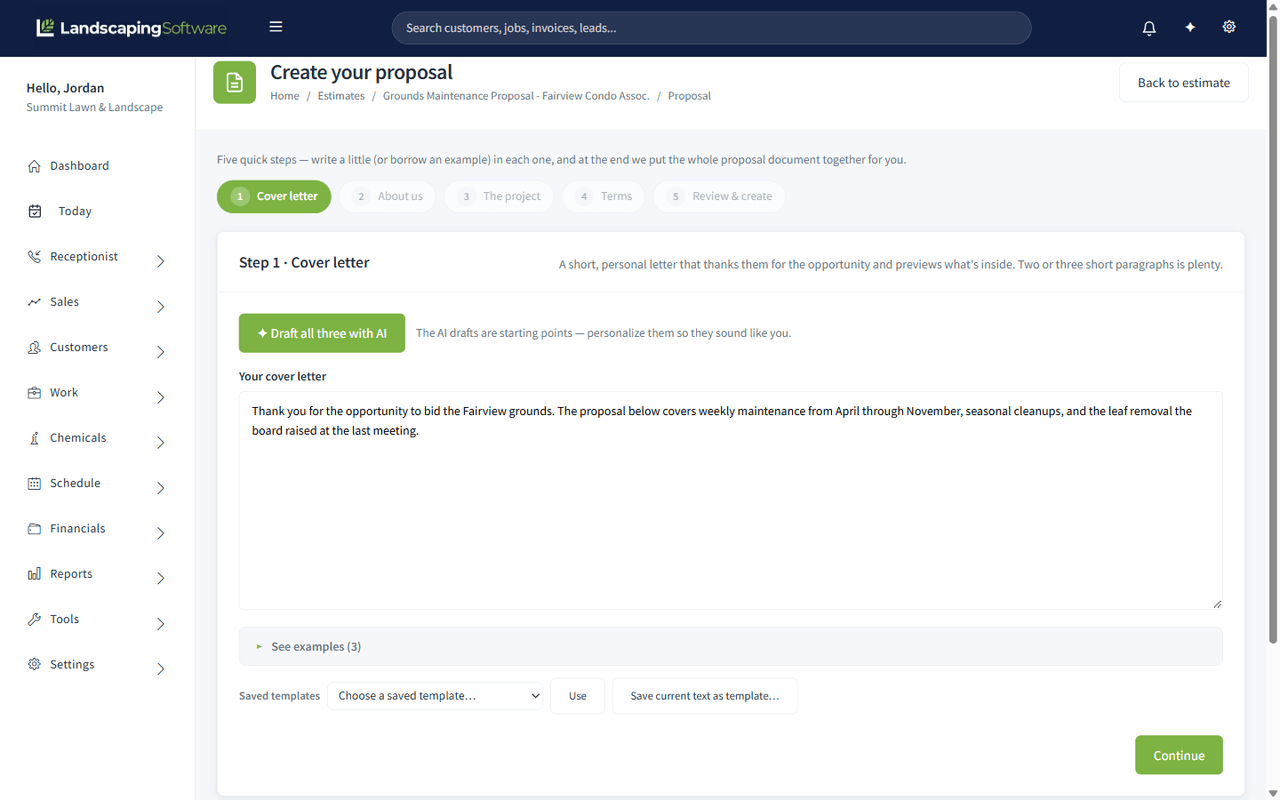
Open the builder
- Open the estimate: Leads & Estimates > Estimates, then the estimate.
- In the More menu, choose Proposal packet.
You land in the proposal builder for that estimate. Back to estimate returns you at any point.
Two ways to build it
| Use when | |
|---|---|
| Guided setup (the wizard) | You are building your first few, or you want the structure decided for you |
| The document editor | You know what you want and would rather write straight into it |
You can start in the wizard and finish in the editor.
The guided setup, step by step
Step 1 · Cover letter. The note to this customer about this job. The one section worth writing fresh every time.
Step 2 · About us. Who your company is. Write it once, save it as a template, and reuse it forever.
Step 3 · The project. The scope of work. This is where you say what you are actually going to do, in the customer’s language rather than line-item shorthand.
Step 4 · Terms. Payment terms, what is excluded, how change orders work.
Step 5 · Review & create. Check it over and click Create my proposal.
At every text step you can Use this example to drop in a starting point rather than face a blank box.
Saved templates
Any section can be saved and reused.
- Save as template stores the section under a name you choose, for example “Standard About Us”.
- Saved templates lists what you have stored. Use drops one into the current section.
- In the document editor, Save selection as template stores just the part you have highlighted.
- Insert at cursor places a saved block where you are typing; Insert all drops the whole thing in.
About us and Terms almost never change between jobs. Templating them is most of the time saving.
Photos
Add photos pulls in work photographs from two places:
- This customer — work you have already done for them
- All past work — your wider portfolio
For a commercial bid, photographs of comparable work do more than another paragraph of description.
The property map
If the job site has a property map, the packet can include it as an image. On a bid where the scope depends on what is being maintained and what is not, the map answers questions the text cannot.
Choose a look
Two layouts: Classic and Modern. They carry the same content, so switch between them and pick the one that suits the customer. Classic reads as more formal, Modern as more visual.
Produce the PDF
Download PDF generates the finished packet. Send it, print it, or take it with you.
About the AI draft
Where AI helps write a section, the builder asks you to Review the AI draft before it goes anywhere. It drafts, you approve. Nothing generated reaches a customer without a person reading it first, and you should read it, especially anything that reads as a commitment about timing, price or warranty.
What a packet does not do
A proposal packet is a document. It does not change the estimate, its line items or its status. When the customer says yes, you still accept the estimate in the normal way. See Manage Estimates and Estimate Approval in the Portal.