How to Use Plan & Features
Last updated October 16, 2026 · Owners
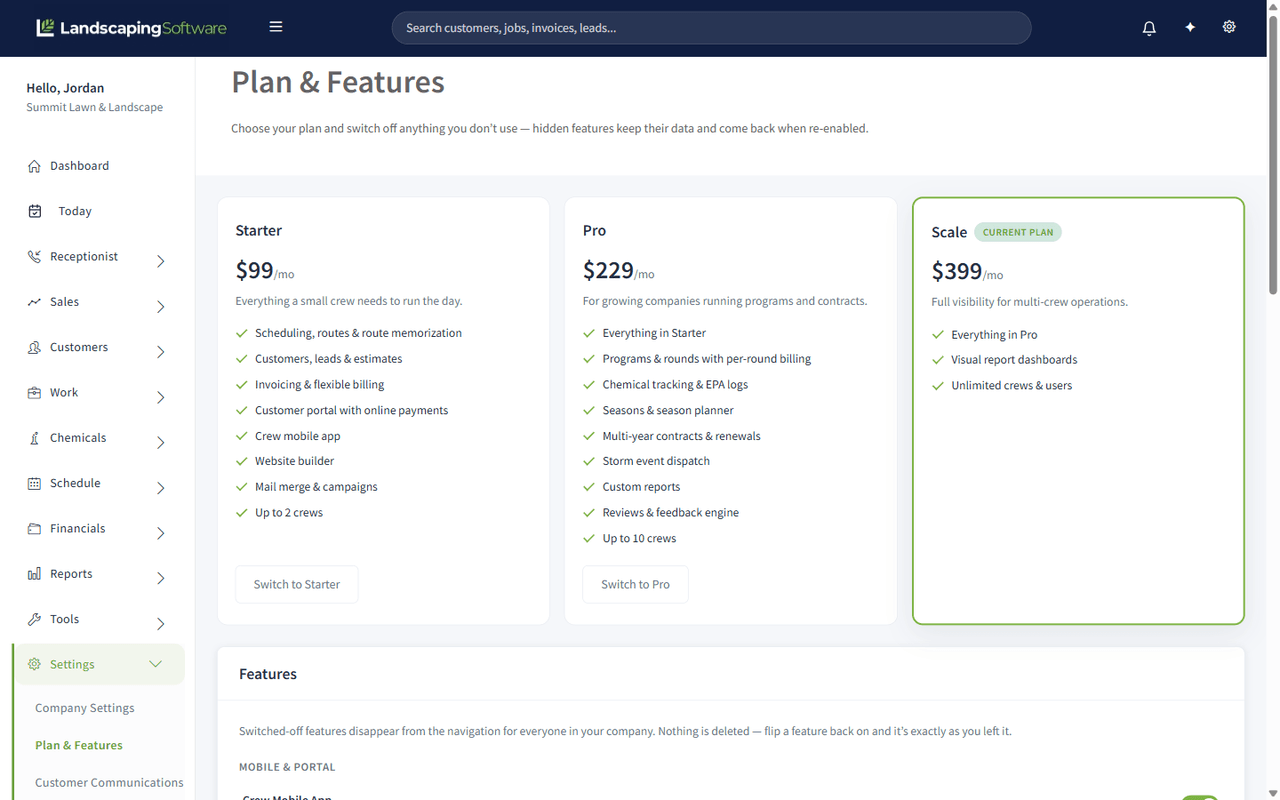
Plan & Features is where you see what you pay, choose your plan, manage billing, add extras, and switch off anything you do not use. Switched-off features disappear from the navigation for everyone in your company, and nothing is deleted: flip one back on and it is exactly as you left it.
Find it at Settings > Plan & Features.
Only the account owner can change billing
The account owner is the person who created the account. Only the owner can change the plan, subscribe, cancel, open billing, or add, change or cancel an add-on. Everyone else can open the page and see the plan, the add-ons and what you pay, but the buttons are replaced by “Only the account owner can change the plan or billing.” Ask the account owner to make the change.
What you pay
The card at the top of the page sums up your bill. It reads differently depending on where you are:
- During the free trial it shows Today ($0.00, nothing is charged during the trial, and whether a card is on file), After your trial (the plan price you will pay from the date the trial ends), and Add-ons you could add (the lowest add-on price; add-ons start with your paid subscription). A chip shows how many trial days are left.
- Once you are subscribed it lists your plan and each add-on with its monthly price, and the Per month, today total. Beside it: the date and amount of your Next invoice (including any scheduled add-on change), and the card on file with its renewal date. The next-invoice amount covers your plan and add-ons only; extra AI Receptionist conversations are added at the end of the month.
- If a payment is past due, or your subscription has ended, it shows your subscription status, the renewal or end date, and the card on file.
The owner’s buttons sit on the same card:
- Subscribe now (during the trial): starts your paid subscription today and ends the rest of the trial. Your card is charged now.
- Pay $… now (when a payment is past due): pays the open balance.
- Resubscribe (after your subscription ended): starts it again on your plan. Everything you had is still there.
- Manage billing, or Add a card when there is no card on file: opens the secure Stripe billing page.
- Cancel subscription: see Cancelling.
The three plans
| Plan | Price | For |
|---|---|---|
| Essential | $99/mo | Everything a small crew needs to run the day |
| Professional | $229/mo | Growing companies running programs and contracts |
| Premier | $399/mo | Full visibility for multi-crew operations |
Essential includes scheduling, routes and route memorization, customers, leads and estimates, invoicing and flexible billing, the customer portal with online payments, the crew mobile app, the website builder, mail merge and campaigns, and up to 2 crews.
Professional adds everything in Essential plus programs and rounds with per-round billing, chemical tracking and EPA logs, seasons and the season planner, multi-year contracts and renewals, storm event dispatch, custom reports, the reviews and feedback engine, property maps, and up to 10 crews.
Premier adds everything in Professional plus visual report dashboards and unlimited crews. No plan limits the number of users.
During the trial the plans show as full cards; once you are subscribed they show as compact cards. Your plan is marked Your plan. Compare every feature jumps to the feature list at the bottom of the page.
Each plan includes a monthly allowance of AI credits for the AI Assistant and Draft with AI:
| Plan | AI credits per month |
|---|---|
| Essential | 500 |
| Professional | 1,500 |
| Premier | 4,000 |
See AI Features and Usage for what each action costs.
Switching plans
Click Switch to (during the trial), or Upgrade to or Downgrade to (once subscribed), on the plan you want. A confirm page shows the move and the price change (for example $399 to $229 a month), what the new plan includes, and anything a downgrade would hide. Confirm, and the change takes effect immediately.
- During the free trial you can switch between plans as often as you like. Nothing is charged and no card is needed.
- Moving up (for example Essential to Professional) charges your card straight away for the rest of the current billing period, less the unused part of your old plan. If the card is declined, your plan stays as it is and you can update the card with Manage billing.
- Moving down credits the unused part of your old plan to your next invoice. Features that are not in the smaller plan are hidden, but your data is kept and comes back if you move up again.
- If a payment is past due, you can’t switch plans until the balance is paid. The confirm page says Pay your outstanding balance first and offers Manage billing instead of a confirm button. Changing plans would not reactivate the account.
- With no card on file (after the trial), the confirm page asks you to Add a card first, then brings you back to confirm.
- If you have cancelled and your subscription is due to end, switching plans does not undo the cancellation. Choose Keep my subscription first if you want to keep it.
Every plan is billed monthly. There is no annual plan.
Crew limits
Each plan includes a set number of crews:
| Plan | Crews |
|---|---|
| Essential | Up to 2 |
| Professional | Up to 10 |
| Premier | Unlimited |
Once you reach your plan’s limit, creating another crew is blocked and you are offered an upgrade. If you move to a smaller plan while you have more crews than it allows, your existing crews are never deleted. You just can’t add new ones until you are under the limit or upgrade again.
Free trial and Subscribe now
New accounts start on a 14-day free trial of the plan picked at signup (Professional is preselected). No card is needed to start.
- The AI Assistant is not available during the trial. It turns on once your paid subscription starts.
- Add-ons, including AI credit top-ups, can’t be added during the trial. Their cards show Starts with your paid subscription.
- To end the trial early and start paying, click Subscribe now. If you have not added a card yet, add one first with Add a card; your subscription then starts straight away.
- If the trial ends without a card on file, the account becomes read-only (see below) until you subscribe.
Manage billing
Click Manage billing to open a secure Stripe billing page where you can:
- add or update the card you pay with
- see and download past invoices
- cancel your subscription
To change plans, use the plan buttons on this page rather than the Stripe billing page.
The Billing tab under Settings lists your past payments and links back here.
Cancelling
Click Cancel subscription and confirm. Cancelling takes effect at the end of the current billing period; you keep full access until then. The page then says when your subscription ends, with a Keep my subscription button if you change your mind. After the end date your account becomes read-only, and nothing is deleted.
Add-ons
The Add-ons section has two cards: AI Receptionist and More AI credits. Monthly add-ons are billed with your subscription, on the same invoice. Add-ons need an active paid subscription, so they are not available during the free trial.
AI Receptionist
The card shows the three receptionist plans:
| Receptionist plan | Price | Conversations included each month | Each extra conversation |
|---|---|---|---|
| Basic | $39/month | 30 | $0.75 |
| Plus | $69/month | 75 | $0.65 |
| Max | $109/month | 150 | $0.55 |
- Not added yet: click Choose a plan to open the AI Receptionist plans page, where a slider shows what you would pay for the calls you expect.
- Active: the card shows your receptionist number, how many conversations you have used this month and when the count resets, your plan marked Current, and Upgrade to (charged today, prorated) or Switch to (starts at your next billing date) on the others. Open usage and billing goes to the receptionist’s Usage & Billing page.
- Scheduled move down: the card says “Moving to … on” the date, that you keep your current plan until then and nothing is charged now, with a Keep link to cancel the move.
- Payment past due: the card is marked Paused.
See AI Receptionist for the allowance, the safety ceiling, extra conversations and how to deactivate.
More AI credits
The card shows how many AI credits you have this month, split into credits from your plan, from your monthly AI add-on, and top-up credits that never expire. See AI usage opens Settings > AI Usage.
- Every month: three monthly add-ons, AI Lite, AI Standard and AI Pro, in that order. Each adds a set number of credits to your plan’s credits every month, and they reset together. Each card shows its monthly price and the credits it adds. Click Add, Upgrade, charged today or Switch at next billing date; a confirm page states what is charged now and when the change takes effect.
- One-time top-ups, never expire: 500 credits for $10 or 1,500 credits for $25. Click Buy. Top-up credits are used only after your monthly credits run out.
Moving up an AI add-on is charged today and the extra credits are added straight away. Moving down or cancelling takes effect at the end of your billing period, and nothing is taken away before then; the card says “Moving to … on” or “… ends on” the date, with a Keep link. See AI Features and Usage.
If your billing lapses: read-only mode
Your account becomes read-only if the subscription lapses, which happens when:
- the free trial ends without a card,
- a payment fails, or
- you cancel and the billing period ends.
In read-only mode:
- You and your team can still log in and see all of your data, and the owner can still use Manage billing and Pay $… now to fix things.
- Your data is never deleted.
- Creating or editing records is paused.
- Automated emails, campaigns and review requests pause.
- Auto-billing of your customers pauses.
- The AI Receptionist pauses.
- Your customers can still pay existing invoices through the customer portal.
Pay the outstanding balance or resubscribe and full access comes back right away.
The feature toggles
Below the add-ons, every gated feature has its own switch, grouped the way the menu is:
- Mobile & Portal: Crew Mobile App, Customer Portal
- Tools: Website Builder, Mail Merge & Campaigns, AI Assistant & Drafting, Custom Reports, Visual Reports
- Receptionist: AI Receptionist
- Work: Programs & Rounds, Chemical Tracking, Seasons & Season Planner, Contracts, Property Maps
- Schedule: Storm Events
- Financials: Renewals
- Marketing: Reviews & Feedback
A feature your plan does not include shows a lock and the plan that includes it; that needs a plan change. Click Save Feature Settings after changing switches.
Some switches affect more than the menu:
- Customer Portal off takes your customer portal offline. Your customers can’t sign in until you switch it back on.
- Website Builder off takes your published website offline. Switch it back on and the site is restored as it was.
- Crew Mobile App off blocks the crew mobile app for your whole company.
Why switch a feature off
The honest reason is menu clutter. A lawn-only company that never plows does not need Storm Events in the sidebar, and a company that does its own marketing elsewhere does not need Mail Merge. Turning them off makes the product smaller for everyone in the company, which makes it easier to train someone on.
Three things worth knowing before you flip one:
- It applies to the whole company, not just you. Everyone loses the menu entry.
- The data stays. Switching Contracts off does not cancel your contracts. It hides the screen. Switch it back on and everything is there.
- Customer-facing features go offline. The portal, your published website and the crew app stop working while their switch is off (see above).