How to Use the AI Assistant, AI Drafting and AI Usage
Last updated October 16, 2026 · Owners and office staff
The product’s AI does two jobs: it answers questions about your own data, and it drafts text you then edit. Both spend credits from a monthly allowance, and the AI Usage page shows where they went.
AI is included on every paid plan. It is not available during the 14-day free trial: it turns on once your paid subscription starts. To start paying before the trial ends, click Subscribe now on Settings > Plan & Features.
The assistant
Open it from the spark icon in the top bar. It introduces itself plainly:
Ask me anything about your business: revenue, overdue customers, the schedule, or your chemical logs. I can look things up and draft text; you stay in control of every action.
It suggests a few starting questions, such as “How much did we invoice this month?”, “Which customers are overdue?”, “What’s on the schedule this week?” and “What chemical applications were logged this month?”
Two limits, stated on the panel itself:
- Answers are drafts based on your data. Verify before acting. The assistant reads your records and can misread them, exactly like a new office hire can.
- It gives no chemical dosing advice. Use the Dose Calculator, which does the label maths deterministically rather than generating it.
It answers; it does not act. Nothing is sent, scheduled, billed or changed because you asked the assistant about it.
Drafting
Look for Draft with AI buttons. They produce a first draft of:
- estimate descriptions
- customer emails
- review responses
- customer summaries
- campaign emails
- program suggestions
- website page copy, first-draft pages, section rewrites and SEO tags
Every one of them hands you the draft to approve. Read it before it goes out, particularly anything that reads as a commitment about timing, price or warranty.
Credits
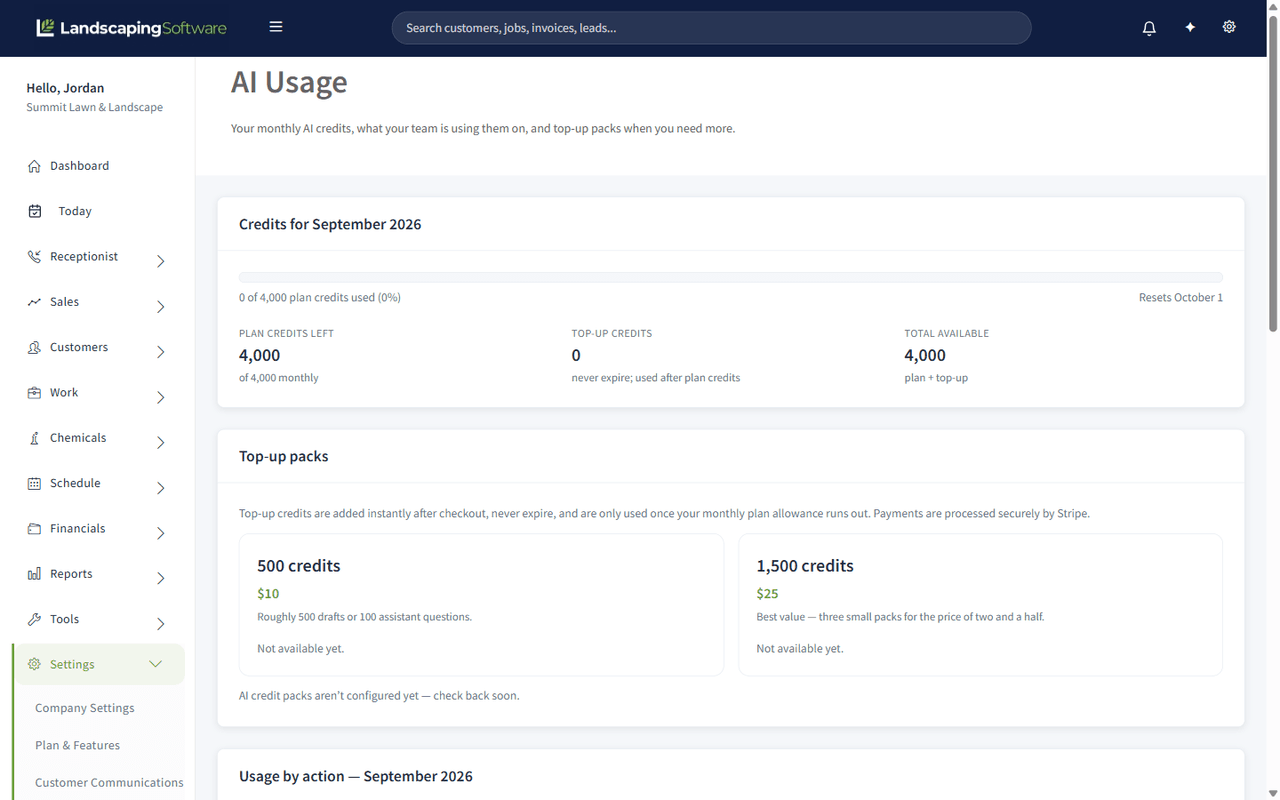
Settings > AI Usage shows the month’s allowance and what has been spent:
- Monthly credits left of your monthly allowance, and the date it resets
- Top-up credits, which never expire and are only used after the monthly credits run out
- Total available
- Usage by action for the month, so you can see which features are actually spending
Different actions cost different amounts, and the page lists every one. As a rough guide: short drafts such as customer emails, estimate descriptions, review responses and SEO tags cost 1 credit; campaign emails and customer summaries cost 2; program suggestions cost 3; an assistant question costs 5; a proposal packet draft costs 10; website section rewrites cost 15; a blog post draft costs 55; a whole-page rewrite costs 100; and a first draft of a whole website costs 150 (the individual pages inside that draft are not charged again). Receptionist conversations cost 0 credits, because the add-on bills them separately. Prices can change, so the AI Usage page is the source of truth.
Your monthly allowance depends on your plan:
| Plan | Credits per month |
|---|---|
| Essential | 500 |
| Professional | 1,500 |
| Premier | 4,000 |
When your team has used most of the month’s credits, the AI Usage page shows a Heads up warning. When the monthly allowance is used up, AI features draw from your top-up credits, or pause until the allowance resets if you have none.
Need more credits?
There are two ways to get more, both on Settings > AI Usage and on the More AI credits card in Settings > Plan & Features > Add-ons. Only the account owner can add or change them, and they need an active paid subscription, so neither is available during the free trial.
- A monthly AI credits add-on: AI Lite, AI Standard or AI Pro, smallest first. Each adds a set number of extra credits every month on top of your plan’s credits (the card shows the price and the credits), and both reset together each month. Your plan credits are used first. Moving up is charged now and the extra credits are added straight away. Moving down or cancelling (Cancel the add-on) takes effect at the end of your billing period, and nothing is taken away before then; until that date the page shows the scheduled change with a Keep link to undo it. Each change opens a confirm page that says what is charged now and when it takes effect.
- A one-time top-up pack: 500 credits for $10 or 1,500 credits for $25. Packs are one-time purchases, not a subscription. Pack credits are added as soon as checkout completes, never expire, and are used only after your monthly credits run out.
With an add-on, the AI Usage page also shows your Current add-on, Plan credits this month and Add-on credits this month separately.
Which model does what
The page is explicit about this, which is unusual and worth reading:
| Work | Model |
|---|---|
| Drafting and summaries (estimate descriptions, customer emails, review responses, customer summaries, website SEO tags) | claude-haiku-4-5 |
| The AI assistant, answering over your customers, schedule, invoices and reports | claude-sonnet-5 |
| Website copy: first drafts, page copy and per-section rewrites | claude-sonnet-5 |
Turning it off
AI is a gated feature. Switch AI Assistant & Drafting off in Plan & Features and the assistant and every Draft-with-AI button disappear for the whole company. Nothing you have already generated is affected; it is your text now.
Related articles
Payments, extra credits, and interrupted requests
After a successful credit-pack payment, credits are added even if you close the checkout page. Bank payments may remain pending until Stripe confirms payment. If a completed payment is still missing, contact support with the checkout reference; buying another pack is not a recovery step.
Support may grant one-off credits to your company. These join the extra-credit balance, carry over between months, and are used after your monthly allowance. Support adjustments are recorded with a reason and administrator attribution.
If a new website build is interrupted after designing the pages, reopen the build screen and retry. The saved plan is used without another design charge. Page creation is saved together, and existing draft edits are preserved. Older interrupted builds without a saved plan still need support recovery; the screen explains this and does not charge for the build again.
New AI requests interrupted before a result is recorded are recovered automatically after about 30–35 minutes, while the app and database are available. Refunds return the original extra credits and any monthly credits that have not expired. While an interrupted website request is being resolved, wait before retrying. A completed request is not automatically refunded just because the browser disconnected; contact support if its result is missing.