How to Use Visit Schedule Templates
Last updated September 22, 2026 · Office staff
A visit schedule template is a saved recurrence pattern with a default duration. Instead of rebuilding “every two weeks, two hours” by hand on every appointment, you pick the template and the recurrence fields fill themselves in.
Find them at Schedule > Schedule Templates.
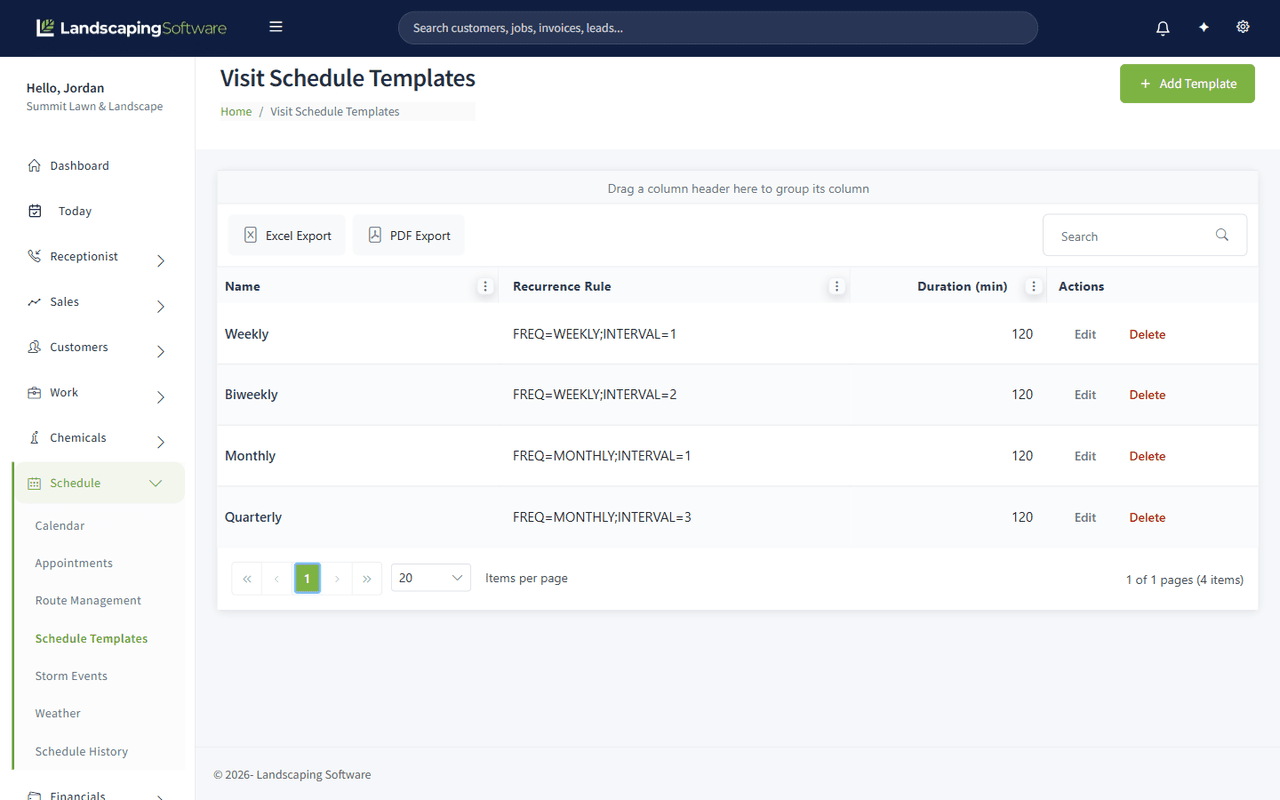
What a template holds
| Column | What it is |
|---|---|
| Name | What you call it, for example “Biweekly” |
| Recurrence Rule | The pattern itself, written as a standard recurrence rule such as FREQ=WEEKLY;INTERVAL=2 |
| Duration (min) | How long a visit on this pattern runs by default |
Most companies start with four: Weekly, Biweekly, Monthly and Quarterly.
Use one
On the Create Appointment form, pick a Recurrence Template. The recurrence editor below fills in with that pattern, and you can still adjust it for this one appointment without changing the template.
Leave the picker on None for a one-off visit.
Add, edit, delete
- Add Template creates one: give it a name, a recurrence rule and a duration.
- Edit changes an existing template.
- Delete removes it.
Editing a template changes what future appointments start from. It does not reach back and rewrite appointments already created from it, which is what you want: last season’s schedule stays as it was actually worked.
Reading a recurrence rule
The rules follow the standard calendar format, so they are readable once you know the two parts:
| Rule | Means |
|---|---|
FREQ=WEEKLY;INTERVAL=1 |
Every week |
FREQ=WEEKLY;INTERVAL=2 |
Every two weeks |
FREQ=MONTHLY;INTERVAL=1 |
Every month |
FREQ=MONTHLY;INTERVAL=3 |
Every three months |
FREQ is the unit, INTERVAL is how many of them to skip.
Templates versus programs versus routes
Three things in the product repeat, and they are not the same thing:
| Use | For |
|---|---|
| Schedule template | The recurrence pattern on one appointment |
| Program rounds | A treatment plan with date windows that generates its own visits |
| Memorized route | The stop order of a crew’s day, reapplied to future days |