How to Use the Season Planner
Last updated September 22, 2026 · Owners and office staff
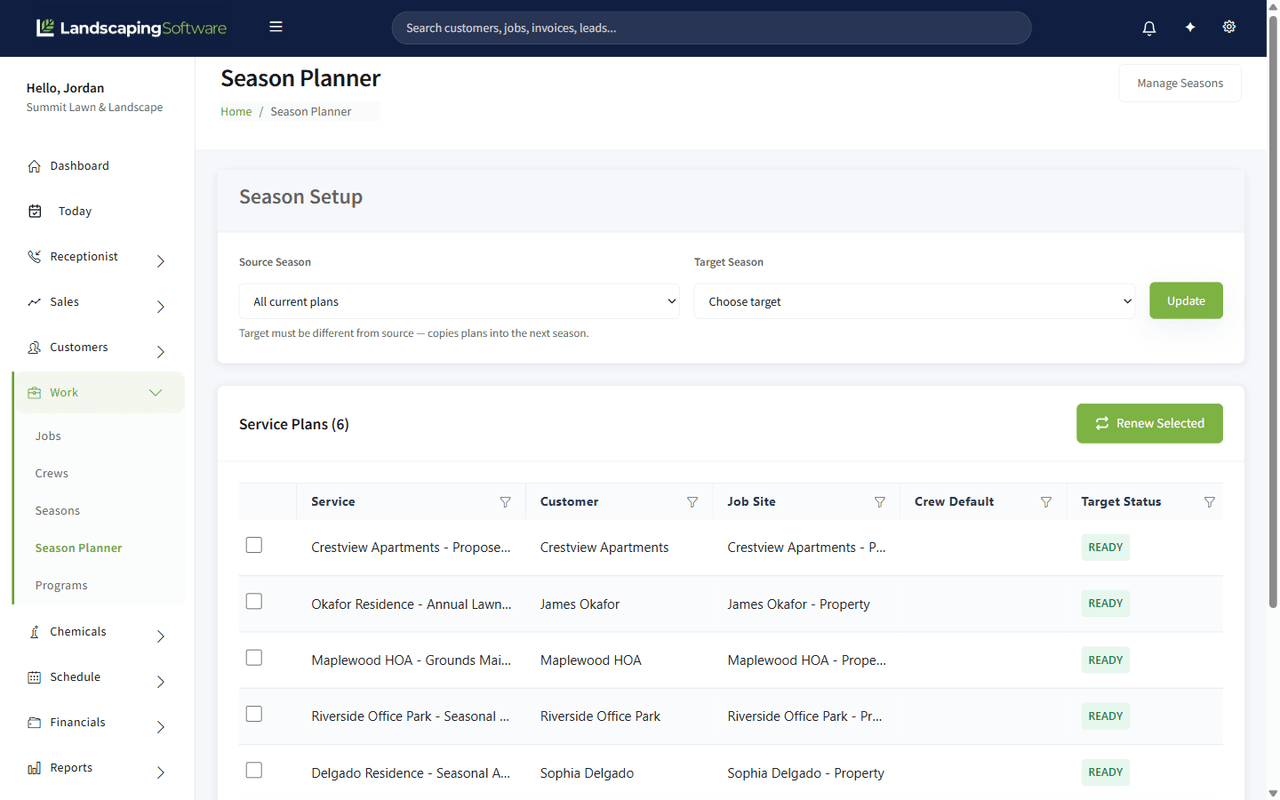
The Season Planner rolls a whole book of work from one season into the next in one pass. Where the Renewal Wizard works job by job, the planner works season to season: pick where the work is coming from, pick where it is going, tick what should carry, and renew the lot.
Find it at Work > Season Planner.
Before you start
- The target season must already exist. Create it first under Work > Seasons if it does not. See Season Lifecycle.
- Source and target have to be different seasons. The page says so under the pickers, and will not let you copy a season onto itself.
Set the seasons
Season Setup at the top has two pickers:
- Source Season — where the work is coming from. All current plans shows everything regardless of season.
- Target Season — where it is going.
Click Update to load the list against those two seasons.
Work the list
Below the pickers, Service Plans lists what is eligible, with a count:
| Column | What it is |
|---|---|
| Service | The plan or contract name |
| Customer | Who it belongs to |
| Job Site | The address it covers |
| Crew Default | The crew it normally runs with |
| Target Status | Whether it is ready to carry into the target season |
READY means nothing is blocking the roll-forward. Tick the rows you want and click Renew Selected.
Planner, wizard or contract?
All three move work into a new year and they suit different books of business.
| Use | When |
|---|---|
| Season Planner | Rolling a whole season forward in bulk, reviewing a list rather than each item |
| Renewal Wizard | Hand-picking jobs and programs, applying a price uplift, generating customer proposals |
| Contracts | Standing agreements that should roll themselves forward every year with an agreed uplift, with no yearly decision at all |
A company running mostly contracts will barely touch the planner. A company running season-by-season maintenance will live in it every autumn.
A sensible autumn routine
- Create next year’s season.
- Open the planner, source last season, target the new one.
- Renew the plans that are carrying, and leave the ones that are not.
- Use the Renewal Wizard for anything that needs a price increase or a proposal.
- Check Renewals for anything the planner did not cover.